



SuperMap iDesktopX 2024 New Features
SuperMap iDesktopX 11i(2024) R2
Version: 11.3.0, Release Date: 2024.11
Data Management
- Added new Database Datasource types:
- Supports reading and writing Dameng (DM) spatial data using the DMSpatial engine. Supported dataset types include: attribute, point, line, region, text, CAD, and mosaic dataset.
- Supports connecting to the Xugu database using the XUGU engine. Supported dataset types include: attribute, point, line, region, text, CAD, and network dataset.
- Added commonly used international projection types and geographic coordinate systems:
- Added the Colombia Urban projection type (IGAC Plano Cartesiano) suitable for the Colombia region, and corresponding Projected Coordinate Systems suitable for different Colombian urban areas.
- Added Geographic Coordinate Systems GCS_MAGNA_SIRGAS and GCS_MAGNA_SIRGAS_2018 for the Colombia region.
- Optimized the Import GDB Function:
- Added support for selecting datasets under GDB groups, improving the flexibility of import data selection and avoiding duplicate data import.
- Supports converting 3D data to 2D data during import, facilitating subsequent operations like data editing and cartography.
- Optimized Exporting GDB Data. Supports preserving the 64-bit integer field format during export, ensuring data consistency before and after export.
Data Processing
- Optimized the Attribute Update function. Added support for merging multiple attribute values using a connector and updating them into a target attribute value.
Cartography
- Supports generating legend items for grid unique value maps.
- Optimized Map Export as Image. Supports splitting the output within a range based on selected fields, ensuring complete objects are exported.
- Optimized the display effect of Line Labels Along Lines. Supports setting a display multiplier for overly long labels, improving map visualization.
- Fixed the issue where text and background were not center-aligned in labels along lines with point symbol backgrounds.
- Image and Raster Layers support non-linear brightness and contrast adjustment via the Gamma parameter, enhancing image display details and improving the display quality of imagery and raster data.
- Fixed the issue where using metadata fields to control the overlay order of images (i.e., setting the "Object Display Order") was ineffective for mosaic dataset image layers.
- Fixed the issue where text and point symbols were truncated at the clip bounds when Map Clipping Display was enabled. In the new version, after enabling "Show Full Label" for the map, they are displayed completely.
- Optimized Label Text display. Supports adding '@' before the font name to achieve vertical display effects.
Map Layout
- Optimized the layout north arrow. The north arrow text now automatically scales according to changes in the north arrow size.
- Optimized the drawing algorithm for picture objects in layouts, improving the display clarity of images after zooming.
- Added support for maintaining a proportional relationship between point marker sizes in layout legends and marker sizes on the map.
Map Tiles
- Fixed the issue where abnormal transparency effects occurred in overlay areas of objects in generated raster tiles when multiple layers in the map had layer transparency configured.
Data Migration
- GDB/MDB Data Migration: Supports selecting datasets under groups during migration to avoid duplicate data import.
- Optimized ArcMap migration:
- Added the Import SDE Tool for easier automated operations.
- Supports migrating only data associated with maps, reducing data redundancy and improving migration efficiency.
- Optimized the Data Migration Plugin Download Method to meet the download needs of users in different countries and regions.
GPA
- Optimized the Export to Excel File tool. Supports selecting fields and adjusting the order of export fields during export, improving the flexibility of selecting export data.
- Added the Create a Map Based on a Template tool to simplify the cartography workflow.
- Optimized the Open Datasource tool. Supports opening data sources with read-only access.
- The Big Data Management tool correctly reads Shapefile types, solving the issue in older versions where all fields were read as text.
- The Big Data Management tool's Read Shapefile File function now allows selecting *.shp files, differing from the old version which only supported selecting folders.
- Added the Sort tool to sort records of a specified dataset field in ascending or descending order.
- Added the Pivot Table tool to categorize and group dataset fields.
- Added the Minimum Bounding Geometry tool to create minimum enclosing boundary geometries for single or grouped input objects.
- Optimized the Raster Zonal Statistics tool, resolving crashes that occurred during execution with nationwide-scale DEM data.
- Updated the Overlay Analysis algorithm, significantly improving result accuracy.
- The Attribute Update tool now supports merging multiple attribute values using a connector and updating them into a target text field.
- Improved the result accuracy of the tool for Merging Shard Polygons for Specific Objects.
Interactive Experience
- Optimized the Topology Check tool interface, adjusting parameter order to improve operational fluency.
- Optimized log output. Each process now outputs an independent log file, making it easier to locate issues.
3D Scene
- Scene
- In rendering engine V2 mode, added support for Loading external PBR material (*.json) for spatial 3D model tiles (*.scp).
- In rendering engine V2 mode, optimized 3D Water Surface Symbols, improving reflection effects for large-scale or non-planar water surfaces.
- In rendering engine V2 mode, added support for HDR format Environment Maps, providing a more convenient usage method.
- In rendering engine V2 mode, added support for HDR Mode, which can be used to enhance picture quality and add more light and dark details.
- In rendering engine V2 mode, optimized the atmospheric effect in spherical scenes, making atmospheric scattering more realistic and softer.
- In rendering engine V2 mode, optimized model display effects, enhancing the three-dimensional sense and realism of models.
- In rendering engine V2 mode, added support for setting SkyBox effects and their rotation angle for spherical scenes, providing high-realism skybox images.
- Added support for saving Screen Layers in scenes.
- In rendering engine V2 mode, when performing Vertex Color Correction on model datasets with common materials and spatial 3D model tile data (*.scp), added support for converting colors from linear space to gamma space.
- 3D Data
- For the Oblique Photography Data Preprocessing function, added a vertex coordinate threshold parameter for checking and identifying data with abnormal geometric vertex positions in *.osgb oblique photography 3D models.
- 3D Geodesign
- Optimized the Model Segmentation function. Added segmentation threshold and segmentation length parameters. Supports segmenting a model along a certain dimension (longest side) of its OBB (Oriented Bounding Box) into multiple parts based on a given segmentation length.
- Objects
- KML Layer now supports adding *.glb Static Models and *.glb Trajectory Models.
- Spatial Analysis
- Added Pipe Burst Analysis functionality. Supports finding upstream/downstream valves and affected pipes based on a burst point.
- GPA
- Added the Generate Image Tile tool, supporting the generation of 3D image tiles based on imagery, raster, or mosaic datasets.
- Added the Terrain and Image Tiles to S3M tool, supporting the generation of spatial 3D model tile data based on image tiles, terrain tiles, and TIN.
- Added the Add Tiles to Scene tool, supporting the addition of 3D terrain tiles (*.sct), 3D image tiles (*.sci3d), and spatial 3D model tiles (*.scp) to specified layers in a specific scene within a specific workspace.
- Added the Remove Tiles from Scene tool, supporting the removal of specified layers from a specific scene within a specific workspace.
- Added the Coordinate Encryption tool, supporting encryption processing of coordinate position information in spatial 3D model tiles (*.scp).
- Added the Generate Nested SCP tool, supporting merging multiple SCP files into a single SCP file for unified management and use of multiple S3M tile datasets, with support for appending and merging SCP.
- Added the RollBack tool, supporting the rollback of TIN terrain cache (*.sct) and oblique photography 3D model tile data (*.scp) to a specified history.
- Added the Get history tool, supporting retrieval of the history of TIN terrain cache (*.sct) and oblique photography 3D model tile data (*.scp) that have undergone operations like mosaicking and hollowing.
- Added the Extract Ground from Point Cloud tool, supporting extraction of ground information from *.las point cloud data.
- Added the Local Update (MongoDB) tool, supporting updates to oblique photography 3D model tile data within arbitrary polygons or discretely distributed areas in a MongoDB database.
- Added the Retrieve RVT Link File tool, supporting retrieval of the absolute storage path for RVT Link Files.
- Added the Multi-section Lofting Body tool, supporting parametric construction of multi-section lofting body models.
- Added the Oblique Cylinder tool, supporting parametric construction of oblique cylinder models.
- Optimized the Generate Tiles from Point Cloud tool, supporting setting a coordinate encryption algorithm to encrypt the coordinate position information of point cloud data.
- Optimized the Point Cloud Instance Segmentation tool, supporting the exclusion of points from specified categories from participating in instance segmentation calculations.
- Optimized the Generate Tiles from Model tool, supporting setting a coordinate encryption algorithm to encrypt the coordinate position information of model data; when generating S3M 3.01 tiles, supports DB format property storage type.
- Optimized the ObliqueBuilder - Generate S3M tool, supporting setting a coordinate encryption algorithm to encrypt the coordinate position information of oblique photography 3D model data.
- Optimized the Import DGN tool, supporting importing line objects.
- Optimized the Import RVT tool, supporting setting whether to generate PBR material for the data, supporting importing data under a specified view name, and supporting importing RVT link files.
- Optimized the Translate Model tool, supporting setting translation amounts based on specified attribute fields.
- Optimized the Import IFC tool, supporting splitting by group type, allowing IFC models to be imported as different datasets by type.
- Optimized the Data Preprocessing tool, adding a vertex coordinate threshold parameter for checking and identifying data with abnormal geometric vertex positions in *.osgb oblique photography 3D models.
- File
- Added the Scene Rendering Engine parameter to the Environment Settings in Options, supporting switching the scene rendering engine between V1 and V2.
- Start
- Optimized the 3D Registration function, adding support for importing and exporting registration files.
Functional Changes
- In the Scene Properties advanced options, the spherical harmonic coefficient parameter has been abolished from the Environment Map module.
- "Data Share" has been renamed to Publish 3D Service.
- Abolished the Light and Shadow Effect options in the Scene Effects function. Light and shadow effects have been migrated to the advanced options within the Scene Properties function.
- The Save to KML and Save as Model Dataset tools have been migrated from the oblique photography data processing module to the oblique data computation module.
- The Model Voxelization and Extract Isosurface tools have been migrated from the 3D field data module to the model edit module.
API Changes
Please refer to SuperMap iDesktopX 11i(2024) R2 API Changes List.
SuperMap iDesktopX 11i(2024) SP1
Version: 11.2.1, Release Date: 2024.09
Data Management
- Optimized Opening External Vector Files. Supports setting parameters upon opening to ensure the correctness of data display effects after opening.
- Optimized opening GDB folders, supporting the choice of opening with read-only access.
- Fixed the issue where Importing CSV Files caused field identification errors due to delimiters.
Spatial Analysis
- Optimized SQL Query:
- Fixed the issue where checking both "highlight in map" and "highlight in scene" failed to execute.
- Resolved the issue where the expression would be cleared after switching datasets post-expression building.
Data Migration
- Optimized imagery and raster layer migration. Supports migrating layer background value, transparency, display method, stretch method, etc., improving the display effects of imagery and raster after migration.
- Resolved the issue where layouts did not support migrating map grids, including graticules and kilometer grids.
- Optimized symbol migration:
- Resolved the issue where the direction of internal symbols in line symbols was incorrect after migration.
- Fixed the migration issue for hash lines with nested point symbols.
- Optimized layout legend migration. Supports migrating legends as grouped objects, along with the background and border of the group object.
- Optimized layout scale bar migration. Supports migrating parameters like number of divisions, division values, frequency, height, etc.
- Optimized layout north arrow migration. Supports migrating the north arrow as an image, ensuring consistent display effects before and after migration.
- Fixed the issue where planar coordinate system text size conversion was incorrect after migration.
Cloud Sharing
- Resolved the issue where sharing files larger than 500MB to iPortal failed.
Remote Sensing Imagery
- Basic Capabilities
- Fixed the issue with saving GPA workflows. After executing a workflow, the *.xml workflow file will be auto-saved.
- Image Rectification
- Resolved the issue where the image window would change after filtering connection points by the current map extent.
- DSM/DEM Production Workflow
- Resolved the issue where result data could not be viewed when generating DSM using GF7 image data.
- Image Quality Inspection
- Fixed the defect of excessive fragmented patches and small detection ranges in blur/distortion detection. By merging adjacent small patches in the detection result and expanding the detection range, the detection result becomes more pronounced, facilitating subsequent analysis and processing.
GPA
- Resolved the issue where some tools failed to read string information.
SuperMap iDesktopX 11i(2024)
Version: 11.2.0, Release Date: 2024.07
Data Management
- Added new Dataset Group functionality, supporting the management of datasets through grouping within a datasource, improving data classification management and query efficiency.
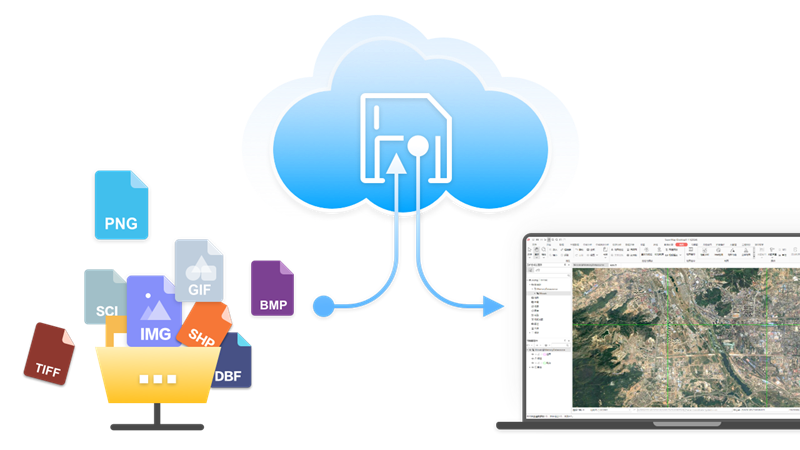
- Added new Cloud Storage functionality, supporting access to data in Alibaba Cloud, Huawei Cloud, MinIO, SeaweedFS object storage services, AWS S3 protocol-compatible object storage services, and FTP services.
- Added new Database User Management functionality:
- PostGIS and Yukon datasources support Creating Users and Roles.
- Supports setting Datasource Permissions for users/roles, including usage and creation permissions.
- Supports setting Dataset Permissions for users/roles, including select, insert, update, and delete.
- Added new Database Transaction Management functionality:
- Supports starting transactions for PostGIS datasources, managing operations like feature editing, attribute table editing, data processing, and analysis within transactions.
- View transaction status via transaction identifiers, including invalid transactions and active transactions.
- Supports batch committing and rolling back transactions.
- Supports viewing dataset transaction status: no transaction lock, current transaction lock, other transaction lock.
- Added direct opening of ArcSDE_Oracle Database Datasource.
- Added support for directly opening *.pix imagery format files.
- Optimized direct Opening Vector File Data:
- Added support for directly opening *.gdb, *.mdb, *.json, *.geojson, *.gpkg, *.vct, *.000 vector format files.
- Supports using directly opened vector files as source data for analysis tools.
- Supports directly outputting analysis results to common data formats.
- Optimized Manage Mosaic Dataset:
- Added support for NoData Management, allowing imagery without NoData information to utilize the mosaic dataset's NoData, ensuring the correctness of statistical data and histogram calculations.
- Supports adding *.pix image files to mosaic datasets, improving data management capabilities.
- Optimized the Export GDB File function. The dataset group structure can be preserved after export.
- Optimized the import MDB/GDB File function. Datasets or dataset groups within the import files can be selected as needed.
- Optimized the Export GeoJSON File function, supporting exporting geographic coordinate systems with EPSG codes.
- Optimized the Import TXT/CSV function, supporting selecting auto-length to improve import file performance.
- Resolved the issue where NoData transparency was ineffective for multi-band imagery with 32-bit pixel format.
- Resolved the display error issue for single-band mosaic dataset imagery with color tables.
Edit Data
- Added Update Column (ToDate) functionality, converting different date formats to yyyy/mm/dd format.
- Added Parallel Copy functionality, copying lines parallel to existing lines based on set distance and direction.
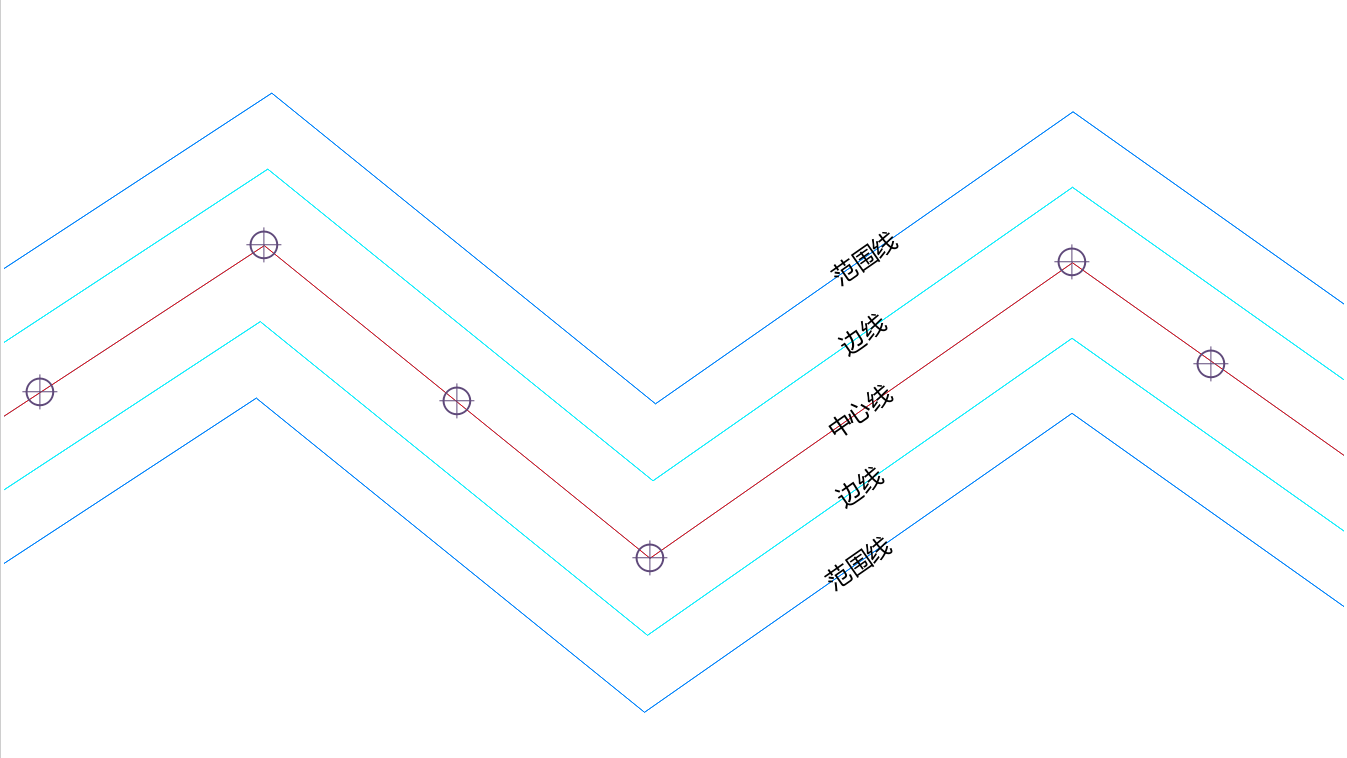
- Added Show Feature Vertices functionality. When drawing line/region objects, you can view the drawn nodes in real-time.
- Optimized the attribute table Find function:
- Supports popping up the find dialog via Ctrl+F shortcut.
- Provides two modes: content find and conditional find, allowing flexible switching for different search scenarios.
- Provides multiple SQL expression input methods for quick query operations.
- Optimized the attribute table Filter capability. Drop-down options now display enumeration value descriptions, consistent with information shown in the attribute table.
- Optimized Attribute Structure management. If input field names contain illegal characters, they are automatically replaced with legal characters to avoid invalid names.
- Optimized region objects. Nodes of region objects drawn counter-clockwise are adjusted to be stored in clockwise order after drawing finishes.
- Optimized Objects</