

URI
<datas_uri>/{id}[.<format>]
Supported methods
Parent resource
Child resources
fileDownload, dataAttributes, dataDatasets, dataContent
Introduction
The data resource is a single data resource information.
Supported Methods:
- GET: Gets the information of data specified by data id.
- HEAD: Checks whether the data resource exists or whether there is a permission to access the resource.
Supported output formats: rjson, json, html, xml.
Resource hierarchy
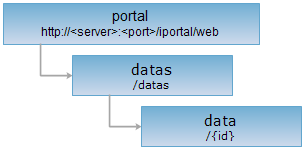
HTTP request methods
Implement the HTTP request on the following URI, where supermapiserver is the server name, with rjson being the output format.
http://supermapiportal:8090/iportal/web/datas/{id}.rjson
GET request
Gets the data info of the specified data item id.
Response structure
The structure of the response resource representation after implementing the GET request on the data resource will be as follows:
| Field | Type | Description |
| MD5 | String | MD5 of the data. |
| authorizeSetting | List<IportalDataAuthorizeEntity> | The data authorization info. |
| coordType | DataCoordType | Coordinate type of data. |
| createTime | Long | Created time of data, that is, uploaded time. |
| dataCheckResult | DataCheckResult | Check result of data and corresponding service. |
| dataItemServices | List<DataServiceInfo> | Services information collection of published data. |
| dataMetaInfo | DataMetaInfo | Data meta information. |
| description | String | The descriptive information about the data. |
| fileName | String | File name of data. |
| id | Integer | Data id. |
| lastModfiedTime | Long | Last modified time of data. |
| nickname | String | The name of the person who uploads the data. |
| publishInfo | DataPublishInfo | Deprecated parameter,data publish information. |
| serviceId | String | Deprecated parameter. It is suggested to use dataItemServices property to get service id info one by one. |
| serviceStatus | ServiceStatus | Deprecated parameter. It is suggested to use dataItemServices to get service status info one by one. |
| size | long | Data file size. |
| status | Status | Data status. |
| storageId | String | Data storage ID. |
| tags | List<String> | The data tag. |
| thumbnail | String | The thumbnail path of data. |
| type | DataItemType | Data type. |
| userName | String | The name of the person who uploads the data. |
Response example
The returned rjson format representation after implementing the GET request on the data resource http://localhost:8090/iportal/web/datas/1.rjson is as follows:
{
"MD5": "4c3abec6c3c6e6c4d1f9604ae7dca661",
"authorizeSetting": [],
"coordType": null,
"createTime": 1494913645957,
"dataCheckResult": {
"dataCheckInfo": null,
"serviceCheckInfos": []
},
"dataItemServices": [],
"dataMetaInfo": null,
"description": null,
"fileName": "osgb0805.zip",
"id": 1,
"lastModifiedTime": 1494913645957,
"nickname": "admin",
"publishInfo": null,
"serviceId": null,
"serviceStatus": "UNPUBLISHED",
"size": 63594049,
"status": "OK",
"storageId": "s670412d_f17ak8go_b512d612_5838_45c3_bd89_e3763c7a2c76",
"tags": [],
"thumbnail": null,
"type": "WORKSPACE",
"userName": "admin"
}
HEAD request
Asks for the response identical to the one that would correspond to a GET request, but without the response body. This is useful for retrieving meta-information contained in response headers, without having to transport the entire content. The meta-information includes the media-type, content-encoding, transfer-encoding, content-length, etc.
HEAD request can be used to check whether the data resource exists, or whether the the client has the permission to access it. It can also determine if the data resource supports an output format <format> if performed on a URI with .<format> included.