

URI
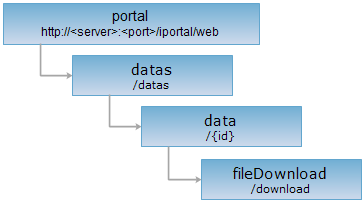
<data_uri>/download[.<format>]
Supported methods
Parent resource
Introduction
fileDownload resource is used to download the data files specified by data item id and you must have the permission to download. It supports the use of HTTP Range header to achieve transmission resuming at break-points.
Supported Methods:
- GET: downloading the data files specified by data item id and you must have the permission to download.
- HEAD: Check whether the fileDownload resource exists, or have the right to access the fileDownload resource.
Supported Formats: Data stream.
Resource hierarchy
HTTP request methods
Implement the HTTP request on the following URI, where supermapiportal is the server name, with rjson being the output format.
http://supermapiportal:8090/iportal/web/datas/download.rjson
GET request
downloading the data files specified by data item id and you must have the permission to download.
Response example
Sends get request to the fileDownload resource http://localhost:8090/iportal/web/datas/1/download to get the files corresponding with data item. The name of the downloaded and the name of the data item are the same.
HEAD request
Asks for the response identical to the one that would correspond to a GET request, but without the response body. This is useful for retrieving meta-information written in response headers, without having to transport the entire content. The meta-information includes the media-type, content-encoding, transfer-encoding, content-length, etc.
HEAD request can be used to check if the fileDownload resource exists, or if the fileDownload resource can be accessed by clients. It can also determine if the fileDownload resource supports an output format <format> if performed on a URI with .<format> included.