

URI
<data_uri>/attributes[.<format>]
Supported methods
Parent resource
Introduction
dataAttributes resource shows the attributes information of data. By sending a PUT request, you can update the data attributes, such as: thumbnail, name, tags, description, meta-info, etc.
Supported Methods:
- PUT:Used to update the data attributes, such as: thumbnail, name, tags, description, meta-info, etc.
Supported output formats: rjson, json, html, xml.
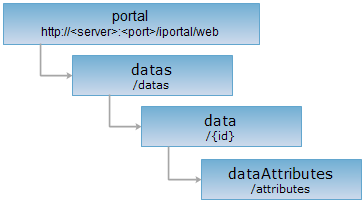
Resource hierarchy
HTTP request methods
Execute the HTTP request on the following URI, where supermapiserver is the server name, with rjson being the output format.
http://supermapiserver:8090/iportal/web/datas/{id}/attributes.rjson
PUT request
- Used to update the data attributes, such as: thumbnail, name, tags, description, meta-info, etc.
Request parameter
To send a PUT request on dataAttributes resource to modify the data attributes, you should include the following parameters in the request body:
| Name | Type | Definition |
| fileName | String | Data name. |
| description | String | Description of data. |
| thumbnail | String | Thumbnail of data. |
| tags | List<String> | Tags of data. |
| dataMetaInfo | DataMetaInfo | Data meta-info. |
Response structure
The structure of the returned resource will be:
| Field | Type | Description |
| succeed | boolean | Whether the attributes of data are updated successfully. |
| error | Httperror | Error message. This field will not be created if the update operation is failed. |
Response example
Execute a PUT request on the dataAttributes resource: http://localhost:8090/iportal/web/datas/1/attributes.rjson to update the data attributes with the following request body:
{
"fileName": "city.zip",
"description": "",
"tags": [
"USERData"
],
"thumbnail": "",
"dataMetaInfo": {
"bounds": "",
"epsgCode": "",
"providers": "",
"releaseTimeMilli": null,
"previewURL": ""
}
}
Then the returned result in rjson format will be:
{
"succeed": true
}