

URI
<portal_uri>/datas[.<format>]
Supported methods
Parent resource
Child resources
Introduction
The datas resource is a data list information that current user is allowed to check with permission.
Supported Methods:
- GET: Gets the data list information that current user is allowed to check with permission.
- HEAD: Checks whether the datas resource exists or whether there is a permission to access the resource.
Supported output formats: rjson, json, html, xml.
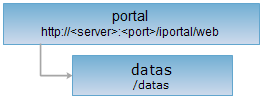
Resource hierarchy
HTTP request methods
Implement the HTTP request on the following URI, where supermapiportal is the server name, with rjson being the output format.
http://supermapiportal:8090/iportal/web/datas.rjson
GET request
Gets the data list information that current user is allowed to check with permission.
Request parameter
If no parameters are set, then the first page of the data list will be returned; If any of the following parameters are set, then the specified data list will be returned. The request parameter must be included in URI.
| Name | Type | Description |
| ids | Integer[] | The int array of data item id. |
| tags | String[] | The data tag. |
| userNames | String[] | Author name of data. You can search data by the author name. By default, all data will be returned. |
| types | DataItemType[] | Data type. |
| fileName | String | Data file size. |
| orderBy | DataItemOrderBy | Sort field. |
| dirIds | Integer[] | Directory id. |
| searchScope | SearchScope | Filter by sharing scope. |
| shareToMe | Boolean | Whether to query resources shared directly to me. This parameter is deprecated. |
| returnSubDir | Boolean | Whether to query resources of sub-directories. true means returning resources of the current directory and its sub-directories; false means current directory only. |
| permissionType | DataPermissionType | Data permission type. Includes: SEARCH (search), DOWNLOAD (download), and DELETE (delete) permissions. |
| hasServices | Boolean | Whether to return published service info. Default: false. When set to true, permissionType must be DOWNLOAD or DELETE. |
| serviceStatuses | ServiceStatus | Service publish status. This parameter is deprecated. |
| serviceId | String | Service ID. This parameter is deprecated. |
| orderType | OrderType | Filter according to ascending or descending order. |
| isNotInDir | Boolean | Filter data by whether the data is in directory. Default value is false and it returns all data list information. If the value is true, returns data list information which is not in directory. NotInDir data list resource that not added in directory. |
| isPublic | Boolean | Filter data by whether the data is public. Default value is false and it returns all data list information. If the value is true, returns data list information which is public. |
| status | Status | Data status. |
| filterFields | FilterField[] | Critical fields used to filter data. Fields name need to be capital. Example: To filter data by uploader's keywords and filter fields, set it like this: keywords=["admin"]&filterFields=["NICKNAME"]. |
| createStart | Long | Query all the data that is uploaded at this time and after this time. If this parameter value is null or less than 0, then the start time is infinite. |
| createEnd | Long | Query all the data that is uploaded at this time and after this time. If this parameter value is null or less than 0, then the end time is infinite. |
| currentPage | int | Page number. |
| pageSize | int | Page size. |
| keywords | String[] | Keyword. |
Response structure
The list of data that the current user has permission to view will be returned by executing the GET request on the datas resource. It includes following fields:
| Field | Type | Description |
| content | List<DataItem> | Page content. |
| currentPage | int | The current page number. |
| pageSize | int | The page size. |
| searchParameter | SearchParameter | The search parameter for the current page. |
| total | int | The total record number. |
| totalPage | int | The total number of pages. |
Response example
The returned rjson format representation after executing the GET request on the datas resource http://localhost:8190/iportal/web/datas.rjson is as follows:
{
"total": 1,
"totalPage": 1,
"pageSize": 9,
"searchParameter": {
"serviceStatuses": null,
"orderType": "ASC",
"fileName": null,
"keywords": null,
"md5s": null,
"shareToMe": null,
"orderBy": null,
"pageSize": 9,
"dirIds": null,
"filterFields": null,
"departmentIds": null,
"type": null,
"hasServices": null,
"createEnd": -1,
"groupIds": null,
"isPublic": null,
"serviceId": null,
"resourceIds": null,
"permissionType": null,
"types": null,
"returnSubDir": null,
"searchScope": null,
"isNotInDir": null,
"userName": null,
"createStart": -1,
"tags": null,
"currentUser": null,
"ids": null,
"userNames": null,
"currentPage": 1,
"status": null
},
"currentPage": 1,
"content": [
{
"dataMetaInfo": null,
"lastModfiedTime": 1489741344677,
"fileName": "CBDDataset.zip",
"thumbnail": "http://rdc.ispeco.com/services/../web/static/portal/img/map/cloud.png",
"dataItemServices": [],
"dataCheckResult": null,
"publishInfo": null,
"authorizeSetting": [],
"description": null,
"userName": "admin",
"type": "WORKSPACE",
"tags": [],
"coordType": null,
"size": 208321950,
"createTime": 1489741344677,
"serviceStatus": "UNPUBLISHED",
"nickname": "adminNick",
"id": 4,
"serviceId": null,
"downloadCount": 12,
"storageId": "x56j3l9i_he784jc3_430c92a0_d9a5_4063_b163_ef1ed56f0de7",
"status": "OK",
"MD5": "9dbc289ec4fd33f1b192d760040d9efc"
}
]
}
If you want to get a specific list of data info, e.g. filtering data which is public, you need to set, e.g. isPublic=true, the GET request can be written as: http://localhost:8190/iportal/web/datas.rjson?isPublic=true. The returned rjson format representation after executing the GET request is:
"content": [
{
"MD5": "4c3abec6c3c6e6c4d1f9604ae7dca661",
"authorizeSetting": [],
"coordType": null,
"createTime": 1494913645957,
"dataCheckResult": {
"dataCheckInfo": null,
"serviceCheckInfos": []
},
"dataItemServices": [],
"dataMetaInfo": null,
"description": null,
"fileName": "osgb0805.zip",
"id": 1,
"lastModfiedTime": 1494913645957,
"nickname": "admin",
"publishInfo": null,
"serviceId": null,
"serviceStatus": "UNPUBLISHED",
"size": 63594049,
"status": "OK",
"storageId": "s670412d_f17ak8go_b512d612_5838_45c3_bd89_e3763c7a2c76",
"tags": [],
"thumbnail": null,
"type": "WORKSPACE",
"userName": "admin"
}
],
"currentPage": 1,
"pageSize": 9,
"searchParameter": {
"createEnd": -1,
"createStart": -1,
"currentPage": 1,
"currentUser": null,
"departmentIds": null,
"dirIds": null,
"fileName": null,
"filterFields": null,
"groupIds": null,
"ids": null,
"isNotInDir": null,
"isPublic": true,
"keywords": null,
"md5s": null,
"orderBy": null,
"orderType": "ASC",
"pageSize": 9,
"serviceId": null,
"serviceStatuses": null,
"status": null,
"tags": null,
"type": null,
"types": null,
"userName": null,
"userNames": null
},
"total": 1,
"totalPage": 1
}
HEAD request
Asks for the response identical to the one that would correspond to a GET request, but without the response body. This is useful for retrieving meta-information contained in response headers, without having to transport the entire content. The meta-information includes the media-type, content-encoding, transfer-encoding, content-length, etc.
HEAD request can be used to check whether the datas resource exists, or whether the the client has the permission to access it. It can also determine if the datas resource supports an output format <format> if performed on a URI with .<format> included.