

URI
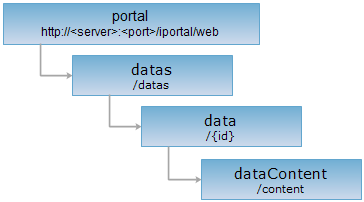
<data_uri>/content[.<format>]
Supported methods
Parent resource
Introduction
The dataContent resource represents the content information of a single data item.
Supported methods:
- GET:Retrieves the content information of the data specified by the data item ID.
- HEAD: Checks whether the dataContent resource exists or whether the permission can access the dataContent resource.
Supported output formats:RJSON,JSON,HTML,XML.
Resource hierarchy
HTTP request methods
Perform an HTTP request on the following URI, using rjson output format as an example, where supermapiportal is the server name.
http://supermapiportal:8190/iportal/web/datas/{id}/content.rjson
GET request
Retrieves the data content specified by the data item ID.
Request parameters
If no parameters are set, Shapefile type data returns content in GBK encoding by default, while GeoJSON and CSV type data returns content in UTF-8 encoding by default. After setting parameters, the data content is returned in the user-specified encoding format. Request parameters must be included in the URI.
| Name | Type | Description |
| fileEncoding | String | [Optional] The encoding format of the data. Currently supports "GBK" and "UTF-8". |
Response structure
Performing a GET request on the dataContent resource. The returned resource representation structure is as follows:
| Field | Type | Description |
| content | String | The data content. Currently supports parsing Excel, GeoJSON, CSV, and Shapefile format file content. |
| fileName | String | The file name of the data. |
| lineNumber | Integer | The number of rows in the data table content. Currently supports returning the number of rows in Excel and CSV data tables. |
| type | DataItemType | The type of the data. |
Response example
Performing a GET request on the dataContent resource: http://127.0.0.1:8190/iportal/web/datas/1823350379/content.rjson . The rjson format resource representation is as follows:
{
"fileName": "Provincial_Capitals.xlsx",
"type": "EXCEL",
"lineNumber": 4,
"content": {
"colTitles": [
"Province",
"Capital"
],
"rows": [
[
"Xinjiang",
"Urumqi"
],
[
"Tibet",
"Lhasa"
],
[
"Qinghai",
"Xining"
],
[
"Gansu",
"Lanzhou"
]
]
}
}
Note: This example only shows the response structure for Excel data type. Different data formats have different parsed content structures, meaning the content structure under the "content" field varies.
HEAD request
Returns the same HTTP response headers as a GET request, but without the response entity. Metadata information contained in the response headers can be obtained without transferring the entire response content. Metadata includes media type, character encoding, content encoding, and content length.
HEAD requests can be used to determine whether the dataContent resource exists or whether the client has permission to access the dataContent resource. By performing a HEAD request on a URI with .<format>, you can also quickly determine whether the dataContent resource supports the <format> format representation.
See