



Function Description
The Freeze Columns feature allows users to fix key field columns to the left side of the table while browsing or editing an attribute table. When the table has many fields and requires horizontal scrolling, the frozen columns remain visible at all times and do not scroll out of view, significantly improving the efficiency of data browsing, comparison, and editing.
SuperMap iDesktopX supports this feature starting from the 2026 version.
Feature Entry
- Table window context menu->Freeze Columns button.
Operation Instructions
- In the opened attribute table, click the column header of the column you want to freeze, or click any cell within that column. To freeze multiple columns, you can use the Ctrl key (to select multiple non-contiguous columns) or the Shift key (to select a contiguous range of columns) for selection.
- Right-click, and in the context menu that appears, select the Freeze Columns option.
-
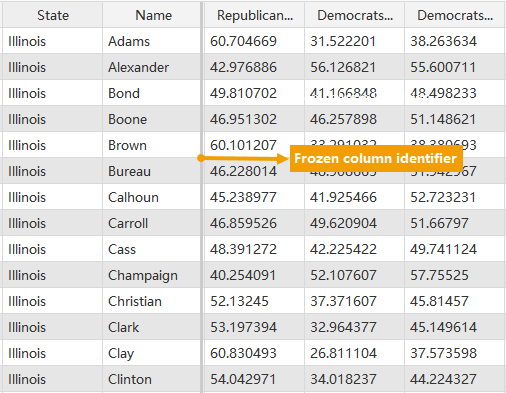
All selected columns that were previously unfrozen will be moved together to the far left of the table and fixed. A clear vertical separator line will appear between the frozen columns and the scrollable columns. When scrolling the table horizontally, the frozen column area remains stationary.
-
After setting frozen columns, the corresponding fields will be displayed at the top of the field expressions in thematic maps, the display fields in layer properties, and all dropdown lists involving SQL Expression field selection.
Unfreeze the Column
Operation Instructions
- Select the frozen columns: In the attribute table, click the column header of a frozen column, or click any cell within a frozen column. You can use the Ctrl or Shift key to batch select multiple frozen columns.
-
Execute unfreeze: Right-click, and in the context menu that appears, selectUnfreeze the Column. After unfreezing, the corresponding fields will no longer be displayed at the top and will return to their original field order.
-
View the result: The selected columns will be unfrozen, moved to the right of the freeze separator line, and restored to normal horizontally scrollable columns.
 Notes:
- Mixed State Selection: When both frozen and unfrozen columns are selected simultaneously, the context menu will uniformly display "Freeze Columns". After clicking, only the previously unfrozen columns will be frozen, while the state of the already frozen columns remains unchanged.
-
Visual Indicator: A clear vertical separator line between the frozen columns and the scrollable columns serves as the most direct visual indicator for distinguishing the frozen area.
Related Topics