



Function Description
The Coordinate System Settings dialog box is used to set the geographic coordinate system information for the selected data sources, datasets, or current map in the current workspace.
Steps
The system provides more than 200 types of geographic coordinate systems, including user-definable ones, for users to choose from. Users can select a predefined geographic coordinate system or customize one in the Coordinate System Settings dialog box to apply to the currently selected data sources, datasets, or current map.
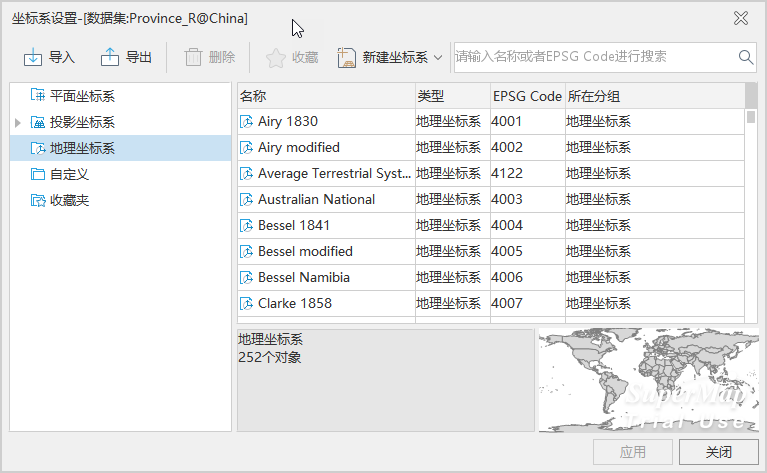 |
- Click the Start tab -> Data Processing group -> Projection Settings button to pop up the Coordinate System Settings window.
- After clicking the Geographic Coordinate System node folder in the left directory tree, the file list on the right displays predefined coordinate systems provided by the system. Select the desired geographic coordinate system; enter the full or partial characters of the coordinate system file in the Search box of the toolbar window to quickly locate it.
- If the predefined coordinate systems do not meet user needs, users can also customize a geographic coordinate system. Please refer to New Geographic Coordinate System.
- After selecting the relevant geographic coordinate system file, click the Apply button to apply the selected geographic coordinate system to the currently selected data sources, datasets, or map.
 Note:
Note:SuperMap ImageX Pro 11.3.0 adds the IMAGNA-SIRGAS and MAGNA-SIRGAS 2018 geographic coordinate systems. If data or maps using these coordinate systems are opened in a version lower than 11.3.0, the coordinate systems cannot be correctly parsed, will be displayed as planar coordinate systems, cannot be projected correctly, and the coordinate system information will be lost when saving maps or outputting map templates.
Related Topics
New Geographic Coordinate System
New Projected Coordinate System
Coordinate System Created by EPSG Encoding
Set Projected Coordinate System