



Layer Node Context Menu
Instructions
The context menu for Screen Layers/Common Layers/Terrain Layers in the Layer Manager provides various operation tools for controlling the same type of layer, such as adding 3D tiles, displaying normals, etc.
Function Entrance
- Layer Manager->Layer Node Context Menu
Operation Steps
- Right-click on a Screen Layer/Common Layer/Terrain Layer in the Layer Manager. The context menu is shown in the figure below.

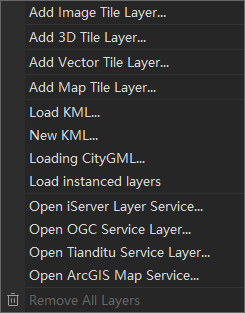
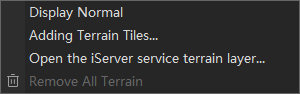
Screen Layer Node Context Menu Common Layer Node Context Menu Terrain Layer Node Context Menu - The Screen Layer Node Context Menu provides the following operations.
- Visible: Controls the visibility of the layer in the scene.
- Add Object: Adds a screen overlay to the scene.
- Remove All Objects: Removes all screen overlays from the scene and deletes all child nodes under the Screen Layer node.
- The Common Layer Node Context Menu provides the following operations:
- Add Image Tile Layer/Add 3D Tile Layer/Add Vector Tile Layer/Add Map Tile Layer: Adds corresponding tile data to the scene.
- Load KML/New KML: Loads existing KML data into the scene or creates new KML data in the scene.
- Load CityGML: Loads CityGML data directly into the scene for browsing and viewing.
- Load Instance Layer: Adds an instance layer to the scene.
- Open iServer Layer Service/Open OGC Service Layer/Open Tianditu Service Layer/Open ArcGIS Map Service: Adds various online map services to the scene.
- Remove All Layers: Removes all Common Layers from the scene and deletes all child nodes under the Common Layer node.
- The Terrain Layer Node Context Menu provides the following operations:
- Display Normal: Controls whether to display terrain data with normals.
- Add Terrain Tiles: Adds terrain tiles to the scene.
- Open iServer Service Terrain Layer: Adds online terrain data to the scene.
- Remove All Terrains: Removes all Terrain Layers from the scene and deletes all child nodes under the Terrain Layer node.
Related Topics