



Point Clustering Analysis
Point clustering analysis is a type of spatial analysis for creating aggregated maps from point datasets. It divides map point features using grid cells or polygons, calculates the quantity of points within each surface object as its statistical value, and may incorporate point weight information to consider weighted values. Finally, it fills surface objects with colors from a gradient based on sorted statistical values.
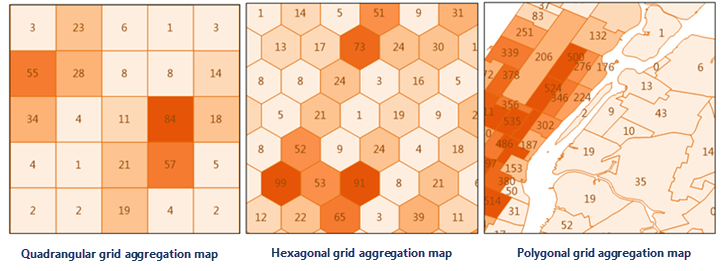
Point clustering analysis types include: Aggregate with Grid and Aggregate with Region. The Aggregate with Grid type can be further divided by grid shape: Quadrilateral Mesh and Hexagonal Mesh.
Application Scenarios
- Analyze the impact of global terrorist attacks on regions using recent data, such as casualty counts and incident frequencies.
- Assess the effects of natural disasters (earthquakes, landslides, rainstorms) on regions and related casualties.
Feature Entry
- Online Tab->Analysis group->Point Clustering Analysis.
Steps
- iServer server address: Log in via the dropdown to select an iServer address and account. For details, see the Data Input page.
- Source Dataset: Set the point dataset for aggregation analysis. Select from the dropdown, which automatically filters valid source datasets. See Data Input for details.
- Analysis Settings:
- Aggregation Type:
- Aggregate with Region: For polygon-based aggregation, set a region dataset (e.g., administrative divisions) following instructions in Data Input.
- Aggregate with Grid: For grid-based aggregation, configure grid type, analysis bounds, grid size, and unit.
- Grid Type: Required parameter. Options: Quadrilateral Mesh and Hexagonal Mesh.
- Analysis Bounds: Optional parameter. Specifies the spatial range of points to analyze, defaulting to the full extent of the source dataset.
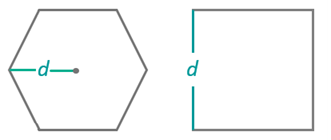
- Grid Size: Required parameter. For quadrilateral meshes, this is the side length; for hexagonal meshes, the distance from center to vertex. Default: 100.
- Grid Unit: Required parameter. Options: Meters, Kilometers, Yards, Feet, Miles. Default: Meters.
-
Weight Field: Specifies field(s) containing point weight values (e.g., col7,col8).
- Multiple weight fields can be specified (comma-separated), equivalent to performing multiple analyses with different weights.
- If empty, point weight defaults to 1.
- Regardless of this setting, an analysis with weight=1 (point count as statistical value) is always performed, reflected in the result dataset's attribute table.
- When setting this parameter, Statistical Mode must also be configured with matching entries.
- Statistical Mode: Optional parameter. Supported modes: Maximum, Minimum, Average, Sum, Variance, Standard Deviation. Must match the number of Weight Field entries.
- Aggregation Type:
- Thematic Parameters Settings
- Numeric Precision: Sets decimal precision for labels in result thematic maps (e.g., "1" = one decimal place). Default: 1.
- Segmentation Mode: Thematic map segmentation methods: Equal Interval, Logarithmic Interval, Quantile Interval, Square Root Interval, Standard Deviation Interval.
- Number of Segments: Sets the segmentation count for thematic maps.
- Color Gradient Mode: Thematic map color schemes: Green-Orange-Purple, Green-Orange, Rainbow, Spectral, Terrain.
- After configuring parameters, execute the analysis. Results automatically open in the map, with output paths shown in the output window. Note: Directly opening result data from this path may fail due to server locks. Copy data to another location for editing.
Related Topics