



Edit the water depth value
Instructions for use
Although the water depth points in the water depth group share the same attributes, the water depth value of each point can be different. Therefore, the water depth value cannot pass the Edit Grouping properties Uniform Settings. You can make modifications through the Depth Points Object Properties panel, or edit the depth values for each depth point individually in the Sounding Group Management panel.
Manually editing the water depth value is typically required in the following scenarios:
- Water Depth Data Update: In the process of chart drawing or updating, if new water depth survey data or environmental change information is received, the existing water depth points need to be adjusted.
- Ensure navigation safety: In important navigation channels, port areas or waters with potential obstacles, accurate water depth values are essential for navigation safety and may need to be manually adjusted.
- Special marking requirements: The water depth points in some areas may need to be accurately modified according to special requirements (such as marking shoals or reefs) to enhance the navigation function of the chart.
Operation steps
Modifying with the Sounding Group Management Panel
- Open the Editable Chart Group whose water depth needs to be modified, and load it to Map.
- Chart tab-> Chart Data Processing group-> click the Sounding Management button, and the Sounding Group Management panel will pop up on the right side of the interface. The upper part of the panel displays the water depth grouping in Chart Group, and the lower part displays the corresponding water depth point list.
- Select a water depth group in the Sounding Group Management panel, and click to select a water depth point in the water depth point list. Map locates and highlights the water depth point.
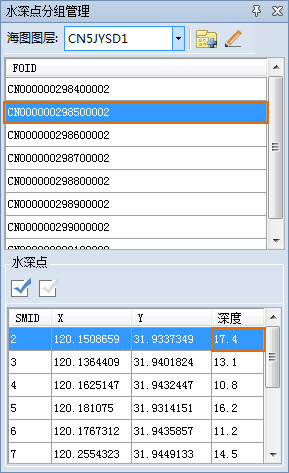
- Click the cell corresponding to the Depth column, enter a new depth value, press Enter to confirm and save the modification.
Modify via Properties Panel
- Open the Editable Chart Group whose water depth needs to be modified, and load it to Map.
- Select the target object by reference , select the water depth point whose value needs to be modified in the map, select Attribute in the Context Menu, and the Attribute panel will pop up on the right side of the interface.
- Expand Attribute Information and locate the Depth entry in the attribute list. Click the corresponding Attribute Value cell and enter a new depth value to modify.
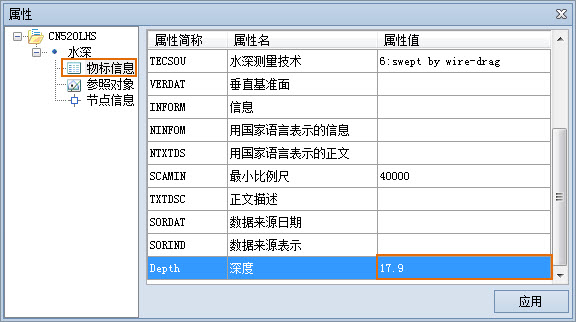
- Click the Apply button to confirm and save the changes.
Related topics
Add/Remove Depth Point