



Edit Grouping properties
Instructions for use
In chart production, bathymetric points are managed in groups. Each bathymetric grouping contains multiple bathymetric point objects with the same attributes except depth. Editing the attributes of the water depth grouping helps to ensure the consistency and standardization of Chart Data and improve the management efficiency when the water depth Data is updated or adjusted. By editing the water depth grouping properties, you can:
- Unified Property Settings: When modifying the properties of a water depth group, all water depth point objects belonging to the group will be automatically updated to avoid redundant work caused by modifying one by one.
- Ensure data consistency: In the process of charting, some attributes (such as water depth description, measurement technology, etc.) are very important for navigation safety. Editing attributes helps to unify standards and ensure data consistency.
- Improve efficiency: Reduce manual operation and improve Data Processing efficiency by modifying the attributes of all water depth points in the group in batch, especially when facing a large number of water depth points.
Because all depth point objects (except depth) in a depth group share the same attribute values, when modifying the object attributes of a depth group, the attribute values of all depth points in the group are updated synchronously.
Operation steps
- Open the Editable Chart Group that needs to edit the water depth grouping attribute, and load it to Map.
- Chart tab-> Chart Data Processing group-> click the Sounding Management button, and the Sounding Group Management panel will pop up on the right side of the interface. The upper part of the panel displays the water depth grouping in Chart Group, and the lower part displays the corresponding water depth point list.
- In the Sounding Group list at the top of the panel, select the water depth group whose attributes need to be edited. Click the Edit Grouping properties button in the toolbar to pop up the Sounding Group Attribute Settings dialog box.
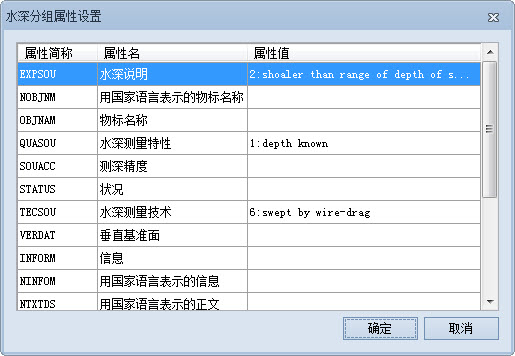
- In the Sounding Group Attribute Settings dialog, you can edit the related attribute values. The following is an example description of a common Attribute modification:
- Water Depth Description: Click the corresponding attribute value cell, click the Drop-down Button, and select "2: shoaler than range of depth of surrounding depth area" ". This indicates that the location is a "relatively shallow area" that may constitute an obstacle to navigation or a shallow area requiring special attention (such as a sandbar, shoal, or rock). This information is essential for the safety of navigation, especially in charting, to warn ships and mariners.
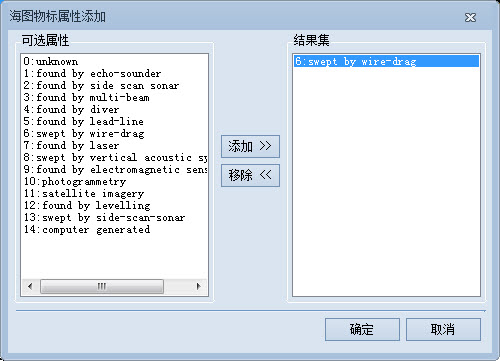
- Bathymetry: Click the corresponding attribute value cell and click the .. button to pop up the Add Objects Attributes dialog box. Select "6: swept by wire-drag" in Optional Attributes and click the Add button to add the attribute value to Result Set. "Swept by wire-drag" means a bathymetry technique in which a cable is towed to detect the location of an underwater obstacle or shallow area. It is often used to determine the minimum depth in a channel to ensure safe passage.
- Minimum scale: directly enter the value of minimum scale in the corresponding attribute value text box, such as 40000, to set the Minimum Visible Scale of the water depth point as 1:40000.
- You can set other properties as needed. After setting, click the "OK" button to save the changes.
Related topics
Add/Remove Depth Point