



Instructions for use
Object Properties describe the characteristics of the object. Editing Object Properties is a Crucial Step that ensures that chart production meets specifications and enhances navigation safety and accuracy. After the feature object is drawn, it needs to be assigned the corresponding attribute value. Attributes of different types of objects are different. S-57 Object Attribute Data Dictionary stores the object category description of S-57 Standard Appendix A, including attribute name, code, type, expected input value, etc.
Operation steps
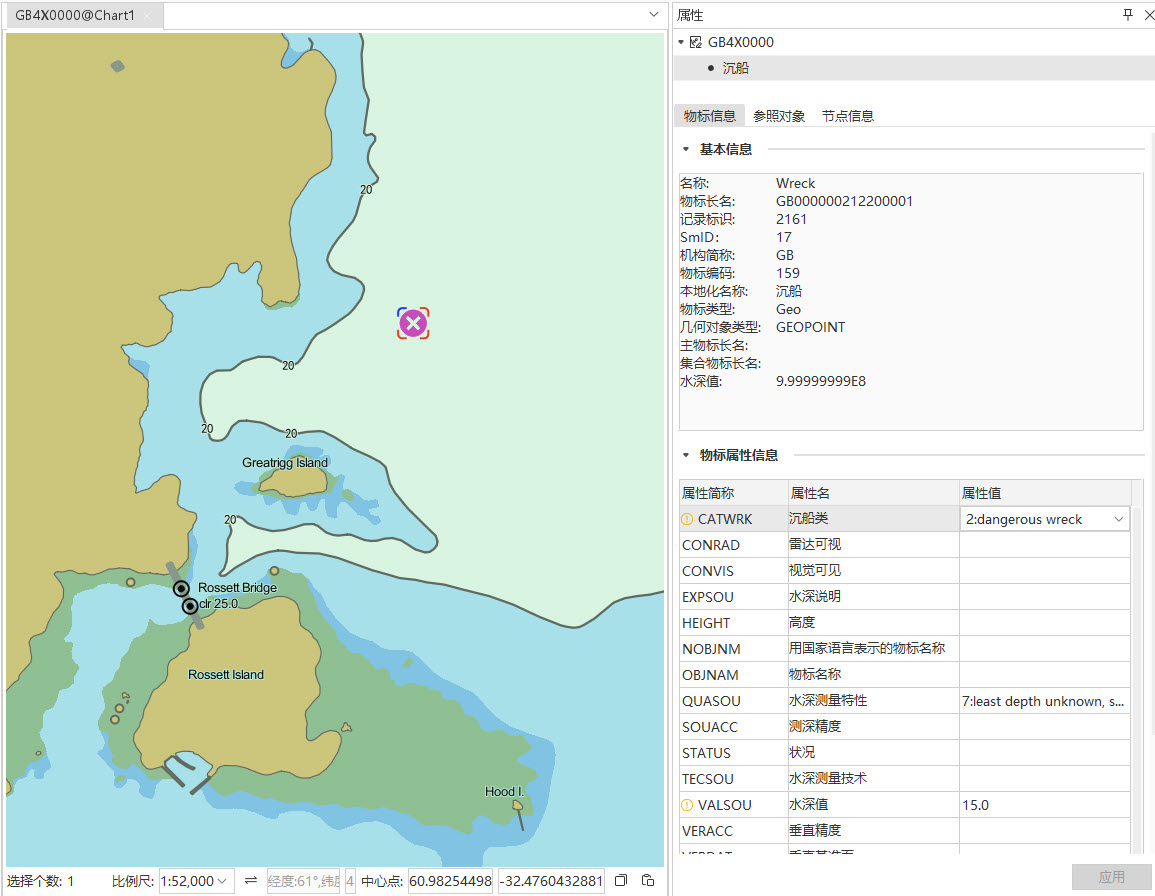
In the Editable Chart Group, select one or more object objects, right click and select Properties to open the Properties Panel on the right. The Properties Panel includes the following sections:
- Object Info: Display Object Basic Info (such as name, Record ID, etc.) and Attribute Information (such as Property Abbreviation, attribute name, attribute value). Attribute Value can be modified.
Reference Object: displays the boundary information of the selected object, including Object ID, Boundary Direction, Boundary Type, Mask Type, etc. Map is automatically positioned and highlighted when an object in the list is selected.
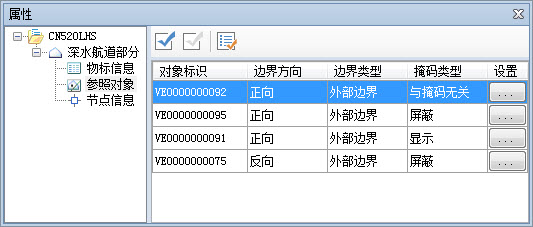
- Object ID: It is formed by connecting two subfields RCNM and RCID of the vector Record ID field (VRID). Among them, RCNM occupies 2 characters to distinguish the type of space object, "VI" represents "isolated node", "VC" represents "connection node", "VE" represents "edge"; RCID is the value of 10 characters.
- Boundary Direction: It refers to the reference mode of the feature object to the direction of the linear space object, including public forward, reverse and Direction Independent. The forward direction is consistent with the node order direction of the line space object, and the reverse direction is opposite to the node order direction of the line space object.
- Boundary Type: Boundary type of the reference edge, including Outer Border and Internal Border.
- Mask Type: Display Method for indicating the reference edge, including mask, display, or Nothing to do with mask.
- Settings: You can configure properties such as horizontal datum (HORDAT), positional accuracy (POSACC), and positional properties (QUAPOS).
- Nodes: Details of the nodes that make up the object, including Object Info and Nodes.
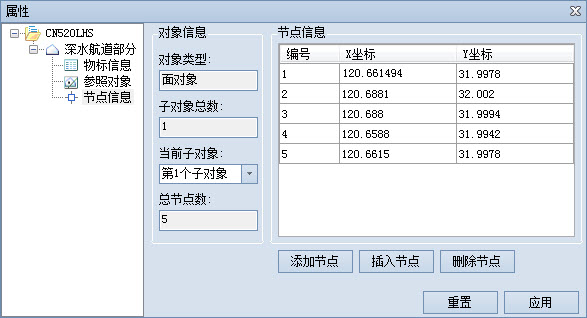
- Object Info: Displays the type of Select Objects, the total number of subobjects, the current subobjects, and the total number of nodes.
- Node Information: Nodes displays the Nodes of the current sub-object in the form of a table. Each record corresponds to a node of the sub-object. The information content is the coordinate information of the node. Unit is the degree. Node can be added, inserted or deleted, and Nodes can be exported as CSV File.
Related topics