



Neighbor Map
Function Description
The Neighbor Map function can automatically identify and locate adjacent map sheets according to the currently selected map sheet, which is convenient for quickly locating and viewing adjacent map sheets when managing and browsing a large number of Chart Groups.
Operation steps
- Load the Chart Group that needs to find adjacent view frames into the Map.
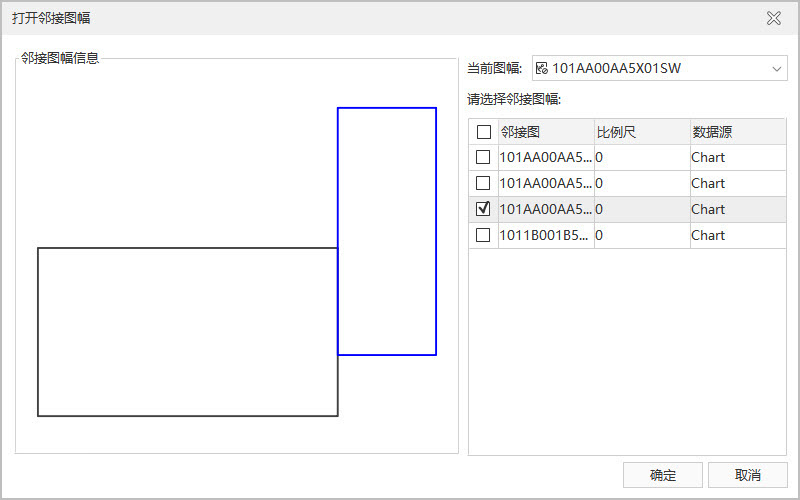
- Enter the Chart tab-> Location Search group-> click the Neighbor Map button, and the Neighbor Map dialog box will pop up. The left side of the dialog box displays the Neighbor Map information, and the right side is used to select the current view frame and the adjacent view frame to be opened.
- Select a view sheet in Current View Sheet and click the adjacent view in Please select an adjacent view sheet to view the Relative of the view sheet in the Neighbor Map information preview box on the left. The black box represents the current Map Range, and the blue box represents the selected adjacent Map Range.
- Check the adjacent map to be opened and click OK. The selected adjacent map will be opened and displayed in the current Map.
Related topics