



Export Nautical Chart
Instructions for use
SuperMap supports the export of Non-editable Chart Group. You can export a non-editable grouping that meets the criteria as a *.000 file or a *.shp file.
- Export as.000 file: The Vector Dataset (Point, Line, Surface, Attribute Dataset) of the All Types contained in the grouping will be combined and exported as one *.000 file.
- Export as.shp file: Vector Dataset (Point, Line, Region Dataset) in the group will be exported as a corresponding single *.shp file.
When the Chart Group selected for export is an editable grouping, the system will automatically convert it to a non-editable grouping.
Operation steps
- In the Datasource of the Current Workspace, select the Non-editable Chart Group you want to export, right-click and select Export Nautical Chart … Button to open the Export Nautical Chart dialog.
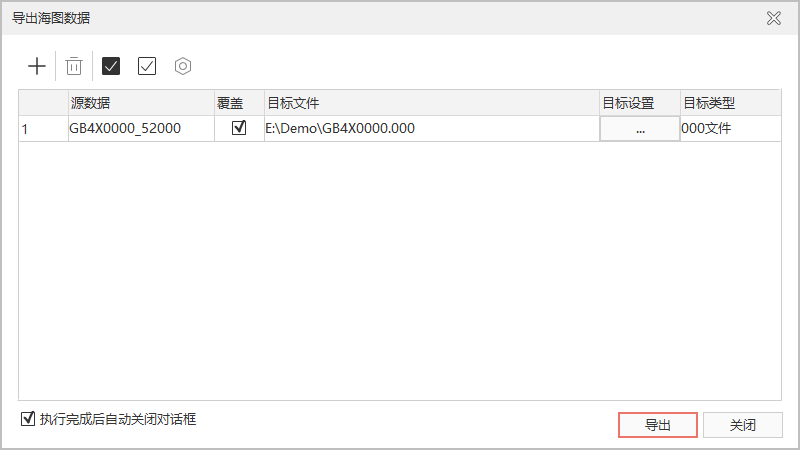
- Click the Add button to continue adding the Non-editable Chart Group you want to export to the list box. After multiple groups are added, you can set and delete the groups added to the list box through other buttons in the toolbar.
- Set Export Parameters:
- Source Data: The name of the group to be exported.
- Overwrite: Set whether to overwrite the file with the same name under the target file path. If checked, the existing file with the same name will be overwritten. If not checked, the file will not be exported.
- Target File: Displays the default path. The Result File is the same as the original group name.
- Target Settings: Set the Export File path. Click the .. button to reassign the Export Path and file name.
- Target type: Click the Drop-down Button of the target type cell to select the Data Export format, which supports 000 file and SHP file formats.
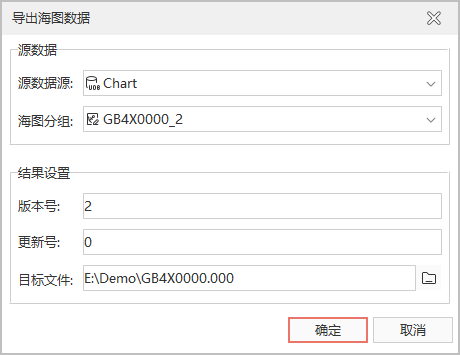
- Click the Export button, and the system will export the All Data files in the list box in batches. If the exported group is editable, a dialog box containing the source data and Result Settings will pop up. After setting the version number and update number, click the "OK" button, and the system will automatically convert it into a non-editable group, and then export it as a *.000 file.
 Caution:
 - Only the whole Chart Group data can be exported as a chart standard file. Individual Dataset cannot be exported as a chart standard file. Exporting a Tabular Dataset as a *.shp file
- is not supported.
Related topics
Topology Construction and Inspection