



Build Master-slave Relationships in Batches
Instructions for use
In chart production, master-slave between objects usually exists in a large amount of data, and manually establishing these relationships one by one is time-consuming and error-prone. Build Master-slave Relationships in Batches can significantly improve efficiency, reduce human errors, and ensure that the hierarchical relationship between objects can be established quickly and accurately. In addition, this batch processing helps to maintain data consistency and accuracy during large-scale chart updates or Data Integration.
- Build Master-The principle of slave Relationships in Batches is based on the coordinate value matching of the object. In the construction process, the system will automatically scan currently edited Chart Group, check the qualified object pairs, and automatically establish the relationship between the master object and the slave object according to their spatial distribution and preset rules. This ensures that relationship provisioning is done automatically according to standardized rules, reducing the possibility of manual intervention and error.
- Applicable application scenarios:
- Large-scale Chart Data Update: When a large number of objects are updated or newly created, the object relationship is quickly straightened out through the Build Master-slave Relationships in Batches.
- Complex Object System Management: For a complex object system with multi-level relationships, you can use Batch Build to simplify relationship processing.
- Ensure data consistency: After multiple data merges or changes, a consistent Master-Slave is quickly re-established through Batch Build.
Operation steps
- In Chart Data editing mode, open the Editable Chart Group.
- Chart tab-> Relationship Management group-> Master/Slave Relationship drop-down-> Click the Build Master-slave Relationships in Batches button.
- The system will automatically check the eligible objects in the current group and automatically Build Master-Slave Relationship. You can view the progress by opening the Details panel of the Build Master-Slave Relationship dialog.
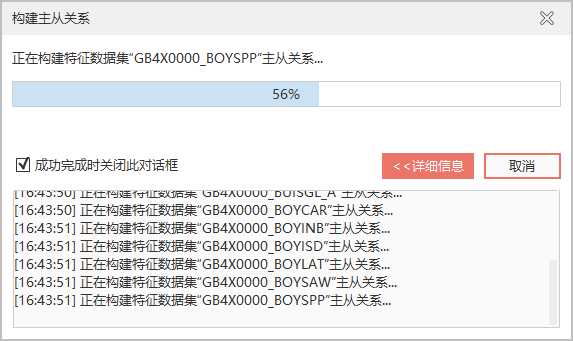
- After the creation is completed, the Master-Slave Relationship Management panel will pop up on the right side of the interface, where you can further view and manage the obtained Master-Slave results.
Related topics