



Create Feature Dataset
Instructions for use
In order to effectively manage and maintain feature objects, feature Dataset plays a vital role in chart production. SuperMap supports the creation of a new feature object Dataset in the Editable Chart Group based on the specified feature object encoding and Dataset Type.
The object data dictionary provided by SuperMap conforms to the IHO S-57 standard and contains the name, code, type, definition and related remarks of the characteristic object, which can be easily used for Create Feature Dataset. These Datasets are widely used in feature identification, Data Update and map sheet generation in chart production to ensure the consistency and accuracy of data.
Operation steps
- In Workspace Manager, select Editable Chart Group and go to the Chart tab-> Chart Data Management group-> Create New Group drop-down menu. Select Feature Dataset.. to pop up the Create Feature Dataset dialog box.
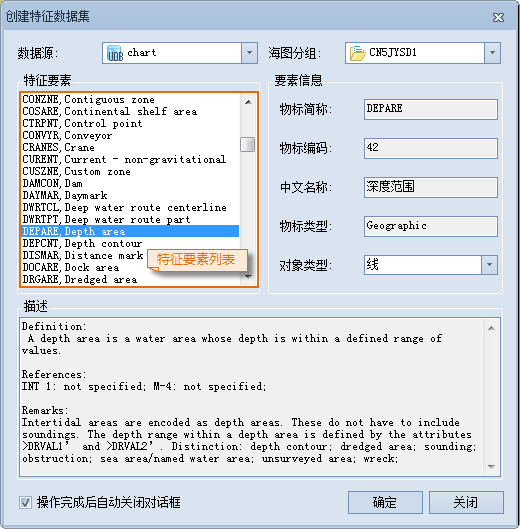
Figure: Create Feature Dataset Dialog - Select Datasource: At Datasource, click the drop-down menu on the right and select Target Datasource from the Open Datasource list in the Current Workspace.
- Select Chart Group: Select the Editable Chart Group of the target in the Chart Group drop-down menu to store the newly created feature Dataset.
- Select Feature: In the Feature list, select the Dataset Type of the feature to be created.
- View Feature information: When Dataset Type is selected, Feature information displays the name, code, type, and other Details of the feature. Click the drop-down menu to the right of Object Type to select the Geometry type of the feature object.
- Definitions and Remarks: View the definitions, reference information, and remarks for the currently selected Feature in the Description text box.
- Confirm creation: Click the OK button to create a new feature object Dataset in the selected Chart Group.
Related topics