



Instructions for use
Various features in the global ocean (such as lighthouses, harbors, waterways, etc.) constitute an important part of Electronic Chart, which provide detailed navigation and geographic information to ensure the safety and efficiency of navigation.
To facilitate Data Update, maintenance, and improve data exchange and interoperability between systems, each feature object requires a unique identifier.
The Iho Electronic Chart standard (ENC) specifies the structure of the Feature Object Identifier (FOID, Feature Object Identifier) field to enable the Unique Identification FOID to include the following subfields:
- AGEN (Producing Agency): identify the agency code of the production feature object data. Each country or region's maritime agency has a unique agency code, which enables decentralized management within Global. For example, the maritime agencies of China and the United States have different codes, which avoids the conflict of numbers.
- FIDN (Feature Identification Number): a unique identification number assigned to each feature object to ensure uniqueness in a wide range.
- Feature Identification Distinguishing (FIDS, Feature Identification Subdivision): used to further subdivide the feature identification number to distinguish different parts of the same feature.
In the S-57 standard, this identifier is also referred to as a Long name. Under the same production mechanism, the uniqueness of FOID is guaranteed by the unique combination of FIDN and FIDS.
In an ENC, different instances of the same object may share the same feature object identifier. For example, in Electronic Charts of different scales or uses, a feature may be represented as a different geometric type (for example, a shipwreck may be a line or surface), but still maintain the same identifier; or, when the feature is split into different chart cells (which may be considered different sheets), the same identifier may still be shared. However, the characteristic object identifiers of different objects may not be duplicated, even if an object has been deleted.
When creating a new S-57 Editable Chart Dataset Group or converting from a Read-Only Dataset Group to an Editable S-57 Chart Dataset Group, you must specify a FIDN sequence name and FIDS to assign a unique FOID to the newly added object. After the object is created, the corresponding FOID is automatically generated and assigned. Therefore, a FIDN sequence needs to be created for the Datasource prior to this to ensure that each newly added object has a unique identifier.
Operation steps
- Select the Datasource node in Workspace Manager, and select Properties in Context Menu to pop up the Properties window.
- On the Feature Sequence panel, click the Add button on the toolbar and on the Create Signature Sequence pop-up dialog, set the name, start value, and end value of the feature signature sequence.
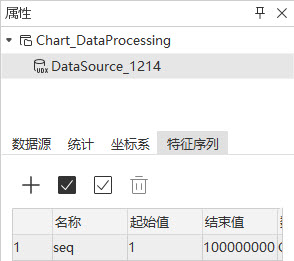
- Click the OK button to complete the creation of FIDN. Repeat step 2 to continue creating FIDN sequences and close the Create Signature Sequence dialog after successful creation.
 Caution:
 The FIDN start value and end value must be integer values, and the start value cannot be less than 1, and the end value must be greater than start value.
Related topics