



Chart Convert Group
Instructions for use
Chart Convert Group refers to the operation of converting S-57 or CJ-57 Chart Group between editable and non-editable types. By grouping Type Conversion, we can meet the different needs of Chart Data editing, publishing and maintenance, and achieve efficient Data Management and reliable publishing process.
- Grouping an editable Convert Group into a non-editable group is typically used in the data publishing phase. After the editing is completed and verified to be correct, the data is locked in a non-editable state to ensure that the distributed data is not modified at will, so as to maintain stability and authority. This conversion applies when the Data Update is completed and the data is ready for general release.
- Using a non-editable Convert Group as an editable grouping is used for scenarios where existing data needs to be modified or updated. You can adjust and optimize the data by releasing the editing lock status of the data, but you need to pay attention to prevent incorrect modification and data loss. This action is typically applied when new data is received or when data is found to require further correction.
Operation steps
Editable Group-> Non-editable Group
The following takes the conversion of Editable Chart Group CN5X0000 to Non-editable Chart Group as an example to introduce the relevant operations in detail:
- In Workspace Manager, right click the CN5X0000 grouping node and select Generate Non-editable Chart Group. Or on the Chart tab-> Chart Data Management group-> Convert Group Drop-down Button, select Generate Non-editable Chart Groups... The Convert to Non-editable Chart Group dialog box pops up, as shown in the following figure:
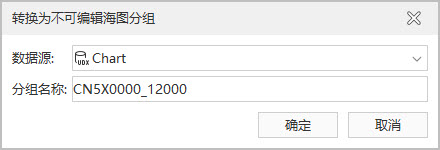
Convert to Non-editable Chart Group - Datasource: Support saving Non-editable Chart Group to Existing data source and new Datasource.
- Save to Existing data source: You can select an existing Datasource in Current Workspace.
- Save to new Datasource: Click the Create.. button in the Datasource drop-down list, select a new Datasource Type, and name it. Create a new Datasource to save the read-only Chart Group data.
- Click the OK button in the dialog box to editable Chart Group the Editable Chart Group Convert to Non, and the generated Non-editable Chart Group is CN5X0000 _ 12000. The naming rule is: "Edit Group Name" + "_" + "Edit Scale".
Non-editable Grouping-> Editable Grouping
To change a non-editable Convert Group to an editable group, do the following:
- In Workspace Manager, right-click a non-editable grouping node and select Generate Editable Chart Group. Or on the Chart tab-> Chart Data Management group-> Convert Group Drop-down Button, select Generate Editable Chart Group... The Convert to Editable Chart Group dialog box pops up, as shown in the following figure:
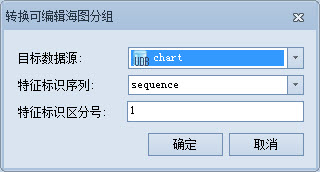
Convert to Editable Chart Group - Datasource: Support saving Non-editable Chart Group to Existing data source and new Datasource.
- Save to Existing data source: You can select an existing Datasource in Current Workspace.
- Save to new Datasource: Click the Create.. button in the Datasource drop-down list, select a new Datasource Type, and name it.
- Click the OK button in the dialog box to editable Chart GroupConvert to Editable Chart Group the Non-.
Related topics