



SuperMap iDesktopX 11i (2024) New Features
The SuperMap iDesktopX 11i (2024) desktop product includes the following new features and optimizations over the previous release.
Data Management
- Dataset Group function is added to support the management of Dataset by grouping in Datasource, so as to improve the efficiency of data classification management and query;
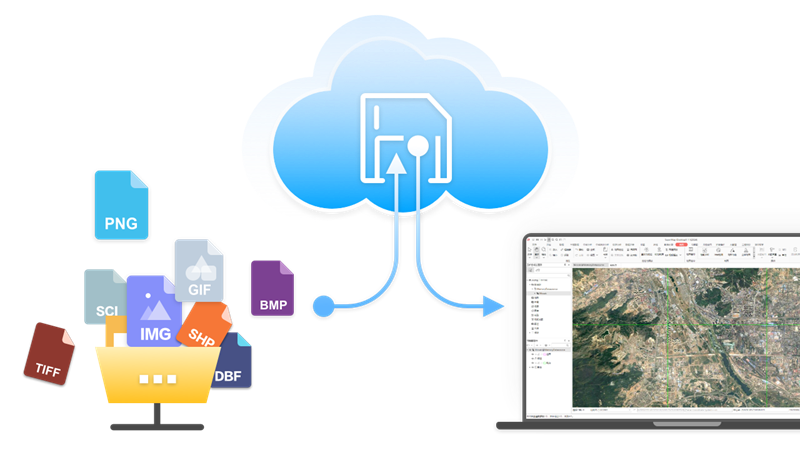
- Cloud Storage function is added to support data access to Alibaba Cloud, Huawei Cloud, MinIO, SeaweedFS object storage service, AWS S3 protocol compatible object storage service and FTP service;
- New Database user management function:
- PostGIS and Yukon Datasource support Create a user and Role ;
- Support the setting of Datasource Permissions for User/Role , including Usage Permissions and Creation Permissions;
- Support the setting of Dataset permissions of User/Role , including selection, insertion, update, and deletion;
- New Database Transaction Management function:
- Support transaction management for PostGISDatasourceStart Transaction, Object Editing, property sheet editing, Data Processing, analysis and other operations;
- Through the transaction ID, check the transaction status, including invalid transaction and transaction in progress;
- Support batch Commit Transaction and Rollback Transaction;
- Dataset transaction status
- can be viewed: No transaction lock, Current transaction lock, and
- other transaction locks;
- Add directly open ArcSDE _ OracleDatabase-type Datasource ;
- Add support to directly open *.pix image format files;
- Optimize direct Open Vector File Data :
- Support the direct opening of *.gdb, *.mdb, *.json, *.geojson, *.gpkg, *.vct and *.000 vector format files;
- Support the analysis of the directly opened Vector File as the source data of the analysis tool;
- Support the direct output of Analyst Result to common data formats;
- Optimize Manage Mosaic Dataset :
- Added support for Valueless management capability so that images without null information can use Mosaic Dataset's null. O as to ensure the correctness of calculating the Statistical Data and the histogram of the image;
- Support adding *.pixImage Files in Mosaic Dataset to improve Data Management capability;
- Optimize the Export GDB file function, and keep the Dataset Group structure after export;
- Optimize the function of importing MDB/ GDB files , and select Dataset or Dataset Group in Import files as required;
- Optimize the Export GeoJson File function to support the export of EPSG encoded Geographic Coordinate System;
- Optimize the Import TXT / CSV function, support the selection of Auto Length, and improve the Import File performance;
- Solve the problem of invalid multi-band image No Value Transparent of 32-bit Pixel Format;
- Solve the problem of Mosaic Dataset single-band color table image display error;
Edit Data
- Add Update Column (ToDate) function, which can convert different date formats to yyyy/mm/DD format;
- Parallel Copy function is added , which can copy the line object parallel to the existing line according to the set distance and direction;
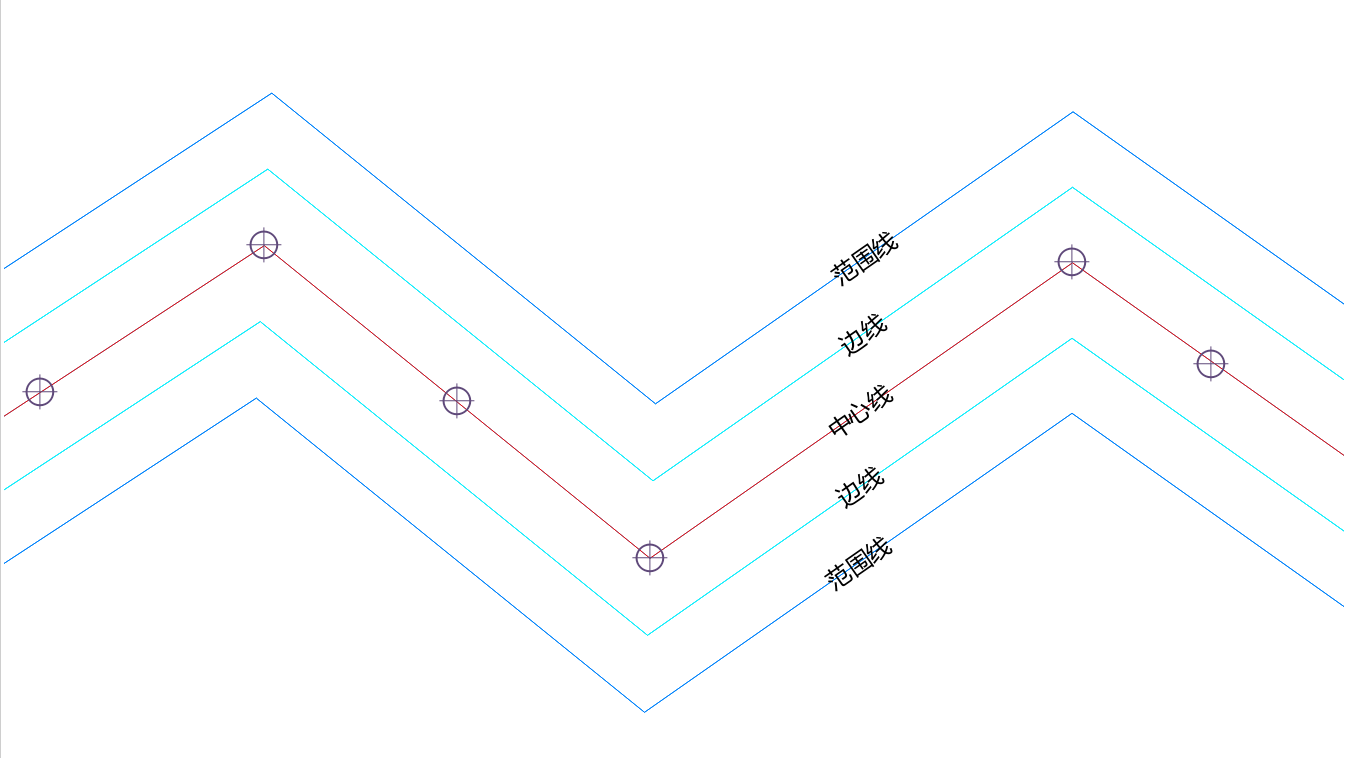
- Show nodes of drawn objects function is added to view the drawn Nodes in real time when drawing line/surface objects;
- Optimize the property sheet Find function:
- Support pop-up search dialog box through Ctrl + F shortcut key;
- It provides two ways of content search and condition search, which can be switched freely in different search scenarios.
- Provide a variety of SQL Expression input methods to quickly implement query operations;
- Optimize the Screening capability of the attribute table. The drop-down option displays the enumeration value Description, which is consistent with the information displayed in the attribute table;
- Optimize the Attribute Structure management. When the input Field contains illegal characters, it will be automatically replaced with legal characters to avoid invalid names;
- Optimize the face Object Drawing, and adjust the face object nodes drawn counterclockwise to be stored in clockwise order after drawing;
- Optimize the Object Drawing function, support the adsorption of existing surface boundary or line objects, and avoid Topology error when drawing;
Data Processing
- Pipeline attribute line transfer data function is added , which can convert pipe point attribute table and pipeline attribute table into 2D or 3D line data;
- Optimize the Topology Check feature:
- Optimize the Inverse Cut Fill function, support the actual range of objects as Analysis Bounds, and improve the analysis accuracy;
Map Cartography
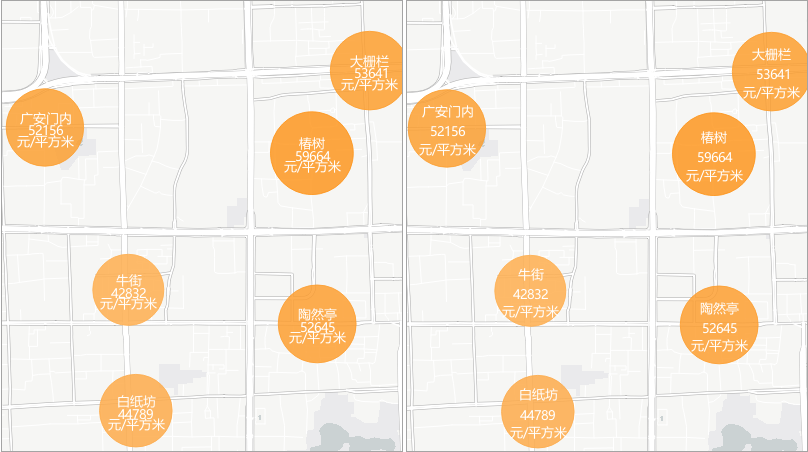
- Optimize the drawing function of the Regional Aggregation Map , and support the adjustment of the line spacing of the aggregated map labels;
- Optimize the Create a new Fill symbol function, support the setting and saving of the contour line style;
- Optimize the Custom Scale list, support the setting and saving of User Default Scale, and Auto Apply to the newly created map to improve the editing convenience;
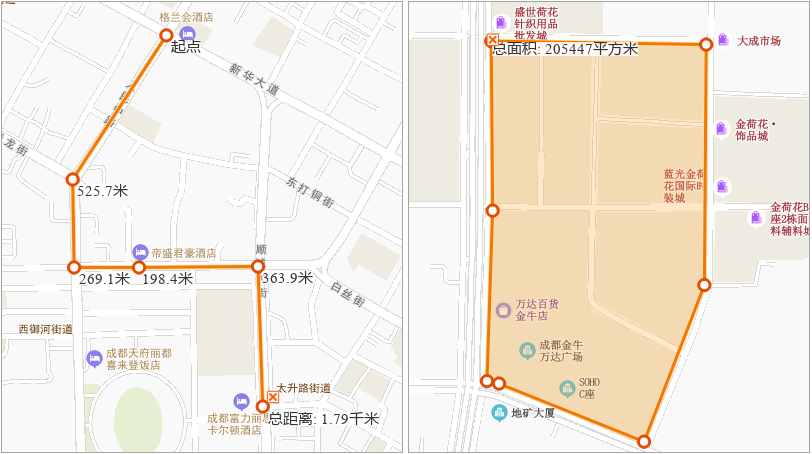
- Optimize the Map MeasurementDisplay Effects and support the clearing of a single measurement and calculation record;
- The method solves the problem that geographic spatial coordinate information is lost during Map Export to PDF ;
- Solve the problem that the transparency of vector thematic map layer Export to PDF is invalid;
Map layout
- Solve the problem of program crash caused by repeated locking of Map Operation in layout;
Spatial Analysis
- Tuning SQL Query :
- Provide the field list and Common Functions table to assist the input of SQL Expression;
- Support search and highlight Search Results, so as to quickly locate the function location and view Function help;
- Optimize the Raster Algebraic Operation and support the calculation using bands;
Map Tiles
- Optimize the Single task / Generate Map Tiles by Multiple Tasks function, Support saving Map Tiles to Cloud Storage;
Machine Learning
- Added SAM-based Prompt Segmentation, Rectangular box prompt, and Polygonal Prompt Segmentation capabilities for precise segmentation of objects in images;
- Pre-training models for forest land extraction and thick cloud detection are added;
- Multiple Classification model is added to reduce user cost;
- Optimize Object Detection , Binary Classification , Multiple Classification、Scene Classification、 Object Extraction and Detect Common Change tools, supporting GPU multi-card reasoning;
Video Map
- The spatialization of Support Zoom Camera Video is added to expand the source of video data;
- Optimize the video spatialization. During Prick registration , the elevation value of the control point can be obtained according to the DEM Data to improve the accuracy of spatialization;
- Optimize the spatialization of Online Video and support the real-time multi-angle registration of Rotate the Camera Video ;
Data Migration
- New ArcGIS ProData Migration function:
- Support the migration of ArcGIS Pro 2.x and 3.x project files;
- Support the migration of GDB and SHP data associated with the project;
- Support map migration, including Vector Layer, UniqueValueRender, segment layer, text layer and Label Layer;
- Support the migration of map General Properties, including name, coordinate system, scale, Background, Rotation angle, etc.;
- Support migration of layer General Properties, including name, maximum Minimum scale, Filter Expression, etc.;
- Support transfer symbols, including simple vector point symbol, Simple line symbology and solid Fill symbol;
- Support the migration of removing the label attribute with the same name in Label Feature;
- Support the migration of subtype information in the feature class is added;
- Optimize symbol migration:
- The problem that the symbol becomes larger after the migration of the blank symbol is
- solved;
- Support the migration of overlay symbols and indiscriminately display the overlay symbols of ArcGIS;
- Support the migration of symbols with offset and rotation parameters;
- Support to modify the style of simple Fill symbol after migration;
- Support all other values or symbol migration without Visible Layer;
- Enhance ArcGISMap Migration capabilities:
- Support the selection of whether to migrate data or layout to avoid repeated migration;
- Provide license verification entry to avoid migration failure due to lack of license;
- Optimize the Migration Report, add a Data sampling subtable, and compare Layer Bounds, value domains, attributes, and other contents before and after migration;
Knowledge Graph
- Optimize Create Entity , support merging the same entity according to the identification field;
Remote Sensing Imagery
- Basic ability
- Add more mainstream optical satellite sensors, including BJ3N3, JL-GP and K3;
- Optimize Map Swipe:
- Support setting Multispectral layer, Panchromatic layer and Orthorectification layer as Swipe Layer;
- The Swipe Layer list filters out non-Visible layers;
- Optimize the image pairing function, support the management of image pairing, and add or remove images that have not been successfully paired;
- Production assistance
- Add an automatic defogging and haze removal tool, which supports removing fog and haze in images;
- Automatic cloud filling is
- added, which supports the replacement of images in cloud areas with cloud-free images;
- Improve the accuracy of cloud detection, avoid the false detection of over-exposed data such as rocks and deserts as clouds;
- The cloud detection performance is
- improved, and the thick cloud detection accuracy is more than 90% through down-sampling processing;
- Image correction
- Optimize Block Adjustment capability, support multi-image matching, and provide quadratic polynomial RPC correction model;
- Improve the image matching capability, support the direct generation of high-quality connection points and Ground Control Point for Original Images with large position deviation, and further improve the geometric accuracy of Process Images;
- DOM Data Production
- The automatic production process of ortho-dom results is
- added to support the image production Dom data based on Orthorectification;
- Optimize the Image Color Balancing function, ignore the highlight cloud area during color equalization, and improve the overall color equalization effect of the image;
- Optimize the True Color Output function, support the Enhance Vegetation area, and enhance the Display
- Effects of vegetation;
- Support independent execution of Image Color Balancing, True Color Output, Image Fusion and Image mosaic functions, and can directly read Local File as source data. There is no need to rely on data in the DOM Production Process;
- DSM/DEM Data Production
- Add DSM/DEM automation production process to simplify user Workflow;
- Support the repair of DSM water area elevation, and the DSM water area elevation can be automatically repaired according to the water area Vector Data elevation;
- Image quality check
- Add DOMImage Planar Accuracy quality inspection function:
- Plane Accuracy and Edge matching accuracy of each image
- can be detected, which is convenient to quickly understand the overall quality, single scene quality and edge matching
- quality of the image;
- Support the automatic generation of checkpoints, and provide the Checkpoint Management function to perform operations such as Classified display, addition, deletion, and modification of checkpoints;
- Add DOM image fine plane quality inspection function, divide the inspection area into Specify size grids, detect the Image Planar Accuracy of each block, and understand the Orthorectification error distribution of blocks smaller than each image area;
- Add the function of drawing deformation detection, which can detect the deformation of houses, mountains and roads in the image, and automatically extract the drawing deformation area;
- Add DOMImage Planar Accuracy quality inspection function:
- Performance and accuracy optimization
- Optimize the performance of Load according to the original image rangeReference image and improve the overall efficiency of Process Image;
Geo-Processing Automation (GPA)
- The Coverage Result function is added to support the coverage of the last executed Result Data when the model is executed repeatedly;
- New Cressman Interpolation Analysis to meet the application of meteorological industry;
- Spark local (multi-process) mode is added , which can improve the utilization efficiency of stand-alone resources when using BigData Tools, thereby improving the execution performance;
- Add the big data Vector Analysis — Measure Distance tool, which supports the nearest Measure Distance for two layers;
- Optimize the big data Vector Analysis — Topology Check tool, and add two check rules: No acute angle in region and No sharp angles in the line;
- Optimize the big data Raster Analysis-Zonal Statistics tool, and support the pixel to process the data according to the area object;
- Optimize BigData Tools to filter empty Geometry when reading FileGDB data to avoid Import Data redundancy;
- Optimize Model Library features:
- Support the selection and authorization of models in the model base to improve the controllability of model encryption;
- Provide Toggle Author ization Code function to obtain different permissions through Toggle Authorization Code;
- Support publishing models or model libraries as services to facilitate model sharing;
- Add the function of connecting the local model library to facilitate the management of the model library in the Local File;
- Support importing the local Model File (.xml) into the Model Library;
- Optimize the adding method of variables, and support dragging Datasource/Dataset nodes to Model Builder Window to become Datasource/Dataset variables;
- Optimize the Generate Distance Raster function to more than double the performance when generating Surface and Cost distance grids. And the larger the amount of generated result Raster Data is, the more obvious the performance improvement is;
- Optimize the Raster Analysis-Neighborhood Statistics function to solve the problem that the calculation cannot be completed under the national DEM Data level;
Interactive experience
- Optimize the Reassign Datasource function, specify one of the Datasource, and the Other Datasource under the specified path will be automatically associated;
- Optimize the Change Dataset function. You only need to specify one of the Datasets to automatically associate the All Data set under the Datasource;
- Data registration is optimized , and the Target Point X/Y coordinate can be quickly input in the pricking point state;
- Optimize the Layer Group function, support moving to a new group, and automatically create a new group while moving the layer, so as to improve the interactive experience of group management;
3D Scene
- Start
- New 3D Registration function: support New 3D Registration window to perform registration operation on a single Model Dataest;
- Data
- In
- model import, "Model File" is renamed as "Model": the supported model Batch Import is Model Dataest, and whether to set Ignore material color is added;
- In
- Data Import, the "Model Folder" "is renamed as" Point-Attached External Model ": Support adding Model through Point Dataset Batch Import Models in Folder mode, with support for setting whether to
- Ignore material color;
- Optimize Append a line function: Support setting whether to keep the material with the same name in Model Dataest;
- Scenes
- New function of Scene Positioning : support to position the camera by inputting coordinate values;
- Added Plane Clip function: supports drawing a plane in the specified Layer Range:, and displays the effect of the specified layer after being clipped by the Plane Clip in a three-dimensional manner;
- Add Open ArcGISMap Service Layer. In the
- Layer ManagerNormal LayerContext Menu.
- Function: support loading of unencrypted ArcGISMap Service; Add Change Dataset function in Layer Context Menu of
- Layer Manager: support Dataset layer based on set thematic map or set Layer Style. Fast and same style for the same type of Dataset;
- Export Model supports the export of GLTF2.0 format;
- Scene Properties : Added support for setting the maximum Exponential of Selectable Layer Number in the scene. Added support for setting and operating camera Scale Factor;
- Scene Effects : Added support for setting the Light source parameters to simulate Sun-illumination by setting the local time at the camera location; Added support for Environment Map parameter to simulate realistic lighting effects and optimized Shadow Set Parameters to adjust shadow effects in the scene;
- Layer Properties : Add Generate 3D Tile Cache option for dynamic image cutting; Oblique Photography Model and Model Tiles add support for setting color styles, including Real Texture and Grayscale Texture;
- Support for viewing Position Info is added to the Spatial Info attribute of the
- Model Dataest object;
- Optimize the Create Thematic Map function: When Point Dataset makes the Custom Thematic Map, Support whether Set Icon is Scale with Map Zoom;
- Optimize Online Map functionality: Open Tianditu Service Layer.. The function supports the setting of subdomain name and Load Open Stree tMap. .
- Flying Management
- New Pan function: support custom Walking Mode and Collision Detection ;
- Optimize the Flying Management function: support the Show Lable and Record Video during the flight;
- 3D Data
- Add Mosaic Dataset Build 3D Tile function: support Mosaic Dataset to generate 3D image tile;
- Added Import RVT function: support the import of *.rvt BIM data produced by Revit software;
- Added Import DGN function: support the import of *.dgn BIM data produced by Microstation software;
- Added I3S to S3M function: supports converting I3S 1.2 and I3S 1.3 data conforming to OGC community standards to S3M data.
- S3m version adds support for S3m 3.01, Involved functions include: Build Tiles from Multiple Model Datasets , Vector DatasetMerge to Generate Tiles、Tiles from Point-Attached External Model、 Stretch Surface to Generate Model Tiles、S3M Version Upgrade、 3D Tiles to S3M、Oblique Import、 Generate Tiles from Point Cloud、Voxel Raster Dataset Right Build 3D Tile、 Model Dataest Right click Build 3D Tile , Vector Dataset Right Build 3D Tile, etc.;
- When
- the S3M version is S3M 3.01, the attribute Storage Format supports DB large files. The functionality invol includes Model Dataest Right click Build 3D tile , Batch Build Model Tile , Stretch Surface to Generate Model Tiles、 Tiles from Point-Attached External Model;
- Optimize the Build Tiles from Multiple Model Datasets function: add a new pyramid partition type: KD tree, which supports adaptive partition of data when Generate Tiles;
- Optimize Tiles from Point-Attached External Model function: add support for setting Target Coordinate System, Texture Compression type, vertex optimization mode and other parameters;
- Optimize 3D Tiles to S3m function: Add Point Cloud Tiles enumeration value to File Type, and support converting 3D TilesPoint Cloud Data to S3m Tile; When converting 3DTiles to S3M, the result is sphere data when the version is S3M 1.0 or S3M 2.0, while ellipsoid data is generated for S3M 3.0 and later versions.
- Optimize MongoDB Tiles Management function: support Fuzzy Search MongoDB database;
- Modify Material Color is renamed as Modify Material: supports material redundancy removal, material type conversion, and Batch modification of materials;
- Optimize the OSGB DataGenerate config files function: support adding root nodes by adding wildcards to source folders to Generate config files;
- Optimize OSGB Data Generate Large Files function: support data encryption during data upgrade;
- Optimize Oblique Import function: Rebuild LODs is renamed as Rebuild the top level, and rebuild index and Merge Borders parameters are abolished. Reconstruction type only supports Rebuild the top level; supports lightweight processing; during Unite Layers, Modify Center Point is automatically selected when the data center is inconsistent; supports data encryption when the Storage Format is compact;
- Optimize Generate Tiles from Point Cloud function: supports the setting of multi-feature Feature Value:
- Optimize the Import Dataset function: support Model FileBulk Import Dataset ; the Import IFC data supports the setting of rotation parameters;
- Optimize Image Dataset Build 3D Tile function: support setting transparent color;
- Optimize the 3D Tile function of the Voxel Raster Dataset Right Build, and rename the File Type as S3m version number;
- The numb of
- threads default to that maximum number of cores on the machine, Involved functions include: Model/terrain/image generation Model, Oblique Import , Tiles from Point-Attached External Model , Stretch Surface to Generate Model Tiles;
- 3D Geographic Design
- Renaming
- Road Design as Road Engineering Design, and adding support for Field Settings Road Width and road thickness based on attributes; Result Data can only be stored in the same Datasource;
- Function of
- optimizing Tube Well Modeling : support Generate in Bulk of tube well model and modification of Relation; Support setting of parameters such as well cover material, well bottom groove diameter, Target Datasource, etc.;
- Optimize Manage Material function: support importing *.json material files;
- Optimize 3D Buffer function: Buffer Radius of 3D surface data: support setting to a negative value;
- Optimize Boolean Operation function: support Boolean Operation for 2D or 3D faces;
- support Boolean Operation for single or multiple objects;
- Optimize the Terrain Tiles (TIN) Clipping function: support importing 2D faces as clipping faces and modifying the Z value of the clipping faces;
- Optimize the Terrain Tiles (TIN) Dig a hole function: support the import of 2D faces as excavation faces, and modify the Z value of the excavation faces;
- Optimize the Terrain Tiles (TIN) Inlay function: support importing 2D faces as facets and modifying the Z value of the facets;
- Optimize the Terrain Tiles (TIN) Extrude Closed Body function: support the import of 2D faces as the Extrude Closed Body range;
- Optimize the Oblique Photography 3D Model Digging function: support the digging processing of Oblique Photography Model based on the closed model;
- Optimize the Oblique Photography 3D Model Mosaic function: support the setting of the For altitude range parameter. Only the Oblique Photography Model within the specified height range are subjected to mosaic processing;
- 3D Analysis
- Add Dynamic Viewshed function: support Viewshed Analysis according to the specified route;
- Optimize Skyline Analysis function: support the setting of skyline width; support the export of Analyst Result as a 2D line;
- Optimize Profile Analysis function: support importing line data as section line; Analyst Result supports displaying Maximum/Minimum Elevation and Maximum/Minimum Slope;
- Traffic Analysis
- New 3D Optimal Path Analysis function: Support the search of the path with the minimum resistance between two points in the specified 3D Network.
- Geo-Processing Automation (GPA)
- S3m version adds support for S3m 3.01, The function involved include: Tiles from Point-Attached External Model , Stretch Surface to Generate Model Tiles、S3M Version Upgrade、 3D Tiles to S3M、ObliqueBuilder - Generate S3M、 Generate Tiles from Point Cloud、Generate Tiles from Model、 Batch Generate Same-Name Model Tiles;
- New Resume Generating Model Tiles tool: Support the continued generation based on the existing 3D Tiles after the Generate Tiles from Model operation is interrupted unexpectedly. Avoid repeated generation;
- New Generating Material Assets tool: supports generating all materials in Model Dataest to the specified directory;
- New Beautify Window Material tool: generate PBR material of window according to the result of AI extraction window;
- New Point Cloud Extract Power Lines tool: Support the extraction of 3D lines classified as power lines from classified Point Cloud Data;
- New Roof Classification tool: supports automatic identification of roof type;
- New Extract Model Location tool: support the extraction of the bottom center point of the external cuboid of the model;
- New Texture Boundary Optimization tool: supports the modification of model textures, and solves the problem of black gaps after Model Dataest generates 3D Tiles;
- New Local Update of Model Tiles tool: Support updating Model Tiles of Specify Range or ID;
- New Local Update of Surface-Stretched Model Tiles tool: Support for vector Local Update of Surface-Stretched Model Tiles;
- New Batch Export Model Datasets tool: supports models in Batch Export Model DatasetsOBJ or FBX format;
- New Model Sub-Object Optimization tool: Solve the problem of Too Large Texture or redundancy in model sub-objects;
- New Save as Model Dataset tool: support Save as Model Dataset of Oblique Photography Model data;
- New Extract Root Node tool: Support copying SCP file and its root node file to Target Path;
- New Vector Generating Tiles tool: support point, line and Region DatasetBuild 3D Tile;
- Added Import RVT tool: supports the import of models in *.rvt format as Model Dataest;
- Import DGN tool is
- added : BIMData in *.dgn format produced by Microstation can be imported as Model Dataest;
- New Batch Import Models tool: supports *.s3mb, *.3ds, *.dae, *.osgb, *.off, *.dxf, *.x, *.fbx, *.osg, *.gltf, Batch Import Model sDataset of models in formats such as *.stl, *.s3m, *.flt, *.obj, *.sgm, etc. When the model is in the format of Batch Import *.obj, setting the rotation mode of OBJ is supported; Support for Ignore material color;
- Add 3D Tile Encryption tool: support 3D Tile Encryption without password such as S3MBLOCK terrain (TIN), terrain (DEM) and image (SCI3D);
- Add Modify 3D Tile Password tool: support the modification of encrypted 3D Tiles data password;
- Add TIN Consolidation tool: After performing cutting, inlaying, hole digging, Boolean Operation and Surface Operation on Terrain Tiles (TIN), Use the TIN Consolidation function to reduce the memory occupation of data;
- A new
- Regular ization of building boundaries tool is added to support the elimination of building vector surfaces that do not conform to the rules;
- Added Construct Buildings with Roofs tools to support parametric construction of buildings with roofs;
- Add Update S3m (MongoDB) tool to support the upgrade of S3MTile in MongoDB;
- Added Oblique to S3M-Lightweight tool: support to simplify geometry and texture of Oblique Photography 3D Data;
- New GIM file filtering tool: support to filter single or multiple GIM files and judge whether the data is overhead transmission line data or substation (converter station) data;
- New Import GIM Substation (Converter Station) tool: GIM Substation (Converter Station) Data supporting * gim file storage Import to the specified Data source;
- New Import GIM Overhead Transmission Line tool: supports Data Import of overhead transmission line stored in * gim file to specified Datasource;
- New Gets the bounding box tool: Support obtaining the bounding box of Model Object;
- The Modify Material Color tool is renamed as the Modify Material tool, which supports setting parameters such as material redundancy removal and material type conversion; When Uniform Settings material is checked, setting of material file is supported;
- Optimize the Oblique Inbound-Rebuild Top Level Tool: Discard the Rebuild Exponent and Merge Borders parameters. The rebuild type only supports Rebuild the top level;
- Optimize 3D Buffer Volume tool: Buffer Radius of 3D face data: support setting to negative value;
- Optimize Dataset split by Field Unique Value tools: support operations such as appending and RecalculateDataset Bounds;
- Optimize Road Design Tool: supports Field SettingsRoad Width and road thickness based on attributes; Result Data can only be stored in the same Datasource;
- Optimize Import Point-Attached External Model Tool: Support Point Dataset via Point-Attached External Model Batch Import ModelsDataset; Support Ignore material color;
- The Batch BIM in Library is renamed as Batch Import , which supports the import of *.dgn and *.max data and the modification of the insertion point and Target Coordinate System;
- The Import. IFC is renamed Import IFC , and supports the setting of rotation angle parameters.
Functional changes
- In Sky Effect , "cloud cover" is renamed "weather";
- The Import Dataset "function in the DatasourceContext Menu no longer supports Import 3D ModelDataset. Use Batch Import "and Point-Attached External Model Import" instead;
- The Point Dataset Generate TIN Tool was renamed Point Dataset Build Terrain Tiles (TIN) ;
- The DEM generates TIN terrain cache tool is renamed as Raster DatasetGenerate Terrain Tiles (TIN) ;
- The DEM generates raster terrain tiles tool was renamed Raster DatasetGenerate Terrain Tiles (DEMs) ;
- The Merge TIN terrain cache tool is renamed as Merge Terrain Tiles (TIN) ;
- The Remove Invalid Values tool is renamed Remove invalid values (TIN);
- The Create Index tool is renamed Create Spatial Index (TIN );
- The TIN Overlay Ocean tool was renamed Terrain Tile (TIN) Overlay Ocean;
- The TIN append tool is renamed Append Terrain Tiles (TIN) ;
- The TIF generates TIN terrain cache tool is renamed as Raster File Generates Terrain Tiles (TIN) ;
- The TIF generates raster terrain tiles tool was renamed Raster File Generates Terrain Tiles (DEMs) ;
- The Mosaic Dataset Generate Raster Tiles tool was renamed Mosaic Datadet Generates Terrain Tiles (DEMs) ;
- The Generate Normal tool is renamed as Generate Normal (TIN) ;
- The Import.3D XML tool is renamed Import 3D XML ;
- The Import. GIM tool was renamed Import GIM ;
- The ImportRVM tool is renamed Import RVM ;
- The Import. GML tool was renamed Import City Gml ;
- The Batch modification of materials tool is renamed Modify Material;
- Abolish all tools in AI extraction;
- Discard tools: Import. OSG, Import OSGB, Import. OFF, Import.stl, Import. SGM.
List of API changes
PackageName adds the following interface list to the com. Supermap. Desktop. Controls:
ClassName MethodName SmOptionPane SmOptionPane(boolean,boolean,int,int) setButtonNoAsDefaultButton() SmPanelSymbol updateSymbolName(String) SmTextStyleOutlineComponent getCheckBoxOutline() getRightPanel() SmDialogProgress updateProgress(int,int) SmDialogProgressTotal updateProgress(int,int,int,int) TableHeaderCheckBoxCellRender TableHeaderCheckBoxCellRender(JTable,int,Runnable) Layer3DsTree setCludeScreenLayer(boolean) setSelectedPaths(List) setSelectedPathByCaptions(List) setSelectedPathByCaptions(String) LayersTree createLayerGroup(DefaultMutableTreeNode) moveLayer(boolean,DefaultMutableTreeNode,int) moveLayerForLayerGroup(List,LayerGroup) WorkspaceTree WorkspaceTree(Workspace,boolean) WorkspaceTree(Workspace,boolean,boolean) isImageBandNodeVisible() setImageBandNodeVisible(boolean) addDatasetGroup(DatasetGroup,DefaultMutableTreeNode) addDataset(Dataset,DefaultMutableTreeNode) getDatasourceNode(String) setSelectedDatasetGroups(List) moveDatasetGroupToDatasetGroup(ArrayList,boolean,DatasetGroup) moveDatasetToGroup(ArrayList,DatasetGroup) moveDatasetToGroup(ArrayList,DatasetGroup,DefaultMutableTreeNode) UICommonToolkit modelRefreshNode(String,NodeDataType) showConfirmDialogYesNo(String,boolean,int,int) showMessageDialogWithOnlyClose(String) WorkspaceComponentManager getS100DatasetChartGroupPopupMenu() ComponentFactory createToolBarButtonEdit() createToolBarButtonReset() createToolBarButtonRecalculate() DatasetUIUtilities deleteDatasetChartGroups(DatasetGroup) deleteDatasetGroup(DatasetGroup) DatasourceOpenUtilities openFolderDatasource(String,FileType) openFolderDatasource(String,FileType,Workspace) checkPasswordError(String,String,Workspace,DatasourceConnectionInfo,String) FileImageUtilties getFileIcon(String,boolean) MapViewUIUtilities createS102Layer(Layer) addDatasetChartGroupsToNewWindow(DatasetGroup) addDatasetGroupsToCurrentWindow(Map,DatasetGroup) NodeDataTypeUtilities isTheme(NodeDataType) SceneUtilities getSupermapXMLGraphics3DType() isV2() getGraphics3DType(Scene) PackageName adds the following interface list to the com. Supermap. Desktop. Core:
ClassName MethodName GlobalParameters isShowCommitTransaction() setShowCommitTransaction(boolean) isShowRollbackTransaction() setShowRollbackTransaction(boolean) IBaseItem getGlobalParameterValueById(String,Class) IContextMenuManager addContextMenuAllLoadedListener(ContextMenuAllLoadedListener) removeContextMenuAllLoadedListener(ContextMenuAllLoadedListener) IFormTabular setTabularQueryResult(TabularQueryResult) setMaxShowCount(int) preToFirst() isCanPre() isCanNext() nextToLast() CatalogInfoManager initCloudStorageInfo() getConnectionCloudStorage() addCloudStorage(String) removeLocalCloudStorage(String) removeCloudStorage(String) updateCloudStorageName(String,String) updateCloudStorageConnectionInfo() removeXMLCloudStorage() CoreResources getHelpIcon() getPromptIcon() getWarningIcon() getErrorIcon() DatasetTypeUtilities getFileGDBSupportDatasetTypes() DatasetUtilities deleteDataset(boolean,Dataset) DatasourceUtilities getDatasource(String) isVECDatasource(Datasource) getAllDatasets(Datasource) isLoadedDatasets(Datasource) isSupportDatasetsFromGroup(Datasource) getRootGroupDatasets(Datasource) getNormalDatasets(Datasource) DateUtilities parse24HFormatDateStringNet(String) FormUtilities fireNewTabularWindowEvent(TabularQueryResult) GeometryUtilities computeMinDistanceLine(Point2D,Geometry) ImageUtilities crop(BufferedImage,int,int,int) getTiffFile(String) hasPyramid(String) Layer3DUtilities layer3DsVisit(Layer3Ds,Function) SqlUtilities getAllValue(DatasetVector,String,boolean) formatData(Object,FieldType) getDateSqlStr(EngineType,Object) SymbolUtilties isSymbolFillHasOutline(SymbolFill) convertMillimeterToPixel(double) convertPixelToMillimeter(int) getDefaultPointSymbolID(Resources) TabularUtilities getMaxSmID(DatasetVector,String) getMinSmID(DatasetVector) WorkflowUtilities getHelpDocRelativePath(IProcess)