



With increasingly convenient and efficient image acquisition, the need for managing massive imagery data and service publishing has become more prevalent. To accomplish these tasks more efficiently, provides a solution based on mosaic datasets.
The mosaic dataset manages data through metadata + original image files. When adding image data to a mosaic dataset, it only records metadata such as file paths, footprints, and resolutions. The actual image files are loaded based on this metadata during usage. Compared to traditional storage management methods, this approach significantly improves import speed and reduces disk space usage.
Features of Mosaic Dataset
- Supports Multiple Raster Formats: The mosaic dataset manages raster data and allows adding different formats (*.tif, *.tiff, *.img, *.ecw, *.pix, *.sid) into a single dataset, enabling bulk import of massive imagery.
- Requires Consistent Sub-dataset Coordinate Systems: Imagery added to the mosaic dataset may have different coordinate systems. For example, in the global image mosaic dataset shown below, the original files use WGS1984-based UTM zonal projections. To enable dynamic mosaic display, the projection settings are unified to gcsWGS1984. Therefore, the mosaic dataset must be built with its coordinate system specified as WGS1984 geographic coordinate system.
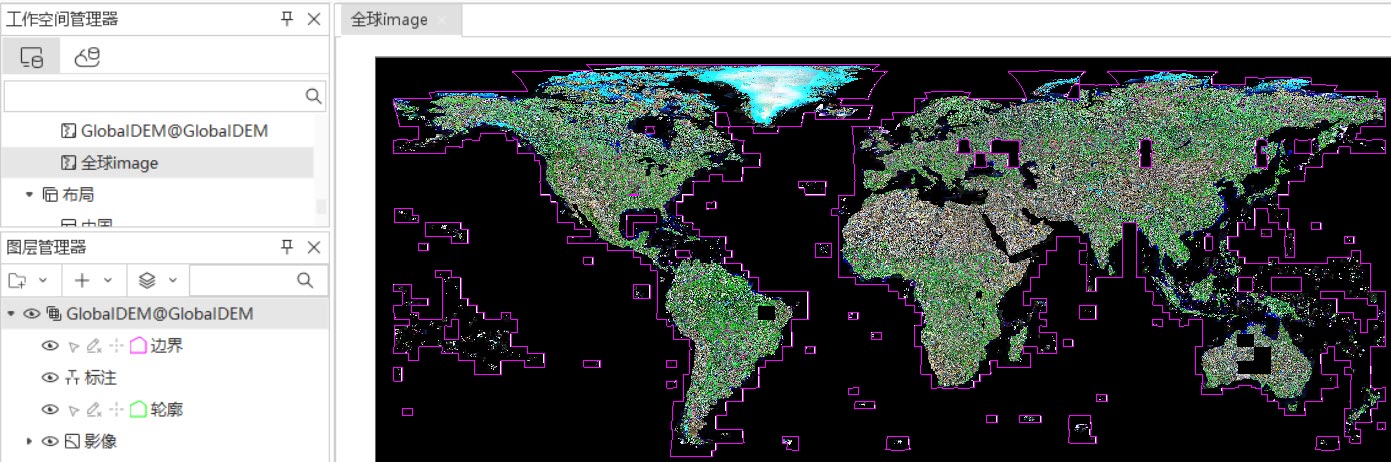
Figure: Managing Global Image Data Using Mosaic Dataset - High Import Efficiency and Low Storage Consumption: Managing massive imagery with mosaic datasets ensures efficient data import and minimal disk usage. Test results show: Importing 22,667 global 30m-resolution DEM tiles (0.98TB total) into a UDBX datasource took 14 minutes. Post-import, UDB file size was 16MB and UDD file 22MB.
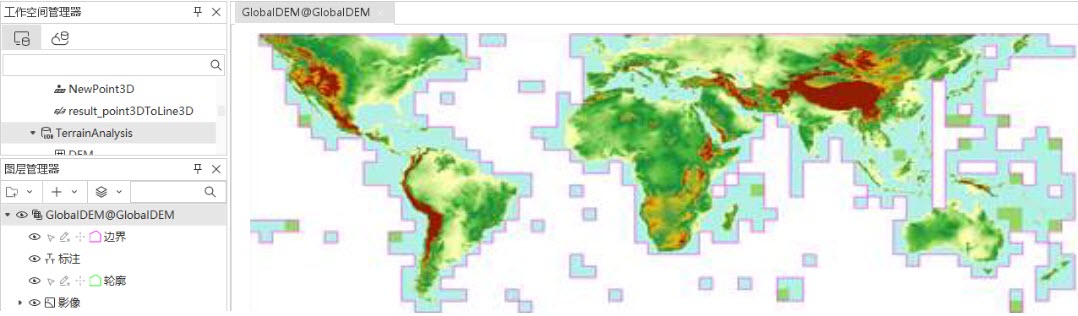
Figure: Managing Global DEM Data Using Mosaic Dataset
Preparation Guidelines
Before adding imagery to a mosaic dataset, understand the basic characteristics of the data to be imported, including image file size, quantity, and pyramid status.
- Data Volume: Estimate import time and storage requirements based on file sizes and quantities.
- Pyramid Status and Tiled Storage: Both significantly improve display efficiency. These can be implemented either before or after import.
- High-performance Hardware: Pyramid building, tiled storage conversion, and map tile generation support multi-threading. Use high-configuration machines for optimal performance.
- Data Content: Determine whether imagery represents spectral reflectance or elevation data, as this affects visualization methods. For DEM data, use color tables and 3D shading to display elevation levels.
- Image Projection: To ensure proper mosaic display in the target coordinate system, first verify image coordinate information (viewable via dataset properties when opening files directly) and determine the required display coordinate system. Below are guidelines for handling two scenarios:
- When source images have a coordinate system different from the display requirement: Set the mosaic dataset's coordinate system to match the display requirement.
Example: If original images use China2000 zonal projection but the map requires China2000, set the mosaic dataset to China2000. This avoids performance loss from dynamic projection.
- When source images share the same coordinate system as the display requirement: Set the mosaic dataset accordingly.
- For source images without coordinate systems (planar coordinates):
- Set the mosaic dataset's coordinate system to the known data projection. Ensure the map uses the same projection without dynamic projection.
- Alternatively, assign the known coordinate system to source images beforehand.
- When source images have a coordinate system different from the display requirement: Set the mosaic dataset's coordinate system to match the display requirement.
Related Topics