

Class RestTransportationAnalystProvider
- java.lang.Object
-
- com.supermap.services.providers.RestProviderBase
-
- com.supermap.services.providers.RestTransportationAnalystProvider
-
- All Implemented Interfaces:
- Disposable, ProviderContextAware, TransportationAnalystProvider
public class RestTransportationAnalystProvider
extends RestProviderBase
implements TransportationAnalystProvider, ProviderContextAware
Rest transportation network analysis service provider.
-
-
Nested Class Summary
-
Nested classes/interfaces inherited from class com.supermap.services.providers.RestProviderBase
RestProviderBase.CacheModel, RestProviderBase.RestRequestException
-
-
Field Summary
-
Fields inherited from class com.supermap.services.providers.RestProviderBase
JAVA_POSTFIX, javaConverter, JSON_POSTFIX, jsonConverter, jsonDecoder, lock, logger, message
-
-
Constructor Summary
Constructors Constructor and Description RestTransportationAnalystProvider()The constructor.RestTransportationAnalystProvider(RestTransportationAnalystProviderSetting setting)The constructor.
-
Method Summary
Methods Modifier and Type Method and Description BurstAnalyseResultburstAnalyseFromEdge(int[] sourceNodeIDs, int edgeID, FacilityAnalystParameter parameter)BurstAnalyseResultburstAnalyseFromNode(int[] sourceNodeIDs, int nodeID, FacilityAnalystParameter parameter)double[][]computeWeightMatrix(int[] nodeIDs, TransportationAnalystParameter parameter)Gets a cost matrix according to the network analysis parameter.The matrix is a 2D double array used to store the resource cost between any two points.double[][]computeWeightMatrix(Point2D[] points, TransportationAnalystParameter parameter)Gets a cost matrix according to the network analysis parameter.The matrix is a 2D double array used to store the resource cost between any two points.ClosestFacilityPaths<java.lang.Integer>findClosestFacility(int[] facilityIDs, int eventID, int expectFacilityCount, boolean fromEvent, double maxWeight, TransportationAnalystParameter parameter)Closest facility analysis, in which events are represented by network node IDs.ClosestFacilityPaths<Point2D>findClosestFacility(Point2D[] facilityPoints, Point2D eventPoint, int expectFacilityCount, boolean fromEvent, double maxWeight, TransportationAnalystParameter parameter)Closest facility analysis, in which events are represented by point coordinates.FacilityAnalyst2DResultfindConnectedEdgesFromEdges(int[] edgeIDs, boolean returnFeatures, boolean connected)Finds the connected edges for the edges specified with ID array.FacilityAnalyst2DResultfindConnectedEdgesFromNodes(int[] nodeIDs, boolean returnFeatures, boolean connected)Finds the connected or unconnected edges for the nodes specified with ID array.FacilityAnalyst2DResultfindCriticalFacilitiesDownFromEdge(int[] sourceNodeIDs, int edgeID, FacilityAnalystParameter parameter)FacilityAnalyst2DResultfindCriticalFacilitiesDownFromNode(int[] sourceNodeIDs, int nodeID, FacilityAnalystParameter parameter)FacilityAnalyst2DResultfindCriticalFacilitiesUpFromEdge(int[] sourceNodeIDs, int edgeID, FacilityAnalystParameter parameter)FacilityAnalyst2DResultfindCriticalFacilitiesUpFromNode(int[] sourceNodeIDs, int nodeID, FacilityAnalystParameter parameter)LocationAnalystResultfindLocation(LocationAnalystParameter parameter)The location-allocation analysis.MTSPPaths<java.lang.Integer>findMTSPPath(int[] nodeIDs, int[] centerIDs, boolean hasLeastTotalCost, TransportationAnalystParameter parameter)The multiple traveling salesmen analysis (logistics).MTSPPaths<Point2D>findMTSPPath(Point2D[] points, Point2D[] centerPoints, boolean hasLeastTotalCost, TransportationAnalystParameter parameter)The multiple traveling salesmen analysis (logistics).PathsfindPath(int[] nodeIDs, boolean hasLeastEdgeCount, TransportationAnalystParameter parameter)Optimal path analysis.PathsfindPath(Point2D[] points, boolean hasLeastEdgeCount, TransportationAnalystParameter parameter)Optimal path analysis.ServiceAreaResults<java.lang.Integer>findServiceArea(int[] centerIDs, double[] weights, boolean isFromCenter, boolean isCenterMutuallyExclusive, TransportationAnalystParameter parameter)The service area analysis.ServiceAreaResults<Point2D>findServiceArea(Point2D[] centerPoints, double[] weights, boolean isFromCenter, boolean isCenterMutuallyExclusive, TransportationAnalystParameter parameter)The service area analysis.TSPPathsfindTSPPath(int[] nodeIDsToVisit, boolean endNodeAssigned, TransportationAnalystParameter parameter)The traveling salesmen analysis.TSPPathsfindTSPPath(Point2D[] pointsToVisit, boolean endNodeAssigned, TransportationAnalystParameter parameter)The traveling salesmen analysis.java.lang.StringgetNetworkDataName()Gets the network data name.PrjCoordSysgetPrjCoordSys()Gets the projection information of the network data.protected RestProviderSettinggetRestProviderSetting()Return the rest service provider configuration information.java.lang.String[]getTurnWeightNames()Gets the name of the turn weight field in a network dataset.java.lang.String[]getWeightNames()Gets the name of the weight field in a network dataset.booleanreloadModel()Reloads the network model.voidsetProviderContext(ProviderContext context)Sets the service provider contextFacilityAnalyst2DResulttraceDownFromEdge(int edgeID, FacilityAnalystParameter parameter)Traces down with the specified edge ID, ie., finding the downstream of the specified edge, and returning the edges and nodes the downstream includes and the total costFacilityAnalyst2DResulttraceDownFromNode(int nodeID, FacilityAnalystParameter parameter)Traces down with the specified node ID, ie., finding the downstream of the specified node, and returning the edges and nodes the downstream includes and the total costFacilityAnalyst2DResulttraceUpFromEdge(int edgeID, FacilityAnalystParameter parameter)Traces up with the specified edge ID, ie., finding the upstream of the specified edge, and returning the edges and nodes the upstream includes and the total costFacilityAnalyst2DResulttraceUpFromNode(int nodeID, FacilityAnalystParameter parameter)Traces up with the specified node ID, ie., finding the upstream of the specified node, and returning the edges and nodes the upstream includes and the total costdoubleupdateEdgeWeight(int edgeID, int fromNodeID, int toNodeID, java.lang.String weightField, double weight)Updates the edge weight.doubleupdateTurnNodeWeight(int nodeID, int fromEdgeID, int toEdgeID, java.lang.String turnWeightField, double weight)Updates the weight of turn node.-
Methods inherited from class com.supermap.services.providers.RestProviderBase
clearCache, dispose, executeRequest, executeRequest, executeRequest, executeRequestForByteArray, executeRequestForByteArray, executeRequestForByteArray, executeRequestForByteArray, executeRequestForList, executeRequestForList, executeRequestForList, executeRequestForList, executeRequestForStream, executeRequestForStream, executeRequestForStream, executeRequestForText, executeRequestForText, executeRequestForText, handleExeption, init, newAndSetClient, rectifyRestServiceRootURL
-
-
-
-
Constructor Detail
-
RestTransportationAnalystProvider
public RestTransportationAnalystProvider()
The constructor.
-
RestTransportationAnalystProvider
public RestTransportationAnalystProvider(RestTransportationAnalystProviderSetting setting)
The constructor.
- Parameters:
setting- The parameter object for setting Rest transportation network analysis service provider.
-
-
Method Detail
-
setProviderContext
public void setProviderContext(ProviderContext context)
Description copied from interface:ProviderContextAwareSets the service provider context
- Specified by:
setProviderContextin interfaceProviderContextAware- Parameters:
context- service provider context
-
computeWeightMatrix
public double[][] computeWeightMatrix(int[] nodeIDs,
                             TransportationAnalystParameter parameter)
Description copied from interface:TransportationAnalystProviderGets a cost matrix according to the network analysis parameter.The matrix is a 2D double array used to store the resource cost between any two points.
- Specified by:
computeWeightMatrixin interfaceTransportationAnalystProvider- Parameters:
nodeIDs- The ID set of the points used to calculate the cost matrix.parameter- The common parameter for setting transportation network analysis. It's optional, and uses the settings of TransportationAnalystSetting by default.- Returns:
- The 2D double array used to store the resource cost between any two points.
-
computeWeightMatrix
public double[][] computeWeightMatrix(Point2D[] points,
                             TransportationAnalystParameter parameter)
Description copied from interface:TransportationAnalystProviderGets a cost matrix according to the network analysis parameter.The matrix is a 2D double array used to store the resource cost between any two points.
- Specified by:
computeWeightMatrixin interfaceTransportationAnalystProvider- Parameters:
points- The points to calculate the cost matrix.parameter- The common parameter for setting transportation network analysis. It's optional, and uses the settings of TransportationAnalystSetting by default.- Returns:
- The 2D double array used to store the resource cost between any two points.
-
findClosestFacility
public ClosestFacilityPaths<java.lang.Integer> findClosestFacility(int[] facilityIDs,
                                                          int eventID,
                                                          int expectFacilityCount,
                                                          boolean fromEvent,
                                                          double maxWeight,
                                                          TransportationAnalystParameter parameter)
Description copied from interface:TransportationAnalystProviderClosest facility analysis, in which events are represented by network node IDs.
The closest facility analysis is to find one or more facilities to which the cost from the event point is the least among the given event point and a set of facilities. The result is the optimal path from the event point to the facility (or from the facility to the event point).
- The facility: the basic element of the closest facility analysis, such as the school, supermarket, gas station, etc.
- The event: the basic element of the closest facility analysis--the location that needs service facilities.
For example: A traffic accident happens in the street, and we need to find out hospitals that are able to be reached within 10 minutes, with hospitals out of 10 minutes' ride out of consideration.In this instance, the accident location is an event, the hospitals around are the facilities.
In the closest facility analysis, there are two methods to specify the event.One is to specify according to the coordinates, and the other one is to specify according to network node ID, ie., specify the network node as the event. This method specifies the event by using node ID.
- Specified by:
findClosestFacilityin interfaceTransportationAnalystProvider- Parameters:
facilityIDs- The facility node ID array. Required.eventID- The event node coordinate. Required.expectFacilityCount- The amount of the expected facilities to search. Optional. The default value is 1.fromEvent- Whether to start the search from the event. Optional. The default value is false.maxWeight- The searching radius. Required. It has the same unit as the weight field in parameter (the general parameter for transportation network analysis). If the search is based on the entire network, set this parameter to 0.parameter- The common parameter for setting transportation network analysis. It's optional, and uses the settings of TransportationAnalystSetting by default.- Returns:
- The result path set of closest facility analysis.
-
findClosestFacility
public ClosestFacilityPaths<Point2D> findClosestFacility(Point2D[] facilityPoints,
                                                Point2D eventPoint,
                                                int expectFacilityCount,
                                                boolean fromEvent,
                                                double maxWeight,
                                                TransportationAnalystParameter parameter)
Description copied from interface:TransportationAnalystProviderClosest facility analysis, in which events are represented by point coordinates.
The closest facility analysis is to find one or more facilities to which the cost from the event point is the least among the given event point and a set of facilities. The result is the optimal path from the event point to the facility (or from the facility to the event point).
- The facility: the basic element of the closest facility analysis, such as the school, supermarket, gas station, etc.
- The event: the basic element of the closest facility analysis--the location that needs service facilities.
For example: A traffic accident happens in the street, and we need to find out hospitals that are able to be reached within 10 minutes, with hospitals out of 10 minutes' ride out of consideration.In this instance, the accident location is an event, the hospitals around are the facilities.
In the closest facility analysis, there are two methods to specify the event.One is to specify according to the coordinates, and the other one is to specify according to network node ID, ie., specify the network node as the event. This method specifies the event by using coordinate of point.
- Specified by:
findClosestFacilityin interfaceTransportationAnalystProvider- Parameters:
facilityPoints- The coordinates array of facility nodes. Required.eventPoint- The event node coordinate. Required.expectFacilityCount- The amount of the expected facilities to search. Optional. The default value is 1.fromEvent- Whether to start the search from the event. Optional. The default value is false.maxWeight- The searching radius. It has the same unit as the weight field in parameter (the general parameter for transportation network analysis). If the search is based on the entire network, set this parameter to 0.parameter- The common parameter for setting transportation network analysis. It's optional, and uses the settings of TransportationAnalystSetting by default.- Returns:
- The result path set of closest facility analysis.
-
findLocation
public LocationAnalystResult findLocation(LocationAnalystParameter parameter)
Description copied from interface:TransportationAnalystProviderThe location-allocation analysis.
The location-allocation analysis is to determine one or more best or optimal positions to build facilities, which makes facilities use one of the most economic and efficient way to provide service or commodity. Location-Allocation is not only o find the best locations, it also needs to consider how many resource each location should provide based on the demands. So it's called Location-Allocation.
In location-allocation analysis, the SupplyCenter and analysis model are set with LocationAnalystParameter. Please see
LocationAnalystParameterclass for more detailes.In location-allocation analysis, all demand points are network nodes. Except for the network nodes corresponding to the supply center points, all network nodes demand points. To exclude certain network nodes, you can set the nodes as barriers.
Example: 7 post offices will be built in an area with 15 candidate locations, represented by blue rectangles in the figure 1 below, that has no post offices. Which locations will be selected to build post offices depending on the following two conditions: no more than 30 minutes by walk for residents and the amount of residents a post office can serve is limited. Based on the two conditions, location-allocation analysis will give optimal locations and points out the service area of each post office. As shown is the figure 2 below, the red points represent the 7 selected locations for setting up post offices.
Note: All network nodes of the following two network datasets are regarded as the residential areas and will participate in the location-allocation analysis. The resident number in the residential area is the amount of services the residential area needs.
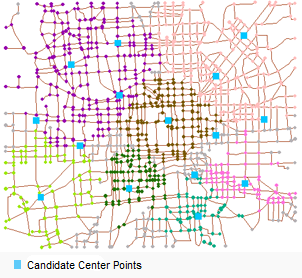
Figure 1. A diagram of network dataset to analyze and 15 candidate center points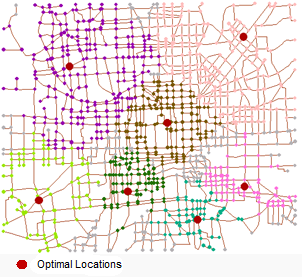
Figure 2. A diagram of the location-allocation analysis result- Specified by:
findLocationin interfaceTransportationAnalystProvider- Parameters:
parameter- The parameter object for location-allocation analysis.- Returns:
- The location-allocation analysis result.
-
findMTSPPath
public MTSPPaths<java.lang.Integer> findMTSPPath(int[] nodeIDs,
                                        int[] centerIDs,
                                        boolean hasLeastTotalCost,
                                        TransportationAnalystParameter parameter)
Description copied from interface:TransportationAnalystProviderThe multiple traveling salesmen analysis (logistics). The logistics center is represented by the ID array of network nodes.
The multiple traveling salesmen analysis is also called logistics. It means with the M centers and N destinations (M, N are both greater than 0) in network dataset, to find the economic and effective delivering path from the supply center to destination, and show the corresponding walk path.
Logistics refers to the problem that how to determine the order of the destinations to be delivered and the best route so as to minimize the total cost of the route.
The MTSP result will list each distribution center and its delivery destinations, the order of the delivery for the destinations and the delivery routes. So as to make the delivery cost for each center at a average level, or minimize the total cost of all the centers.
Example: There are 50 newspaper retailers (destinations), and 4 newspaper supply locations (supply centers). Now we need to find out the optimal path to deliver the newspaper to the retailers, which is a logistics problem. The following figure demonstrates this example.
Figure 1 shows the analysis result, where the big circles represent the 4 newspaper supply locations (supply centers) and the small circles represent the newspaper retailers (destinations). Each color represents a solution for one supply center, including its destinations, the visited order and the delivery route. Figure 2 shows the delivery solution of Supply Center 2. Blue circles with numbers are destinations (18 in total) of the Supply Center 2. Newspaper will be delivered in the order indicated by the numbers on the blue circles, with the delivery man starting at the supply center, passing through 1, 2, etc., and then go back to the supply center.
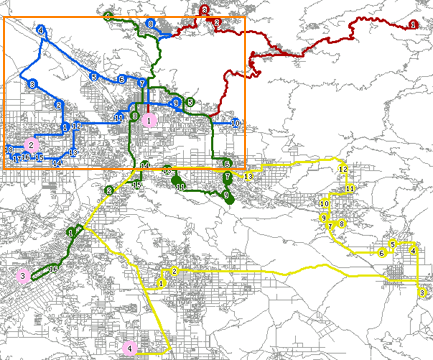 Figure 1. The result of multiple traveling salesmen analysis
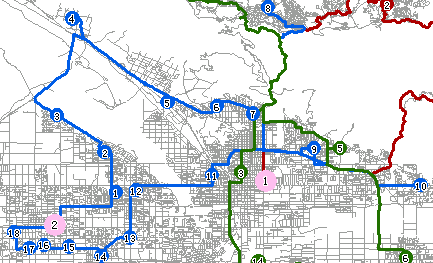 Figure 2. The delivery solution for Supply Center 2
- Specified by:
findMTSPPathin interfaceTransportationAnalystProvider- Parameters:
nodeIDs- The destination node ID array. Required.centerIDs- The ID array of Centers, ie., specifies the centers in the form of the node ID array of the network dataset. Required.hasLeastTotalCost- Whether the delivery solution has the least total cost. Optional. The default is false, indicating to adopt the locally optimal solution. If set to true, the solution with the least total cost will be adopted.In the solution with the least total cost, the cost of certain supply centers may be far more than some other supply centers. The locally optimal cost solution balances the cost of all supply centers to make them have similar cost, but the total cost may not be the least.
parameter- The common parameter for setting transportation network analysis. It's optional, and uses the settings of TransportationAnalystSetting by default.- Returns:
- The result set of multiple traveling salesmen analysis.
-
findMTSPPath
public MTSPPaths<Point2D> findMTSPPath(Point2D[] points,
                              Point2D[] centerPoints,
                              boolean hasLeastTotalCost,
                              TransportationAnalystParameter parameter)
Description copied from interface:TransportationAnalystProviderThe multiple traveling salesmen analysis (logistics). The logistics center is represented by the coordinates of network nodes.
The multiple traveling salesmen analysis is also called logistics. It means with the M centers and N destinations (M, N are both greater than 0) in network dataset, to find the economic and effective delivering path from the supply center to destination, and show the corresponding walk path.
Logistics refers to the problem that how to determine the order of the destinations to be delivered and the best route so as to minimize the total cost of the route.
The MTSP result will list each distribution center and its delivery destinations, the order of the delivery for the destinations and the delivery routes. So as to make the delivery cost for each center at a average level, or minimize the total cost of all the centers.
Example: There are 50 newspaper retailers (destinations), and 4 newspaper supply locations (supply centers). Now we need to find out the optimal path to deliver the newspaper to the retailers, which is a logistics problem. The following figure demonstrates this example.
Figure 1 shows the analysis result, where the big circles represent the 4 newspaper supply locations (supply centers) and the small circles represent the newspaper retailers (destinations). Each color represents a solution for one supply center, including its destinations, the visited order and the delivery route. Figure 2 shows the delivery solution of Supply Center 2. Blue circles with numbers are destinations (18 in total) of the Supply Center 2. Newspaper will be delivered in the order indicated by the numbers on the blue circles, with the delivery man starting at the supply center, passing through 1, 2, etc., and then go back to the supply center.
Figure 1. The result of multiple traveling salesmen analysis Figure 2. The delivery solution for Supply Center 2- Specified by:
findMTSPPathin interfaceTransportationAnalystProvider- Parameters:
points- The points array of the destinations represented by coordinates. Required.centerPoints- The points array of the supply centers represented by coordinates, ie., specify the supply centers by using the coordinates of their points. Required.hasLeastTotalCost- Whether the delivery solution has the least total cost. Optional. The default is false, indicating to adopt the locally optimal solution. If set to true, the solution with the least total cost will be adopted.In the solution with the least total cost, the cost of certain supply centers may be far more than some other supply centers. The locally optimal cost solution balances the cost of all supply centers to make them have similar cost, but the total cost may not be the least.
parameter- The common parameter for setting transportation network analysis. It's optional, and uses the settings of TransportationAnalystSetting by default.- Returns:
- The result set of multiple traveling salesmen analysis.
-
findPath
public Paths findPath(int[] nodeIDs,
             boolean hasLeastEdgeCount,
             TransportationAnalystParameter parameter)
Description copied from interface:TransportationAnalystProviderOptimal path analysis.
The optimal path analysis aims at finding out the path with the minimum impedance in the network dataset with the given N points (N is greater than 2). The "minimum impedance" can refer to the shortest time, the minimum cost, the best scenery, the best road condition, passing the least bridges, passing the least toll-stations, passing the most countries, etc.
This method returns a path with the minimum impedance passing all the N points in a certain order.
Example: Suppose there are four nodes, 1, 2, 3, and 4, to be accessed in order. To find the optimal path needs to first find the optimal paths between node 1 and 2, node 2 and 3, as well as node 3 and 4, represented with R1_2, R2_3, R3_4, respectively. Then the optimal path passing nodes 1, 2, 3, and 4 in order is R which equals to R1_2 + R2_3 + R3_4.
Similarities and differences between optimal path analysis and traveling salesmen analysis:
- Similarities: Both of them aim at finding out the least cost path by traversing network nodes.
- The difference: They handle the order in which the points are visited differently. In an optimal path analysis, the points have to be visited in a specified order. Whereas in a traveling salesmen analysis, the best order for visiting the points is to be determined and is not necessarily the same with any specified order. For detailed information on traveling salesmen analysis, please see the
#findTSPPath(String,String,TransportationAnalystParameter,boolean).
- Specified by:
findPathin interfaceTransportationAnalystProvider- Parameters:
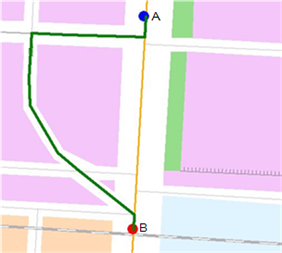
nodeIDs- The node ID array to pass through. This parameter is required.hasLeastEdgeCount- Whether the path has the least edges. This parameter is optional. The default is false.The path with the least number of edges may not be the shortest path. As shown in the figure below, the green path is the path with the least edges, with this parameter set to true, and the yellow path is the result path, with this parameter set to false.
parameter- The common parameter for setting transportation network analysis. It's optional, and uses the settings of TransportationAnalystSetting by default.- Returns:
- The optimal path analysis result set, which includes only one element now.
-
findPath
public Paths findPath(Point2D[] points,
             boolean hasLeastEdgeCount,
             TransportationAnalystParameter parameter)
Description copied from interface:TransportationAnalystProviderOptimal path analysis.
The optimal path analysis aims at finding out the path with the minimum impedance in the network dataset with the given N points (N is greater than 2). The "minimum impedance" can refer to the shortest time, the minimum cost, the best scenery, the best road condition, passing the least bridges, passing the least toll-stations, passing the most countries, etc.
This method returns a path with the minimum impedance passing all the N points in a certain order.
Example: Suppose there are four nodes, 1, 2, 3, and 4, to be accessed in order. To find the optimal path needs to first find the optimal paths between node 1 and 2, node 2 and 3, as well as node 3 and 4, represented with R1_2, R2_3, R3_4, respectively. Then the optimal path passing nodes 1, 2, 3, and 4 in order is R which equals to R1_2 + R2_3 + R3_4.
Similarities and differences between optimal path analysis and traveling salesmen analysis:
- Similarities: Both of them aim at finding out the least cost path by traversing network nodes.
- The difference: They handle the order in which the points are visited differently. In an optimal path analysis, the points have to be visited in a specified order. Whereas in a traveling salesmen analysis, the best order for visiting the points is to be determined and is not necessarily the same with any specified order. For detailed information on traveling salesmen analysis, please see the
#findTSPPath(String,String,TransportationAnalystParameter,boolean).
- Specified by:
findPathin interfaceTransportationAnalystProvider- Parameters:
points- The coordinate array of the points need to be passed. This parameter is required.hasLeastEdgeCount- Whether the path has the least edges. This parameter is optional. The default is false.The path with the least number of edges may not be the shortest path. As shown in the figure below, the green path is the path with the least edges, with this parameter set to true, and the yellow path is the result path, with this parameter set to false.
parameter- The common parameter for setting transportation network analysis. It's optional, and uses the settings of TransportationAnalystSetting by default.- Returns:
- The optimal path analysis result set, which includes only one element now.
-
findServiceArea
public ServiceAreaResults<java.lang.Integer> findServiceArea(int[] centerIDs,
                                                    double[] weights,
                                                    boolean isFromCenter,
                                                    boolean isCenterMutuallyExclusive,
                                                    TransportationAnalystParameter parameter)
Description copied from interface:TransportationAnalystProviderThe service area analysis.
The service area analysis is to find the area the supply center serves in the network.
Service area: The area contains all the accessible edges and nodes, with the specified point as the center. In short, it is the area that a supply location of a specific service serves.
Service area analysis: Calculates the service area for a specified point in the network. For instance, we can calculate the 30-minute service area for a point in the network. In this result service area, the time cost from the point to any point in the service area will be less than 30 minutes.
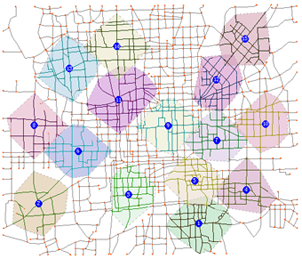
The following image shows what is the service area analysis result like and what problems the service area analysis solves. The blue circles in the figure below represent the supply center that supplies services. Areas in different colors are service areas of the supply center with different impedances.
- Specified by:
findServiceAreain interfaceTransportationAnalystProvider- Parameters:
centerIDs- The center ID array. This parameter is required.weights- The service radius collection. This parameter is required. The collection size is the same as the center count. This parameter identifies the value range that used in the service area analysis. If we set weights[0] to 30.0, it indicates that it shouldn't take more than 30 minutes to get to the 1st supply center from any points of the service area of the 1st point.isFromCenter- whether to analyze from the supply center point. The parameter is optional. The default is false, which means the analysis doesn't start from the center point.Whether to analyze from the center point shows the relation mode between the supply center and the demand points. If the analysis starts from the supply center, it means the supply center actively delivers services to demand points. If the analysis doesn't start from the supply center, the demand point actively gets the services from the supply center and the supply center passively provides the services
For instance, when analyzing the service area of a milk station, isFromCenter needs to be set to true because the milk station actively sends milk to residents. However, when analyzing the service area of a school, isFromCetner needs to be set to false because students actively come to the school to have classes every day.
isCenterMutuallyExclusive- Whether the service areas are mutually exclusive. This parameter is optional. The default is false, which means service areas are not mutually exclusive. If set to true, overlapping service areas will be handled. Note: Supply center mutual exclusion is not supported currently.Below shows the effects before and after exclusion handling.
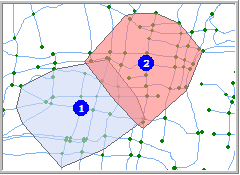
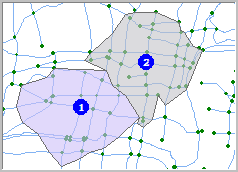
A result without no-overlay processing A result after overlay processing parameter- The common parameter for setting transportation network analysis. It's optional, and uses the settings of TransportationAnalystSetting by default.- Returns:
- The service area analysis result. It is an array whose size is the same with the number of the supply center. Every element in the array corresponds to the description of a service area of a supply center.
-
findServiceArea
public ServiceAreaResults<Point2D> findServiceArea(Point2D[] centerPoints,
                                          double[] weights,
                                          boolean isFromCenter,
                                          boolean isCenterMutuallyExclusive,
                                          TransportationAnalystParameter parameter)
Description copied from interface:TransportationAnalystProviderThe service area analysis.
The service area analysis is to find the area the supply center serves in the network.
Service area: The area contains all the accessible edges and nodes, with the specified point as the center. In short, it is the area that a supply location of a specific service serves.
Service area analysis: Calculates the service area for a specified point in the network. For instance, we can calculate the 30-minute service area for a point in the network. In this result service area, the time cost from the point to any point in the service area will be less than 30 minutes.
The following image shows what is the service area analysis result like and what problems the service area analysis solves. The blue circles in the figure below represent the supply center that supplies services. Areas in different colors are service areas of the supply center with different impedances.
- Specified by:
findServiceAreain interfaceTransportationAnalystProvider- Parameters:
centerPoints- The points array of the service centers represented by coordinates. Required.weights- The service radius collection. This parameter is required. The collection size is the same as the center count. This parameter identifies the value range that used in the service area analysis. If we set weights[0] to 30.0, it indicates that it shouldn't take more than 30 minutes to get to the 1st supply center from any points of the service area of the 1st point.isFromCenter- whether to analyze from the supply center point. The parameter is optional. The default is false, which means the analysis doesn't start from the center point.Whether to analyze from the center point shows the relation mode between the supply center and the demand points. If the analysis starts from the supply center, it means the supply center actively delivers services to demand points. If the analysis doesn't start from the supply center, the demand point actively gets the services from the supply center and the supply center passively provides the services
For instance, when analyzing the service area of a milk station, isFromCenter needs to be set to true because the milk station actively sends milk to residents. However, when analyzing the service area of a school, isFromCetner needs to be set to false because students actively come to the school to have classes every day.
isCenterMutuallyExclusive- Whether the service areas are mutually exclusive. This parameter is optional. The default is false, which means service areas are not mutually exclusive. If set to true, overlapping service areas will be handled. Note: Supply center mutual exclusion is not supported currently.Below shows the effects before and after exclusion handling.
A result without no-overlay processing A result after overlay processing parameter- The common parameter for setting transportation network analysis. It's optional, and uses the settings of TransportationAnalystSetting by default.- Returns:
- The service area analysis result. It is an array whose size is the same with the number of the supply center. Every element in the array corresponds to the description of a service area of a supply center.
-
findTSPPath
public TSPPaths findTSPPath(int[] nodeIDsToVisit,
                   boolean endNodeAssigned,
                   TransportationAnalystParameter parameter)
Description copied from interface:TransportationAnalystProviderThe traveling salesmen analysis.
The traveling salesmen analysis is to find out the path that passes a specified set of points, with the least (or almost least) impedance. The order of passing those points are not fixed and is decided through the analysis.
In traveling salesmen analysis, if the end node is specified, the traveling salesmen must access the end node last. The access order of other nodes is determined by the traveling salesmen.
The passing points needed to be visited are specified by using nodeI|DsToVisit parameter, of which the first node is the starting point for the traveling salesman.
Similarities and differences between optimal path analysis and traveling salesmen analysis:
- Similarities: Both of them aim at finding out the least cost path by traversing network nodes.
- The difference: They handle the order in which the points are visited differently. In an optimal path analysis, the points have to be visited in a specified order. Whereas in a traveling salesmen analysis, the best order for visiting the points is to be determined and is not necessarily the same with any specified order. For detailed information on optimal path analysis, please see the
#findPath(Point2D[],boolean,String,TransportationAnalystParameter).
- Specified by:
findTSPPathin interfaceTransportationAnalystProvider- Parameters:
nodeIDsToVisit- The IDs of the nodes to pass through. This parameter is required.endNodeAssigned- Whether to assign the end node, which is an optional parameter. The default is false. If it is true, it represents assigning the end node. The traveling salesmen must access the end node, i.e., the last passing point.parameter- The common parameter for setting transportation network analysis. It's optional, and uses the settings of TransportationAnalystSetting by default.- Returns:
- The traveling salesmen analysis result collection, which only includes one element now.
-
findTSPPath
public TSPPaths findTSPPath(Point2D[] pointsToVisit,
                   boolean endNodeAssigned,
                   TransportationAnalystParameter parameter)
Description copied from interface:TransportationAnalystProviderThe traveling salesmen analysis.
The traveling salesmen analysis is to find out the path that passes a specified set of points, with the least (or almost least) impedance. The order of passing those points are not fixed and is decided through the analysis.
In traveling salesmen analysis, if the end node is specified, the traveling salesmen must access the end node last. The access order of other nodes is determined by the traveling salesmen.
The passing points needed to be visited are specified by using nodeI|DsToVisit parameter, of which the first node is the starting point for the traveling salesman.
Similarities and differences between optimal path analysis and traveling salesmen analysis:
- Similarities: Both of them aim at finding out the least cost path by traversing network nodes.
- The difference: They handle the order in which the points are visited differently. In an optimal path analysis, the points have to be visited in a specified order. Whereas in a traveling salesmen analysis, the best order for visiting the points is to be determined and is not necessarily the same with any specified order. For detailed information on optimal path analysis, please see the
#findPath(Point2D[],boolean,String,TransportationAnalystParameter).
- Specified by:
findTSPPathin interfaceTransportationAnalystProvider- Parameters:
pointsToVisit- The coordinates of the nodes to pass through. This parameter is required.endNodeAssigned- Whether to assign the end node, which is an optional parameter. The default is false. If it is true, it represents assigning the end node. The traveling salesmen must access the end node, i.e., the last passing point.parameter- The common parameter for setting transportation network analysis. It's optional, and uses the settings of TransportationAnalystSetting by default.- Returns:
- The traveling salesmen analysis result collection, which only includes one element now.
-
updateEdgeWeight
public double updateEdgeWeight(int edgeID,
                      int fromNodeID,
                      int toNodeID,
                      java.lang.String weightField,
                      double weight)
Description copied from interface:TransportationAnalystProviderUpdates the edge weight.
- Specified by:
updateEdgeWeightin interfaceTransportationAnalystProvider- Parameters:
edgeID- The target edge ID.fromNodeID- The start node ID of the target edge.toNodeID- The end node ID of the target edge.weightField- The name of the weight information (WeightFieldInfocorresponding to the target edge. Parameters fromNodeID and toNodeID determine which field to update, the from-to or the to-from field.weight- The new weight.- Returns:
- The original weight if the update is successful, or the minimum value of the double data type otherwise.
-
updateTurnNodeWeight
public double updateTurnNodeWeight(int nodeID,
                          int fromEdgeID,
                          int toEdgeID,
                          java.lang.String turnWeightField,
                          double weight)
Description copied from interface:TransportationAnalystProviderUpdates the weight of turn node.
- Specified by:
updateTurnNodeWeightin interfaceTransportationAnalystProvider- Parameters:
nodeID- The target turn node ID.fromEdgeID- The start edge ID of the target turn node.toEdgeID- The end edge ID of the target turn node.turnWeightField- The name of the turn weight filed.weight- The new weight.- Returns:
- The original weight if the update is successful, or the minimum value of the double data type otherwise.
-
getNetworkDataName
public java.lang.String getNetworkDataName()
Description copied from interface:TransportationAnalystProviderGets the network data name.
- Specified by:
getNetworkDataNamein interfaceTransportationAnalystProvider- Returns:
- The network data name.
-
getPrjCoordSys
public PrjCoordSys getPrjCoordSys()
Description copied from interface:TransportationAnalystProviderGets the projection information of the network data.
- Specified by:
getPrjCoordSysin interfaceTransportationAnalystProvider- Returns:
-
getWeightNames
public java.lang.String[] getWeightNames()
Description copied from interface:TransportationAnalystProviderGets the name of the weight field in a network dataset.
- Specified by:
getWeightNamesin interfaceTransportationAnalystProvider- Returns:
-
getTurnWeightNames
public java.lang.String[] getTurnWeightNames()
Description copied from interface:TransportationAnalystProviderGets the name of the turn weight field in a network dataset.
- Specified by:
getTurnWeightNamesin interfaceTransportationAnalystProvider- Returns:
-
reloadModel
public boolean reloadModel()
Description copied from interface:TransportationAnalystProviderReloads the network model.
- Specified by:
reloadModelin interfaceTransportationAnalystProvider- Returns:
-
getRestProviderSetting
protected RestProviderSetting getRestProviderSetting()
Description copied from class:RestProviderBaseReturn the rest service provider configuration information.- Specified by:
getRestProviderSettingin classRestProviderBase- Returns:
-
findCriticalFacilitiesUpFromEdge
public FacilityAnalyst2DResult findCriticalFacilitiesUpFromEdge(int[] sourceNodeIDs,
                                                       int edgeID,
                                                       FacilityAnalystParameter parameter)
- Specified by:
findCriticalFacilitiesUpFromEdgein interfaceTransportationAnalystProvider
-
findCriticalFacilitiesDownFromEdge
public FacilityAnalyst2DResult findCriticalFacilitiesDownFromEdge(int[] sourceNodeIDs,
                                                         int edgeID,
                                                         FacilityAnalystParameter parameter)
- Specified by:
findCriticalFacilitiesDownFromEdgein interfaceTransportationAnalystProvider
-
findCriticalFacilitiesUpFromNode
public FacilityAnalyst2DResult findCriticalFacilitiesUpFromNode(int[] sourceNodeIDs,
                                                       int nodeID,
                                                       FacilityAnalystParameter parameter)
- Specified by:
findCriticalFacilitiesUpFromNodein interfaceTransportationAnalystProvider
-
findCriticalFacilitiesDownFromNode
public FacilityAnalyst2DResult findCriticalFacilitiesDownFromNode(int[] sourceNodeIDs,
                                                         int nodeID,
                                                         FacilityAnalystParameter parameter)
- Specified by:
findCriticalFacilitiesDownFromNodein interfaceTransportationAnalystProvider
-
burstAnalyseFromNode
public BurstAnalyseResult burstAnalyseFromNode(int[] sourceNodeIDs,
                                      int nodeID,
                                      FacilityAnalystParameter parameter)
- Specified by:
burstAnalyseFromNodein interfaceTransportationAnalystProvider
-
burstAnalyseFromEdge
public BurstAnalyseResult burstAnalyseFromEdge(int[] sourceNodeIDs,
                                      int edgeID,
                                      FacilityAnalystParameter parameter)
- Specified by:
burstAnalyseFromEdgein interfaceTransportationAnalystProvider
-
findConnectedEdgesFromEdges
public FacilityAnalyst2DResult findConnectedEdgesFromEdges(int[] edgeIDs,
                                                  boolean returnFeatures,
                                                  boolean connected)
Description copied from interface:TransportationAnalystProviderFinds the connected edges for the edges specified with ID array. The ID array of the connected edges and features array will be returned.- Specified by:
findConnectedEdgesFromEdgesin interfaceTransportationAnalystProvider- Parameters:
edgeIDs- The ID array of the specified edges.returnFeatures- Whether to return features. If set to true, it will return features; false, doesn't return.connected- Connected or unconnected. If set to true, it will return the connected edges; false, return the unconnected edges.- Returns:
-
findConnectedEdgesFromNodes
public FacilityAnalyst2DResult findConnectedEdgesFromNodes(int[] nodeIDs,
                                                  boolean returnFeatures,
                                                  boolean connected)
Description copied from interface:TransportationAnalystProviderFinds the connected or unconnected edges for the nodes specified with ID array. And the ID array of the edges and features array will be returned.- Specified by:
findConnectedEdgesFromNodesin interfaceTransportationAnalystProvider- Parameters:
nodeIDs- The iD array of the specified nodes.returnFeatures- Whether to return features. If set to true, it will return features; false, doesn't return.connected- Connected or unconnected. If set to true, it will return the connected edges; false, return the unconnected edges.- Returns:
-
traceDownFromNode
public FacilityAnalyst2DResult traceDownFromNode(int nodeID,
                                        FacilityAnalystParameter parameter)
Description copied from interface:TransportationAnalystProviderTraces down with the specified node ID, ie., finding the downstream of the specified node, and returning the edges and nodes the downstream includes and the total cost- Specified by:
traceDownFromNodein interfaceTransportationAnalystProvider- Returns:
-
traceUpFromNode
public FacilityAnalyst2DResult traceUpFromNode(int nodeID,
                                      FacilityAnalystParameter parameter)
Description copied from interface:TransportationAnalystProviderTraces up with the specified node ID, ie., finding the upstream of the specified node, and returning the edges and nodes the upstream includes and the total cost- Specified by:
traceUpFromNodein interfaceTransportationAnalystProvider- Parameters:
nodeID- The specified node ID- Returns:
-
traceDownFromEdge
public FacilityAnalyst2DResult traceDownFromEdge(int edgeID,
                                        FacilityAnalystParameter parameter)
Description copied from interface:TransportationAnalystProviderTraces down with the specified edge ID, ie., finding the downstream of the specified edge, and returning the edges and nodes the downstream includes and the total cost- Specified by:
traceDownFromEdgein interfaceTransportationAnalystProvider- Parameters:
edgeID- The specified edge ID- Returns:
-
traceUpFromEdge
public FacilityAnalyst2DResult traceUpFromEdge(int edgeID,
                                      FacilityAnalystParameter parameter)
Description copied from interface:TransportationAnalystProviderTraces up with the specified edge ID, ie., finding the upstream of the specified edge, and returning the edges and nodes the upstream includes and the total cost- Specified by:
traceUpFromEdgein interfaceTransportationAnalystProvider- Parameters:
edgeID- The specified edge ID- Returns:
-
-