

URI
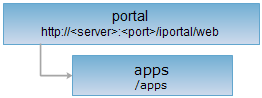
<portal_uri>/apps[.<format>]
Supported methods
Parent resource
Child resources
app, appsShareSetting, appsCheckStatus, appsCheckInfos
Introduction
apps resource is an application list for users who have right to view. It supports registering a new application, and supports deletes applications in a batch.
Supported Methods:
- GET: Gets the list of all the applications according to the query parameters. Authorized users can perform this operation.
- POST: Registers a new application. Supports all users (including ordinary users and administrators).
- DELETE: Deletes applications. It suppors to pass several application ids to delete them in a batch. Authorized users can perform this operation.
- HEAD: Checks whether the apps resource exists, or if the current client have the authority to the apps resource.
Supported output formats: rjson, json, html, xml.
Resource hierarchy
HTTP request methods
Execute the HTTP request on the following URI, where supermapiserver is the server name, with rjson being the output format.
http://supermapiportal:8090/iportal/web/apps.rjson
GET request
Gets the list of all the applications that the current user is allowed to view.
Request parameter
If no query parameters are set, it will return the list of all the application on the first page that the current user can access. To query with the specified conditions, you should set the following parameters according to your needs and include them in URI.
| Name | Type | Description |
| userNames | String[] | Query by the app registrant name. |
| tags | String[] | Filter by application tag. |
| type | AppType | Filter by application type. |
| currentUser | User | Filter by current logged in user. |
| orderBy | AppOrderBy | Filter by order type. |
| orderType | OrderType | Filter by ascending or descending order. |
| keywords | String[] | Query by keyword. |
| shareToMe | Boolean | Whether to query resources shared directly to me. This parameter is deprecated. |
| searchScope | SearchScope | Filter by sharing scope. |
| permissionType | String | Filter by permission type. Permission types include SEARCH (searchable), READ (viewable), DELETE (deletable). |
| isNotInDir | Boolean | Filter by whether not grouped. Default is false, returns all app list. If true, returns ungrouped app list. |
| returnSubDir | Boolean | Whether to query resources of sub-directories. true means returning resources of the current directory and its sub-directories; false means current directory only. |
| filterFields | FilterFields[] | Field filtering for keyword queries. Field names need to be capitalized. For example, to filter based on the keyword of the application, you need to set keywords=["231"]&filterFields=["APPNAME"]. |
| pageSize | int | Page size. |
| dirIds | Integer[] | Filter by directory IDs. |
| checkStatus | CheckStatus | Filter by review status. |
| currentPage | int | Page number. |
| createStart | Long | Query apps created at this time value or after this time value. If the value is null or less than 0, the start time for app queries is not limited. |
| createEnd | Long | Query apps created earlier than or at this time value. If the value is null or less than 0, the end time for app queries is not limited. |
Response structure
Execute a GET request on the apps resource, the list of all the apps that the current user is allowed to view will be returned. It includes the following fields:
| Field | Type | Description |
| content | List<IportalApp> | Contents of the page. |
| currentPage | int | Current page number. |
| pageSize | int | Page size. |
| searchParameter | SearchParameter | Search parameter on current page. |
| total | int | Total records. |
| totalPage | int | Total pages. |
Response example
Exectue a GET request on apps resource http://localhost:8190/iportal/web/apps.rjson, the returned representation in rjson format will be as follows:
{
"total": 4,
"totalPage": 1,
"pageSize": 9,
"searchParameter": {
"permissionType": null,
"orderType": "ASC",
"keywords": null,
"returnSubDir": null,
"shareToMe": null,
"searchScope": null,
"orderBy": null,
"isNotInDir": false,
"pageSize": 9,
"dirIds": null,
"filterFields": null,
"departmentIds": [],
"type": null,
"createStart": null,
"tags": null,
"checkStatus": null,
"currentUser": null,
"createEnd": null,
"groupIds": [],
"userNames": null,
"currentPage": 1,
"resourceIds": null
},
"currentPage": 1,
"content": [
{
"thumbnail": "http://localhost:8190/iportal/services/../web/static/portal/img/app/defaultThumbnail.jpg",
"address": "http://localhost:8190/iportal/apps/dataviz/edit.html",
"contactInfo": null,
"appName": "DataViz",
"authorizeSetting": null,
"description": "Data visualization platform for creating and sharing map resources online.",
"updateTime": 1545791449839,
"verifyReason": null,
"userName": "supermap_cloud",
"type": "WEBAPP",
"tags": [
"SuperMap"
],
"checkUser": null,
"checkUserNick": null,
"checkStatus": "SUCCESSFUL",
"checkTime": null,
"createTime": 1502937349060,
"nickname": "supermap_cloud",
"detailImages": null,
"id": 1
},
{
"thumbnail": "http://localhost:8190/iportal/services/../web/static/portal/img/app/defaultThumbnail.jpg",
"address": "http://localhost:8190/iportal/apps/insights/edit.html",
"contactInfo": null,
"appName": "DataInsights",
"authorizeSetting": null,
"description": "Data insights platform for geographic data visualization and spatial analysis.",
"updateTime": 1545791449839,
"verifyReason": null,
"userName": "supermap_cloud",
"type": "WEBAPP",
"tags": [
"SuperMap"
],
"checkUser": null,
"checkUserNick": null,
"checkStatus": "SUCCESSFUL",
"checkTime": null,
"createTime": 1502937349060,
"nickname": "supermap_cloud",
"detailImages": null,
"id": 2
},
{
"thumbnail": "http://localhost:8190/iportal/services/../web/static/portal/img/app/defaultThumbnail.jpg",
"address": "http://localhost:8190/iportal/apps/mapdashboard/v2/index.html?action=create",
"contactInfo": null,
"appName": "MapDashboard",
"authorizeSetting": null,
"description": "Interactive map dashboard for quickly creating 2D/3D map applications.",
"updateTime": 1545791449839,
"verifyReason": null,
"userName": "supermap_cloud",
"type": "WEBAPP",
"tags": [
"SuperMap"
],
"checkUser": null,
"checkUserNick": null,
"checkStatus": "SUCCESSFUL",
"checkTime": null,
"createTime": 1502937349060,
"nickname": "supermap_cloud",
"detailImages": null,
"id": 3
},
{
"thumbnail": "http://localhost:8190/iportal/services/../web/static/portal/img/app/defaultThumbnail.jpg",
"address": "http://localhost:8190/iportal/apps/earth/index.html",
"contactInfo": null,
"appName": "Earth",
"authorizeSetting": null,
"description": "3D globe for browsing, creating, saving and sharing 3D scenes online.",
"updateTime": 1545791449839,
"verifyReason": null,
"userName": "supermap_cloud",
"type": "WEBAPP",
"tags": [
"SuperMap"
],
"checkUser": null,
"checkUserNick": null,
"checkStatus": "SUCCESSFUL",
"checkTime": null,
"createTime": 1502937349060,
"nickname": "supermap_cloud",
"detailImages": null,
"id": 4
}
]
}
If you want to get the specified app list information, for example, filter according to the app's key cahracters, you need to set keywords=["iServer"]&filterFields=["APPNAME"], that is ,execute GET request on apps resource: http://localhost:8190/iportal/web/apps.rjson?keywords=["iServer"]&filterFields=["APPNAME"], the returned rjson format representation will be as follows:
{
"total": 1,
"totalPage": 1,
"pageSize": 9,
"searchParameter": {
"permissionType": null,
"orderType": "ASC",
"keywords": [
"DataViz"
],
"returnSubDir": null,
"shareToMe": null,
"searchScope": null,
"orderBy": null,
"isNotInDir": null,
"pageSize": 9,
"dirIds": null,
"filterFields": [
"APPNAME"
],
"departmentIds": [],
"type": null,
"createStart": -1,
"tags": null,
"checkStatus": null,
"currentUser": null,
"createEnd": -1,
"groupIds": [],
"userNames": null,
"currentPage": 1,
"resourceIds": null
},
"currentPage": 1,
"content": [
{
"thumbnail": "http://localhost:8190/iportal/services/../web/static/portal/img/app/defaultThumbnail.jpg",
"address": "http://localhost:8190/iportal/apps/dataviz/edit.html",
"contactInfo": null,
"appName": "DataViz",
"authorizeSetting": null,
"description": "Data visualization platform for creating and sharing map resources online.",
"updateTime": 1545791449839,
"verifyReason": null,
"userName": "supermap_cloud",
"type": "WEBAPP",
"tags": [
"SuperMap"
],
"checkUser": null,
"checkUserNick": null,
"checkStatus": "SUCCESSFUL",
"checkTime": null,
"createTime": 1502937349060,
"nickname": "supermap_cloud",
"detailImages": null,
"id": 1
}
]
}
POST request
Registers a new application.
Request parameter
To send a POST request, the following parameters need to be included in the request body.
| Name | Type | Description |
| tags | List<String> | The tag of registered application. |
| appName | String | The name of registered application. |
| address | String | The address of registered application. |
| description | String | The description of registered application. |
| contactInfo | ContactInfo | Contact information of the registered application. |
| detailImages | String[] | Description images of the registered application. |
| thumbnail | String | Thumbnail of the registered application. |
| type | AppType | The type of registered application. |
| authorizeSetting | List<IportalAuthorizeEntity> | Authorization information. The types of permissions applied include: DELETE (View/Edit/Delete), READ (View), READWRITE (View/Edit). |
Response structure
The structure for the resource representation returned should be:
| Field | Type | Description |
| newResourceID | String | ID of new registered application. |
| newResourceLocation | String | URI of new registered application. |
| succeed | boolean | Whether application is registered successfully or not. |
Response example
Execute a POST request on the apps resource: http://localhost:8190/iportal/web/apps.rjson to create register an application with the following request body:
{
"detailImages": [],
"tags": [
"SuperMap"
],
"appName": "doc",
"address": "http://doc.iserver.com",
"thumbnail": "",
"description": "",
"type": "WEBAPP",
"authorizeSetting": [
{
"permissionType": "READ",
"entityType": "USER",
"entityName": "GUEST",
"entityId": null
}
],
"contactInfo": {
"contactUser": "",
"contactOrganization": "",
"email": ""
}
}
Then the returned result in rjson format will be:
{
"succeed": true,
"newResourceID": "3",
"newResourceLocation": "http://localhost:8190/iportal/web/apps/3"
}
DELETE request
Deletes applications. The URL should include the id array of the applications to be deleted.
Response structure
The structure for the resource representation returned should be:
| Field | Type | Description |
| succeed | boolean | Whether the application is successfully deleted. |
| error | Httperror | Error information. This field will not be displayed if the application is successfully deleted. |
Response example
The returned rjson format representation after executing the DELETE request on the apps resource http://localhost:8190/iportal/web/apps.rjson?ids=[1,2], to delete the apps with id being "1" and "2" in a batch:
{ "succeed": true}
HEAD request
Returns the same HTTP response header as the GET request, but no response entity, which can be used to retrieve the meta data contained in response message header without having to transmit the entire response content. Meta data information includes media type, character coding, compression coding, entity content length, etc.
HEAD request is used to determine whether the apps resource exists, or if the user has the authority to access it. By executing an HEAD request with a .<format> URI, you can quickly determine whether the apps resource supports the <format> representation.