

URI
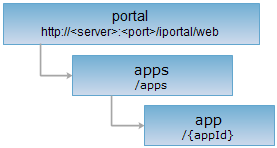
<apps_uri>/{appId}[.<format>]
Supported methods
Parent resource
Introduction
Application resource. Supports viewing detailed information of the application, editing and updating the application information, and deleting the application.
Supported Methods:
- GET: Gets detailed information of the specified application. All users with permission will be supported.
- PUT: Edits and updates basic info of the specified application. All users with permission will be supported.
- DELETE: Deletes the specified application. All users with permission will be supported.
- HEAD: Checks whether the application resource exists, and whether the application resource can be visited.
Supported output formats: rjson, json, html, xml.
Resource hierarchy
HTTP request methods
Implement the HTTP request on the following URI, where supermapiportal is the server name, with rjson being the output format.
http://supermapiportal:8090/iportal/web/apps/{appId}.rjson
GET request
Get detailed information of the specified application.
Request parameter
The structure of the response resource representation after implementing the GET request on the app resource http://localhost:8090/iportal/web/apps/2.rjsonwill be as follows:
| Name | Type | Description |
| address | String | Application URL. |
| appName | String | Application name. |
| createTime | Long | The time of application registered. |
| authorizeSetting | List<IportalAuthorizeEntity> | Authorization information. The types of permissions applied include: DELETE (View/Edit/Delete), READ (View), READWRITE (View/Edit). |
| description | String | The description of the application. |
| id | Integer | Application ID. |
| nickname | String | User's nickname. |
| tags | List<String> | Application tag. |
| thumbnail | String | Application thumbnail file path. |
| type | AppType | Application type. |
| updateTime | Long | Last updated time of application. |
| userName | String | User name. |
| contactInfo | ContactInfo | Contact information of the application. |
| detailImages | String[] | Description images of the application. |
| checkStatus | CheckStatus | Application review status. |
| checkTime | Long | Application review time. |
| checkUser | String | Name of the application reviewer. |
| checkUserNick | String | Nickname of the application reviewer. |
| verifyReason | String | Application review comments. |
Response example
The returned rjson format representation after implementing the GET request on the service app resource http://localhost:8190/iportal/web/apps/1683827090.rjson is as follows:
{
"thumbnail": "http://127.0.0.1:8190/iportal/services/../web/static/portal/img/app/defaultThumbnail.jpg",
"address": "https://wiki.ispeco.com/pages/viewpage.action?pageId=65537225",
"contactInfo": {
"contactOrganization": "SuperMap",
"contactUser": "wm",
"email": "12359566@qq.com"
},
"appName": "Geographic Information Management Platform",
"authorizeSetting": [
{
"permissionType": "DELETE",
"aliasName": "iPortal1",
"entityRoles": [
"DATA_CENTER",
"PORTAL_USER"
],
"entityType": "USER",
"entityName": "iPortal1",
"entityId": null
},
{
"permissionType": "SEARCH",
"aliasName": "GUEST",
"entityRoles": [],
"entityType": "USER",
"entityName": "GUEST",
"entityId": null
}
],
"description": "Geographic Information Integration, Management and Sharing",
"updateTime": 1608636386544,
"verifyReason": null,
"userName": "iPortal1",
"type": "PCAPP",
"tags": [
"SuperMap",
"USER App"
],
"checkUser": null,
"checkUserNick": null,
"checkStatus": "SUCCESSFUL",
"checkTime": null,
"createTime": 1607396629359,
"nickname": "iPortal1",
"detailImages": [],
"id": 1683827090
}
PUT request
Edits and updates basic info of the specified application.
Request parameter
Following arguments need to be included in the request sent.
| Field | Type | Description |
| application Name | String | Application name. |
| address | String | Application URL. |
|
description |
String | The description of the application. |
|
tags |
List<String> | Application tag. |
| thumbnail | String | Application thumbnail file path. |
| contactInfo | ContactInfo | Contact information of the application. |
| type | AppType | Application type. |
| detailImages | String[] | Description images of the application. |
Response structure
The structure of the response resource representation is as follows:
| Field | Type | Description |
| succeed | boolean | Whether the application has been updated successfully. |
| error | Httperror | Error information. This field will not be displayed if it is updated successfully. |
Response example
Modify the application name, execute a PUT request on the app resource: http://localhost:8190/iportal/web/apps/1683827090.rjson, the request body is as follows:
{
"detailImages": [],
"address": "https://wiki.ispeco.com/pages/viewpage.action?pageId=65537225",
"appName": "Geographic Information Management Platform",
"description": "Geographic Information Integration, Management and Sharing",
"tags": [
"SuperMap",
"USER App"
],
"thumbnail": "http://127.0.0.1:8190/iportal/services/../resources/thumbnail/app/app1683827090.png",
"type": "PCAPP",
"contactInfo": {
"contactOrganization": "SuperMap",
"contactUser": "wm",
"email": "12359566@qq.com"
}
}
The returned rjson format representation is as follows:
{ "succeed": true}
DELETE request
Delete the application with specified ID.
Response structure
The structure of the response resource representation is as follows:
| Field | Type | Description |
| succeed | boolean | Whether the application is successfully deleted. |
| error | Httperror | Error information. This field will not be displayed if the application is successfully deleted. |
Response example
Execute a DELETE request on the app resource: http://localhost:8190/iportal/web/apps/6.rjson, the returned rjson format response result is as follows:
HEAD request
Asks for the response identical to the one that would correspond to a GET request, but without the response body. This is useful for retrieving meta-information contained in response headers, without having to transport the entire content. The meta-information includes the media-type, content-encoding, transfer-encoding, content-length, etc.
HEAD request can be used to check whether the app resource exists, or whether the the client has the permission to access it. It can also determine if the app resource supports an output format <format> if performed on a URI with .<format> included.