



DSM Production Workflow
A Digital Surface Model (DSM) refers to a dataset that represents the undulating shape of object surfaces (including tree canopies, roofs, etc.) using a series of discrete or regular points in three-dimensional coordinates. It typically plays a role in the following scenarios:
- Large-scale Urban 3D Modeling and Planning: Conducting overall urban planning, skyline analysis, urban heat island effect simulation, wireless communication base station deployment, or planning for large-scale infrastructure construction (such as high-speed rail lines traversing urban areas).
- Regional Forest Ecosystem and Carbon Sink Research: Estimating regional forest stock, monitoring forest canopy height changes, and analyzing large-scale ecological corridors.
- Wide-area Disaster Assessment and Emergency Response: After disasters such as typhoons, floods, and earthquakes, assessing building damage in affected areas, simulating inundation extents, and visualizing disaster situations in 3D.
- Full-cycle Monitoring of Large Engineering Projects: Monitoring surface changes before, during, and after the construction of large projects such as airports, ports, hydropower stations, and mines.
The workflow is described as follows:
- Set Image Path (dsm/dem): Set information such as the original image, reference image, and result data processing path.
- Generate Connection Points: Automatically generate connection points in overlapping areas of images, used to stitch and adjust multiple satellite images, ensuring geometric consistency between images.
- Generate Ground Control Points: Generate ground control points based on image feature points, used for high-precision geometric correction and position tracking, ensuring the geographical location accuracy of images.
- Block Network Adjustment: Based on connection points and ground control points, obtain the orientation parameters of satellite images through adjustment calculations.
- Generate DSM: Generate point cloud data through dense matching algorithms, and obtain DSM data after interpolation processing.
- DSM Filtering: Filter DSM data to remove surface features such as buildings and vegetation.
- Construct the DSM Mosaic Line: Automatically generate mosaic lines based on the specified mosaic line construction method. During image mosaic, overlapping areas are selected according to the mosaic lines to ensure seamless and natural mosaic results.
- output results(DSM/DEM): Merge and output multiple DSM data.
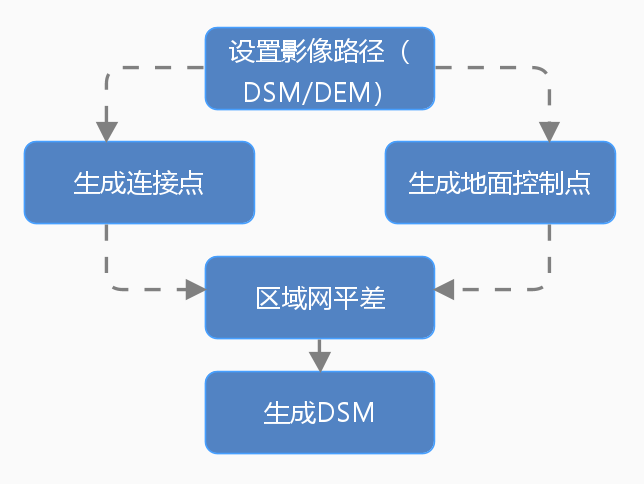 |
| Figure: DSM Production Workflow |