



Group
Function Description
The group function combines any objects (of the same or different geometry types) in the current layer into a compound.
- Combine objects of the same or different types to create a new compound. Objects of the same type in line and polygon layers can be grouped. Objects of different types in a CAD composite layer can be grouped.
- In the attributes of the newly created compound, system fields (except SmUserID) are assigned by the system. The SmUserID field and non-system fields inherit the corresponding information from the object with the smallest SmID value among the grouped objects.
- Supports grouping of geometry across layers.
- In a point dataset, grouping of point objects is not supported.
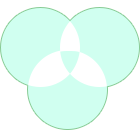
- When the number of overlapping polygon areas is even, the overlapping region appears white after grouping and is part of the result data.
Function Entry
- Edit Data Tab -> Object Editing Group -> General editing -> Group and Ungroup -> Group
- In the map -> Context Menu -> Group button.
Operation Instructions
- With the layer in editable state, select two or multiple objects.
- On the Edit Data tab, in the General editing drop-down menu, click the Group button in the Group and Ungroup group to combine the selected objects.
Or perform the following:
Select the two objects to be merged, right-click, and choose the Group command from the context menu.
Difference Between Group and Merge
 |
|
 |
 |
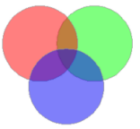
| Original Objects | CAD Layer Group Result | Polygon Layer Group Result | Union Result |
- Merge can only operate on objects of the same type, while group can operate on objects of different types.
- Merge cannot operate on point objects, while group can operate on point objects in text layers.
 Notes:
- After performing a group operation in a polygon layer, the overlapping areas of two polygon objects appear white; this is part of the result and not a missing area.
- When there is a containment relationship between the grouped polygon objects, it is treated as a donut polygon, and the result is consistent with the donut polygon result.
Related Topics