



Bulk Along-Path Modeling
Usage Instructions
For scenarios where a large amount of linear model data needs to be constructed, this tool can quickly build models such as underground pipe galleries and road guardrails based on the modeling path and model objects. The result data will be saved as a point dataset plus attached models in the form of point attachment.
Parameter Descriptions
| Parameter Name | Parameter Description | Parameter Type |
|---|---|---|
| Model Object (Optional) |
Input model object, which can be specified by the output of tools such as Import Model and Create LOD. This parameter is mutually exclusive with Model File; one of them must be set. | Model |
| Model File (Optional) |
Select a model file to specify the model object. Supported model file formats include: *.s3mb, *.3ds, *.dae, *.osgb, *.off, *.fbx, *.gltf, *.stl, *.obj. This parameter is mutually exclusive with Model Object; one of them must be set. | String |
| Transformation Matrix (Optional) |
Specify the transformation matrix for translating, rotating, and scaling the model object to achieve the desired spatial position. It can be specified by the output of the Transformation Matrix tool. | Matrix |
| Modeling Path | Specify the lofting path for the model object, which must be a 3D line object. The model will be lofted along the path in its own Y-axis direction. This parameter can be specified by the output of tools such as Get Dataset Geometry Collection. | Geometry |
| Model Smoothing Factor (Optional) |
Set the smoothness at the turns of the model. The larger the smoothing factor, the smoother the turns, but the computation time and result data volume will increase. | Integer |
| Modeling Spacing (Optional) |
Set the distance between each model object along the modeling path, in meters. When the spacing distance is greater than 0, the model objects will be distributed along the lofting path at the specified distance. | Double |
| Path Simplification Threshold (Optional) |
Set the threshold for simplifying the modeling path. The larger the value, the higher the simplification degree. The unit is meters, and the default value is 0.1. When this parameter is equal to 0, the system will not simplify the modeling path; when it is greater than 0, the system will simplify the modeling path based on the threshold, i.e., remove points whose vertical distance to the straight line connecting the first and last points of the path is less than the threshold (as shown in the figure below); when it is less than 0, the system will perform adaptive simplification on the modeling path.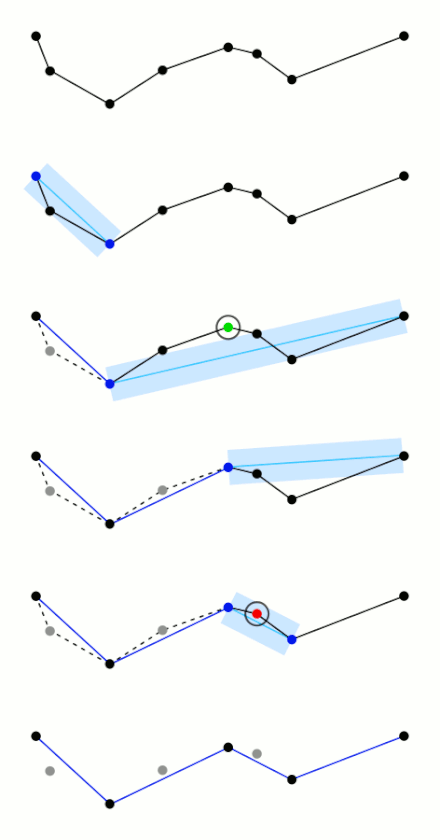
|
Double |
| Flip (Optional) |
Set whether to flip the model object. | Boolean |
| Datasource | Set the datasource for storing the result data. | Datasource |
| Dataset | Set the name of the result dataset. | String |
| Coordinate System Setting (Optional) |
Set the target coordinate system information for the result data. It can be specified by the output of Build Coordinate System. For iDesktopX, refer to Set Projected Coordinate System. | PrjCoordSys |
Output Results
| Parameter Name | Parameter Description | Parameter Type |
|---|---|---|
| Dataset | Result dataset | DatasetVector |