



Eliminate
Feature Description
Used to merge small polygons into adjacent polygons that have the largest area or the longest shared boundary.
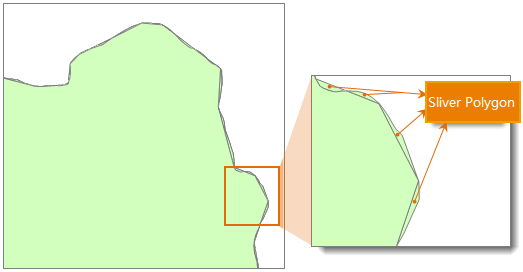
After operations such as intersect, identity, or update, or when converting raster to vector, many fragmented small polygons may exist that do not meet the minimum mapping area requirement. This tool can be used to merge and simplify these fragmented polygons.

Parameter Description
| Parameter Name | Parameter Interpretation | Parameter Type |
|---|---|---|
| Source Dataset | The dataset to be processed for shard polygons merge. | DatasetVector |
| Broken Polygon Area | The default value is 0. You can manually input a value based on actual conditions. Polygons smaller than this area will be merged. The unit depends on the dataset unit. For example, if the dataset unit is meters, then the unit for this parameter is square meters. | Double |
| Tolerance | The specified fuzzy value, whose unit must be consistent with the source dataset unit. During the merge process, if the distance between two nodes is less than the set tolerance value, they will be automatically merged into one. The tolerance value should be greater than or equal to 0; specifying a value less than 0 will cause an exception during execution. | Double |
| Combine Mode (Optional) |
Specifies the method for merging fragmented polygons. The following two modes are supported: "Merge by Area": Merges shard polygons into the adjacent polygon with the largest area. "Merge by Shared Boundary": Merges shard polygons into the adjacent polygon with the longest shared boundary. |
EliminateMode |
| Automatically Remove Isolated Small Polygons (Optional) |
Automatically merges adjacent fragmented polygons. If after multiple merges a polygon is still judged as fragmented, you can choose to delete it. Checking this option means that isolated fragmented polygons that cannot be merged will be automatically deleted; unchecking it will preserve isolated fragmented polygons. | Boolean |
| Group Field (Optional) |
Specifies a grouping field. Geometries with the same field value will be grouped together, and only polygons with the same field value can be merged. | String |
| Priority Field of the Merged Object (Optional) |
The priority field(s) of the merged object. One or more priority fields can be specified. 1. When multiple priority fields are specified, comparison is performed in the order of the fields. Objects with equal field values are considered matches. If the highest priority field does not yield a unique match, the next highest priority field is compared, and so on until all priority fields are compared. Finally, the merge is performed with the adjacent object that uniquely matches the priority fields. 2. If the priority field is empty or there is no unique matching object, the merge is performed based on the principle of the largest area, i.e., merging the shard polygon into the adjacent largest polygon. |
String |
Output Result
| Parameter Name | Parameter Interpretation | Parameter Type |
|---|---|---|
| Result Dataset | The result dataset after performing the shard polygons merge. | DatasetVector |
Notes
- Shard polygons typically refer to polygons whose area is far smaller than other polygon objects in the dataset, generally considered to be between one-millionth and one-ten-thousandth of the area of the largest polygon in the dataset. However, in practical operations, an appropriate minimum polygon area needs to be set based on actual requirements. Setting too large a tolerance for disjointed polygon objects or for polygons that are actually adjacent is unreasonable and may cause failure to merge tiny polygons.
- This tool applies to cases where two polygons share a common boundary. After processing, the shared boundary will be removed.
- After performing the shard polygons merge, the number of objects in the dataset may decrease.
Related Topics
Perform Eliminate on Specific Objects