



Function Description
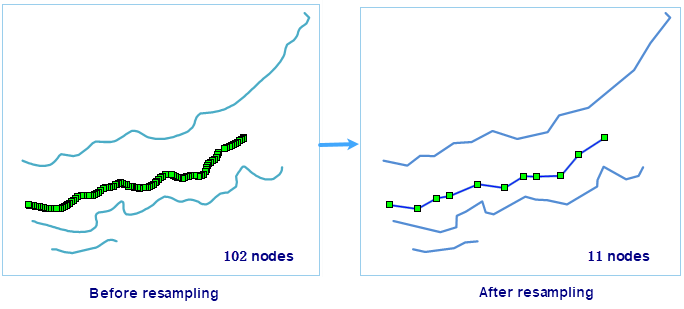
When the object nodes are too dense, the coordinate data can be re-collected, and some nodes can be eliminated according to certain rules, so as to achieve the purpose of simplifying the data. Dataset resampling supports line, surface, and Network datasets, and multiple datasets can be processed in batches.
Function entrance
- Data tab, Data Processing, Vector, Vector Resample.
- Toolbox-> Data Processing-> Vector Resample.
Parameter Description
- Resampling Method: The Application provides two resampling methods for the user to select, namely, Light Bar Method and Douglas. If you want to know the specific operation method, you can refer to the description of the Line Object Resampling Description page in the document.
- Resampling Distance: refers to the resampling tolerance. The larger the resampling distance is, the simpler the sampling Result Data is.
 Hint:
Hint: Resample distance should be greater than 0. 0000000001, less than 1/10 of Dataset Bounds.
- Save Small Geometry: a small object refers to a surface object whose geometry area is 0 after resampling. The Save Small Geometry operation only works on the surface object. If this setting is checked, the boundary of the small object whose area is 0 after resampling will be restored.
- Line intersection point unchanged: When the processed data is Line Dataset, the setting of line intersection point unchanged is supported to ensure the correctness of Topology between objects.
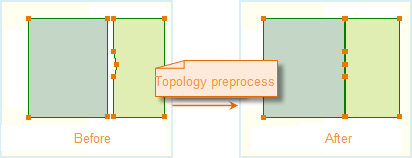
- Topology Preprocessing: When the processing data is Region Dataset, check this option to set Node Snap Tolerance. For complex Region DatasetTop ological preprocessing. Topological preprocessing preserves the Topology of the Region Dataset to ensure that there are no gaps when resampling the common boundary.
This function mainly deals with intersecting or adjacent Regions; When there are different numbers of nodes on both sides of the adjacent (intersecting) boundary, and the vertical distance from the node to the adjacent boundary is less than Node Snap Tolerance, merge the positions on both sides of the boundary, and unify the number of nodes on both sides of the adjacent (intersecting) boundary by adding nodes.
 Caution:
 Since the Topology Preprocessing operation is performed directly in the operated Dataset, Modifies the Dataset that participates in resampling. If the user does not want to modify the source data, please back up the data before Topology Preprocessing.
Related topics