Since this is a weather forecast map, we need to represent the information such as the city name, weather, temperatures, etc. on the map.
Label matrix maps features in representing various types of information as matrix labels. With label matrix map, you can integrate the symbols, pictures, and text into a single label to label an object.
The Capital_P point dataset in the China400 datasource is used to create the forecast map for China on August 17, 2010. The fields that will be used for the thematic map creation are listed in the table below.
| Field | Label |
| CapitalName | National and provincial capitals |
| Path_1 | The relative path of the picture used to indicate the weather |
| Path_2 | The relative path of the picture used to indicate the weather |
| Weather | The weather |
| Temperature | Highest/Lowest Temperature |
 alt="" />Basic Steps:
- Click Capital_P in the Layer Manger.
- On the Right-click menu, click the Create Thematic Map... > Label Map > Matrix to create a label matrix thematic map in default style. The newly created label matrix map is added to the layer manager as the topmost layer.
- Design the structure of the matrix label based on the information you want to represent.
(1) In the Label Matrix Map Manager, set Columns and Rows to 1 and 4 respectively.
(2) Select the second row and set its columns and rows to 2 and 1 respectively.
- Set each cell in the label matrix.
- The label matrix map will be shown as below after the above settings.
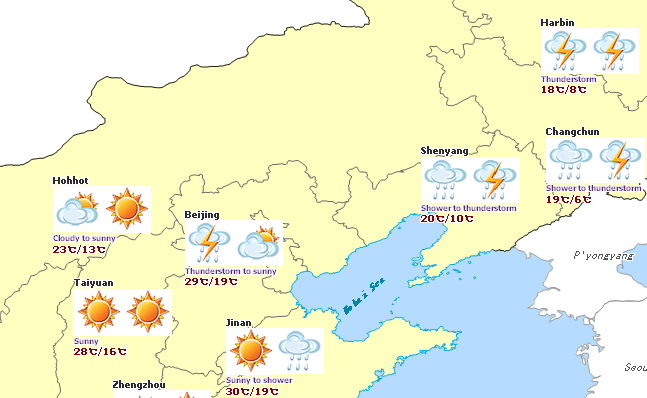
- Select the label matrix map in the Layer Manger, right click to display the context menu, and click Save as Thematic Map Template. The Save as Template dialog box shows up. Specify the destination and name for the thematic map template and click Save to save the results as a thematic map template for later use.

alt="" />Note
WeatherMatrixLabel.xml, the thematic map template for the label matrix map layer is provided under \SampleData\China. You can directly apply it to the Capital_P layer through the Load Thematic Map Template command in the context menu.