URI
<geometry_uri>/routelocator[.<format>]
Supported methods
Parent resource
Child resources
Introduction
The routeLocatorResults resource. You can create a routeLocatorResult resource through implementing the POST request on this resource. Supports the following analysis operations:
- Pass one or more M values to a single route object and return coordinate point information.
- Pass one or more M values to multiple route objects and return coordinate point information
Supported Methods:
- GET: Returns a form for the POST request.
- POST: Returns the created routeLocatorResults resource, including locater point and locater line.
- HEAD: Checks whether routeLocatorResults resource exists, or whether it can be accessed.
Supported output formats: rjson, json, html, xml.
Resource hierarchy
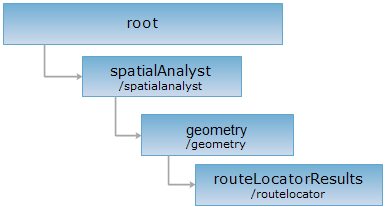
HTTP request methods
Implement the HTTP request on the following URI, where supermapiserver is the server name, with rjson being the output format.
http://supermapiserver:8090/iserver/services/spatialanalyst-sample/restjsr/spatialanalyst/geometry/routelocator.rjson
GET request
Gets a form for the POST request.
POST request
Returns the created route locater point (line) analysis result.
Request parameter
| Name | Type | Description |
| sourceRoute | Route | [Required] The route object. |
| type | LocateType | [Required] Type: Point or Line. |
| measure | double | The M value of the locater point. Meaningful only when the route object is locater point. |
| offset | double | The offset of the locater point. Meaningful only when the route object is locater line. The default value is 0. |
| isIgnoreGap | boolean | Wether to ignore the distance among child objects. The default is false, indicating not to ignore the distance among child objects. |
| startMeasure | double | The start M value of the locater line. Meaningful only when the route object is locater line. |
| endMeasure | double | The end M value of the locater line. Meaningful only when the route object is locater line. |
Response structure
The resonse parameters are as follows:
| Field | Type | Description |
|
succeed |
boolean | Whether the analysis result have been created successfully. |
| newResourceID | String | The ID for the analysis result resource. |
| postResultType | PostResultType |
The result type fo the POST request. |
| newResourceLocation | String | The URI of the newly created resource. |
Response example 1 Pass a single M value to a single route
Suppose we implement the POST request on the routeLocatorResults resource http://localhost:8090/iserver/services/spatialanalyst-sample/restjsr/spatialanalyst/geometry/routelocator.rjson to perform a single route location point operation. The rjson format request body sent is as follows:
{
"sourceRoute": {
"type": "LINEM",
"parts": [4],
"points": [{
"measure": 0,
"y": -6674.466867067760,
"x": 3817.3527876130100
},
{
"measure": 199.57954019411700,
"y": -6670.830929417590,
"x": 3617.806369901500
},
{
"measure": 609.3656478634480,
"y": -6877.837541432360,
"x": 3264.1498746678400
},
{
"measure": 936.0174126282960,
"y": -7038.687780615180,
"x": 2979.846206068900
}]
},
"type": "POINT",
"measure": 10,
"offset": 0,
"isIgnoreGap": false
}
The result in rjson format returned is as follows:
{
"succeed": true,
"newResourceID": "ryw0x19a_478fb6d0164248c79e05fcb955a19dfe",
"postResultType": "CreateChild",
"newResourceLocation": "http://localhost:8090/iserver/services/spatialanalyst-sample/restjsr/spatialanalyst/geometry/routelocator/ryw0x19a_478fb6d0164248c79e05fcb955a19dfe"
}
Response example 2 Pass multiple M values to a single route [New in 2026 Update1]
Suppose we implement the POST request on the routeLocatorResults resource http://localhost:8090/iserver/services/spatialanalyst-sample/restjsr/spatialanalyst/geometry/routelocator.rjson to perform a route location operation for multiple points. The rjson format request body sent is as follows:
[
{
"route": {
"id": 1,
"type": "LINEM",
"parts": [
4
],
"points": [
{
"measure": 0,
"y": -6674.46686706776,
"x": 3817.35278761301
},
{
"measure": 199.579540194117,
"y": -6670.83092941759,
"x": 3617.8063699015
},
{
"measure": 609.365647863448,
"y": -6877.83754143236,
"x": 3264.14987466784
},
{
"measure": 936.017412628296,
"y": -7038.68778061518,
"x": 2979.8462060689
}
]
},
"measures": [
10,
100,
500,
800
]
}
]
The returned rjson has exactly the same structure as in the example above, and will not be repeated here.
Response example 3 Pass multiple M values to multiple routes [New in 2026 Update1]
Suppose we implement the POST request on the routeLocatorResults resource http://localhost:8090/iserver/services/spatialanalyst-sample/restjsr/spatialanalyst/geometry/routelocator.rjson to perform a batch route location operation for multiple points. The rjson format request body sent is as follows:
[
{
"route": {
"id": 1,
"type": "LINEM",
"parts": [
4
],
"points": [
{
"measure": 0,
"y": -6674.46686706776,
"x": 3817.35278761301
},
{
"measure": 199.579540194117,
"y": -6670.83092941759,
"x": 3617.8063699015
},
{
"measure": 609.365647863448,
"y": -6877.83754143236,
"x": 3264.14987466784
},
{
"measure": 936.017412628296,
"y": -7038.68778061518,
"x": 2979.8462060689
}
]
},
"measures": [
100,
200
],
"offsets": [
0
],
"isIgnoreGap": false
},
{
"route": {
"id": 2,
"type": "LINEM",
"parts": [
2
],
"points": [
{
"measure": 0,
"y": -6600,
"x": 4000
},
{
"measure": 100,
"y": -6600,
"x": 4100
}
]
},
"measures": [
50,
100
],
"offsets": [
0
],
"isIgnoreGap": false
}
]
The returned rjson has exactly the same structure as in the example above, and will not be repeated here.
HEAD request
Asks for the response identical to the one that would correspond to a GET request, but without the response body. This is useful for retrieving meta-information written in response headers, without having to transport the entire content. The meta-information includes the media-type, content-encoding, transfer-encoding, content-length, etc.
HEAD request can be used to check if the routeLocatorResults resource exists, or if the routeLocatorResults resource can be accessed by clients. It can also determine if the routeLocatorResults resource supports an output format <format> if performed on a URI with .<format> included.