URI
<geometry_uri>/relativePosition3D[.<format>]
Supported methods
Parent resource
Child resources
geometryGetRelativePosition3DResult
Introduction
Used to query the spatial relations between geometries through 3D spatial query. By sending a POST request on this resource, a 3D spatial query result resource will be created, from which you can get the specific result.
Supported methods:
- GET: Returns a form for performing POST request.
- POST: Creates a 3D spatial query result resource.
- HEAD: Checks whether the relativePosition3D resource exists, or if the client has the authority to access the relativePosition3D resource.
Supported output formats: RJSON, JSON, HTML, XML.
Resource hierarchy
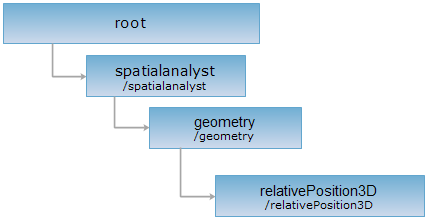
HTTP request methods
Execute HTTP request on the following URI, here we take rjosn as the output format as an example. Where, supermapiserver is the server name.
http://supermapiserver:8090/iserver/services/spatialAnalysis-BIM2/restjsr/spatialanalyst/geometry/relativePosition3D.rjson
GET request
Returns a form for performing POST request.
POST request
Performing a POST request on the current resource with the needed parameters, a 3D spatial query result resource will be created.
Request parameter
Performing a POST request on the current resource with the needed parameters, a 3D spatial query result resource will be created.
| Field | Type | Definition |
| sourceGeometry | Geometry | [Required] The source geometry, ie., the geometry on which the analysis operations will be operated. |
| bottomAltitude | double | [Required] The bottom altitude of the specified source geometry. |
| extendedHeightSource | double | [Required] The extending height of the specified source geometry. |
| operateGeometrySource | Geometry | [Required] The operate geometry. |
| bottomAltitudeOperate | double | [Required] The bottom altitude of the specified operate geometry. |
| extendedHeightOperate | double | [Required] The extending height of the specified operate geometry. |
| operation | String | Default: getRelativePosition, indicating getting the relative spatial position. |
| resultSetting | GeometrySpatialAnalystResultSetting | The settings for 3D spatial analysis result. |
Response structure
The normal response code is 201. Response fields:
| Field | Type | Description |
| postResultType | PostResultType | The result type of POST requests. It shows what operations have done to the target resource. |
| newResourceID | String | The ID of the analysis result resource. |
| succeed | boolean | Marks whether the analysis is successful. |
| newResourceLocation | String | The URI of the new created resource. |
Response example
Sending a POST request on relativePosition3D resource with URL: http://supermapiserver:8090/iserver/services/spatialAnalysis-BIM2/restjsr/spatialanalyst/geometry/relativePosition3D.rjson and the following parameters as the request body:
{
"sourceGeometry":{"type":"REGION", "points":[{"x":23, "y":23}, {"x":33, "y":35}, {"x":43, "y":22}]},
"bottomAltitudeSource":"1",
"extendedHeightSource":"1",
"operateGeometry":{"type":"REGION", "points":[{"x":23, "y":23}, {"x":34, "y":47}, {"x":50, "y":12}]},
"bottomAltitudeOperate":"1",
"extendedHeightOperate":"1",
"operation":"getRelativePosition"
}
the returned resource description in rjson format is as follows.
{
"postResultType":"CreateChild",
"newResourceID":"2fe735b026974a13a1bbf00ac710ddef_8ab9531ece344f5ab9f4d39b3c58da12",
"succeed":true,
"newResourceLocation":"http://supermapiserver:8090/iserver/services/spatialAnalysis-BIM2/restjsr/spatialanalyst/geometry/relativePosition3D/2fe735b026974a13a1bbf00ac710ddef_8ab9531ece344f5ab9f4d39b3c58da12"
}
HEAD request
Returns the same HTTP response header as the GET request, but no response entity, which can be used to retrieve the meta data contained in response message header without having to transmit the entire response content. Meta data information includes media type, character coding, compression coding, entity content length, etc.
HEAD request is used to determine whether the relativePosition3Dresource exists, or if the client has the authority to access it. By executing an HEAD request with a .<format> URI, you can quickly determine whether the relativePosition3Dresource supports the <format> representation.