URI
<feature_uri>/attachments
Supported methods
Parent resource
Introduction
The attachments resource represents a collection of attachments associated with features, including attachments added by iDesktopX and iServer. The operations performed on attachments through iDesktopX and iServer will also be reflected in the other end, that is, attachments uploaded by this resource can be displayed in iDesktopX; attachments deleted by iDesktopX and iServer will not be displayed in the attachment list at the other end.
Note: Attachments added by versions prior to iServer 2025 will not be displayed in iDesktopX 2025.
Supported Methods:
- GET: Gets the attachment list by GET request for the attachments resource.
- POST: Associates an attachment to the feature by executing POST request.
- HEAD: Check whether the attachment resource exists, or to access the attachment resource.
Supported output formats: rjson, json, html, xml.
Resource hierarchy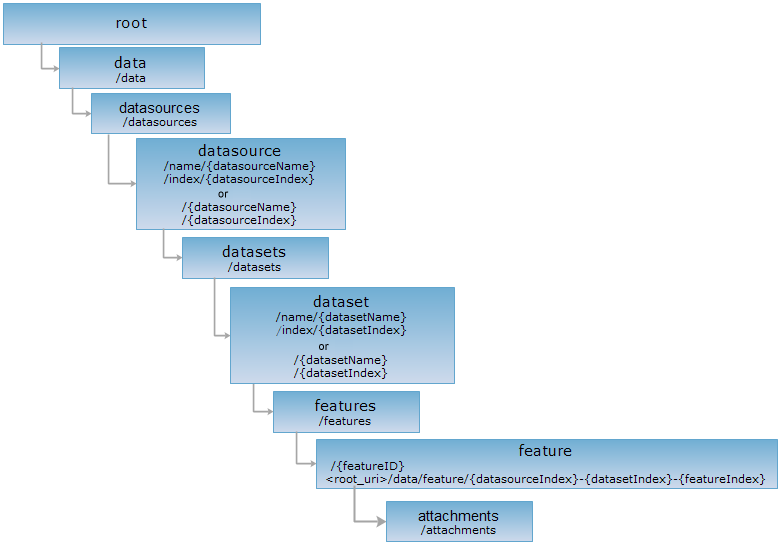
HTTP request methods
Implement the HTTP request on the following URI, where supermapiserver is the server name, with rjson being the output format.
http://supermapiserver:8090/iserver/services/data-world/rest/data/feature/0-14-0/attachments
GET request
Get the attachment collection that is associated with features. Get the attachment list by GET request for the attachments resource.
Response structure
The returned resource representation is an attachment array if GET request is executed on the attachments resource. The corresponding Java class is AttachmentInfo. The fields are:
| Field | Type | Description |
| name | String[] | Name of the uploaded file. |
| size | long | Uploaded file size, in Bytes. |
| id | int | The system will assign an ID to this file if the file is uploaded. |
| contentType | String[] | The type of the uploaded file. |
Response example
Implement GET request for attachments resource. The rjson format representation is as follows:
http://supermapiserver:8090/iserver/services/data-jingjin/rest/data/feature/0-8-2/attachments.rjson
The result returned is as the following:
[{
"contentType": "image/png",
"id": 1,
"name": "metadata.png",
"size": 40104
}]
POST request
You could upload attachments which are related with features when implementing POST request. The attachments could be files like pictures, documents, videos, etc.
HEAD request
Asks for the response identical to the one that would correspond to a GET request, but without the response body. This is useful for retrieving meta-information written in response headers, without having to transport the entire content. The meta-information includes the media-type, content-encoding, transfer-encoding, content-length, etc.
HEAD request can be used to check if the attachments resource exists, or if the attachments resource can be accessed by clients. It can also determine if the attachments resource supports an output format <format> if performed on a URI with .<format> included.