URI
- <features_uri>/{featureID}[.<format>]
- <data_uri>/feature/{datasourceIndex}-{datasetIndex}-{featureIndex}[.<format>]
Supported methods
Parent resource
Introduction
The feature resource represents a feature. The feature resource can help you get, modify, delete the feature information (only applicable to features in a point, line, or region dataset).
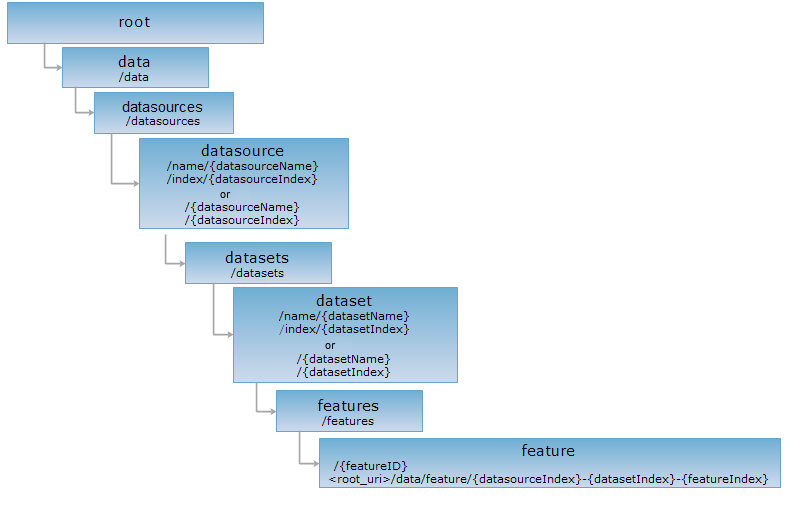
A feature resource can be got through the ID (URI1) or index (URI2) of the resource.
Note: URI2 is a simplified way to access the URI of a feature. To locate a feature, simply add the datasource index, dataset index, and feature index, connected with "-", to the end of the URI. In the example URI, datasourceIndex, datasetIndex, and featureIndex are respectively the datasource index, dataset index, and feature index. For example, http://supermapiserver:8090/iserver/services/data-world/rest/data/feature/0-2-7 represents the feature at index 7 in the dataset at index 2 in the datasource at index 0.
Supported methods
- GET: Gets the information about a feature.
- PUT: Modifies a feature, if it is a point, line, region, text, CAD dataset or tabular dataset.
- PUT: Modifies a feature, if it is a point, line, region, text, CAD dataset or tabular dataset.
- HEAD: Checks the existence of a feature resource and whether it can be accessed by the client.
Supported output formats: PNG, BMP, GIF, JPG, RJSON, JSON, HTML, XML.
GIS Services Resource Hierarchy
HTTP request methods
Below is an example of performing an HTTP request on a specified URI with rjson as the output format. supermapiserver in the URI is the name of the server.
http://supermapiserver:8090/iserver/services/data-world/rest/data/datasources/name/World/datasets/name/Countries/features/featureid.rjson
GET Request
Gets the information about a feature, including the field list, field value list, and the geometric object.
Request parameters
Parameters needed when implementing the GET request on the feature resource to get the feature information include:
| Field | Type | Definition |
| hasGeometry | boolean | Whether to get the geometric object. True means to get, and false means not to get. The default is true. |
If no parameter is transferred, the response returned will include the geometric object by implementing the GET request on the feature resource.
Response structure
When implementing the GET request on the feature resource, the representation of the resource returned is included in the entity body of the response message, as shown below:
| Field | Type | Definition |
| ID | int | The ID of the feature. |
| fieldNames | String[] | The field collection. |
| fieldValues | String[] | The field value collection. |
| geometry | geometry | The geometric object corresponding to the feature. |
Example usage
Below is the URI for implementing the GET request on the feature resource, with the geometric object not included in the response:
http://supermapiserver:8090/iserver/services/data-world/rest/data/datasources/name/World/datasets/name/Countries/features/247.rjson?hasGeometry=false
The representation of the feature with the ID of 247 is returned:
{
"ID": 247,
"fieldNames": [
"SMID",
"SMSDRIW",
"SMSDRIN",
"SMSDRIE",
"SMSDRIS",
"SMUSERID",
"SMAREA",
"SMPERIMETER",
"SMGEOMETRYSIZE",
"SQKM",
"SQMI",
"COLOR_MAP",
"CAPITAL",
"COUNTRY",
"POP_1994",
"CONTINENT"
],
"fieldValues": [
"247",
"73.62005",
"53.55374",
"134.76846",
"3.8537261",
"0",
"960.4537031350538",
"6.685997649733246E7",
"147412",
"9367281.0",
"3616707.25",
"1",
"Beijing",
"PRC",
"1.128139689E9",
"Asia"
],
"geometry": null
}
PUT request
Modifies a feature (if it is a point, line, region, text, CAD dataset or tabular dataset). Supermap system fields, which start with "sm" or "SM" are read-only fields.
Request parameters
The representation of the modified feature needs to be contained in the request body, as shown below, if you want to implement the PUT request on the feature resource to modify the feature.
| Field | Type | Definition |
| fieldNames | String[] | The predefined feature property field name array. Supermap system fields, which start with "sm" or "SM" are read-only fields. |
| fieldValues | String[] | The predefined feature property field name array, in correspondence with fieldNames. |
| geometry | geometry | The geometric object corresponding to the feature. |
Response structure
When implementing the PUT request on the feature resource, the representation of the resource returned is included in the entity body of the response message, as shown below:
| Name | Type | Description |
| succeed | boolean | If the operation was successful. |
| error | HttpError | An error message, if the operation is successful, you do not have this field. |
Example usage
Parameters need to be included in the request body when implementing the PUT request on the feature resource with http://supermapiserver:8090/iserver/services/data-world/rest/data/datasources/name/World/datasets/name/Countries/features/247.rjson to change the value of POP_1994 of the specified feature to 1,600,000,000, or 1.6E9, are as follows:
{
"ID": 247,
"fieldNames": [
"POP_1994"
],
"fieldValues": [
"1.6E9"
]
}
If successful, the response in rjson format is as follows:
{"succeed": true}
DELETE
PUT: Modifies a feature, if it is a point, line, region, text, CAD dataset or tabular dataset.
Request parameters
None.
Response structure
When implementing the DELETE request on the feature resource to delete a dataset, the response is as follows:
| Name | Type | Description |
| succeed | boolean | Whether the delete operation is successful. |
| error | HttpError | An error message, if the operation is successful, you do not have this field. |
Example usage
Implement the DELETE request on the sample feature resource with http://supermapiserver:8090/iserver/services/data-world/rest/data/datasources/name/World/datasets/name/Countries/features/247.rjson to delete the feature with the ID of 247 in the Countries dataset in World and get the response in rjson format.
{"succeed": true}
HEAD request
Asks for the response identical to the one that would correspond to a GET request, but without the response body. This is useful for retrieving meta-information written in response headers, without having to transport the entire content. The meta-information includes the media-type, content-encoding, transfer-encoding, content-length, etc.
The HEAD request helps check the existence of the feature resource and whether it can be accessed by the client. By implementing the HEAD request on the URI, with .<format> appended to the end, we can quickly get to know whether the feature resource supports the representation in <format> or not.