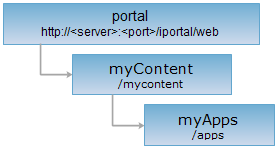
<myContent_uri>/apps[.<format>]
myApps is the collection of all the applications created by the current user.
Supported Methods:
Supported output formats: rjson, json, html, xml.
Implement the HTTP request on the following URI, where supermapiportal is the server name, with rjson being the output format.
http://supermapiportal:8090/iportal/web/mycontent/apps.rjson
Gets the list of all the applications created by the current user.
If this parameter is not set, then the list of applications on the first page will be returned. If the parameter is set, the list of the applications specified by the user will be returned. The request parameters are included in URI.
| Name | Type | Description |
| userNames | String[] | Queries according to the applications creator names. This parameter is expired, that is, SuperMap iPortal 9D or higher version won't use this parameter. |
| tags | String[] | Queried by application tag. |
| type | AppType | Querying by application type. |
| keywords | String[] | Querying by keywords. |
| orderBy | AppOrderBy | Sort field. Multiple fields can be used in sorting. |
| orderType | OrderType | Sort by ascending or descending. |
| currentPage | int | Page number. |
| pageSize | int | Page size. |
| filterFields | FilterFields[] | The field filter for ketword query. The field name needs to be capitalized. Such as: According to the key character of application name to filter, you need to set keywords = ["application"] & filterFields = ["APPNAME"]. |
Implement Get request for the myApps resource, and return the application list which can be visited by current users. Consists of following fields:
| Field | Type | Description |
| content | List<IportalApp> | Contents of the page. |
| currentPage | int | The current page number. |
| pageSize | int | The page size. |
| searchParameter | SearchParameter | The search parameter for the current page. |
| total | int | The total record number. |
| totalPage | int | The total number of pages. |
The returned rjson format representation after implementing the GET request on the myApps resource http://localhost:8090/iportal/web/mycontent/apps.rjson is as follows:
{
"content": [
{
"address": "http://192.168.120.48/services/../apps/builder/4",
"appName": "test the application",
"authorizeSetting": [
{
"aliasName": "test",
"entityId": null,
"entityName": "test",
"entityType": "USER",
"permissionType": "READWRITE"
},
{
"aliasName": "liyl",
"entityId": null,
"entityName": "liyl",
"entityType": "USER",
"permissionType": "DELETE"
}
],
"createTime": 1491025915727,
"description": null,
"id": 9,
"nickname": "liyl",
"tags": null,
"thumbnail": null,
"type": "BUILDERAPP",
"updateTime": 1491025915727,
"userName": "liyl"
}
],
"currentPage": 1,
"pageSize": 9,
"searchParameter": {
"currentPage": 1,
"currentUser": null,
"departmentIds": null,
"filterFields": null,
"groupIds": null,
"keywords": null,
"orderBy": null,
"orderType": "ASC",
"pageSize": 9,
"tags": null,
"type": null,
"userNames": [
"liyl"
]
},
"total": 1,
"totalPage": 1
}
Asks for the response identical to the one that would correspond to a GET request, but without the response body. This is useful for retrieving meta-information written in response headers, without having to transport the entire content. The meta-information includes the media-type, content-encoding, transfer-encoding, content-length, etc.
HEAD request can be used to check if the myApps resource exists, or if the myApps resource can be accessed by clients. It can also determine if the myApps resource supports an output format <format> if performed on a URI with <format> included.