The Web Printing Service turns on asynchronous printing mode by default. To create a print job:
- Access the iServer service list and select the webprinting/rest service resource
- Click webprinting-> v1-> jobs to enter the print task list resource page.
- Click Create Print Task to enter the Create Print Task Resource pack
- Enter the POST request body and click the "Create Print Task" button to start executing the task. For information about how to write a request body, see That prints the task list resource POST request .
The request body for creating print job input consists of three top-level objects:
{
"content": {},
"layoutOptions": {},
"exportOptions": {}
}
content
The Content object is a required object that defines the Web content to be printed. Consists of the following parameters:
- Type (required): the supported type of Web printing content. Currently supported type: WEBMAP.
- URL (optional): SuperMap iPortal data to be printed Web App The url address of the WebMap made. For example: http://supermapiportal:8190/iportal/web/maps/ { mapid }/map. rjson.
- Token (optional): If the WebMap to be printed is a private WebMap of the SuperMap iPortal user, the token of the SuperMap iPortal user needs to be provided.
- Value (optional): What is passed is a conformity SuperMap WebMap Canonical WebMap JSON expression,It can also be a complete SuperMap iPortal data on the map to make a json expression of WebMap. If the url parameter has been filled in, this parameter may not be passed.
Example 1: Incoming a SuperMap iPortal data above the WebMap made by the Web App The url address
{
"content": {
"type": "WEBMAP",
"url":"http://supermapiportal:8190/iportal/web/maps/{mapid}/map.rjson"
}
}
Example 2: Pass in the json of a complete SuperMap iPortal data and the WebMap made on the map Expression
{
"content": {
"type": "WEBMAP",
"value": {
"extent": {
"leftBottom": {
"x": -20037508.3427892,
"y": -20037508.3427891
},
"rightTop": {
"x": 20037508.3427892,
"y": 20037508.3427891
}
},
"maxScale": "1:144447.927",
"level": 4,
"center": {
"x": 11382417.9336122,
"y": 4134167.44525748
},
"baseLayer": {
"layerType": "TILE",
"name": "ChinaDark",
"url": "https://iserver.supermap.io/iserver/services/map-china/rest/maps/ChinaDark"
},
"layers": [
{
"layerType": "VECTOR",
"visible": true,
"name": "Records of earthquakes of magnitude 6 or above in Chinese history",
"featureType": "POINT",
"xyField": {
"xField": "经度",
"yField": "纬度"
},
"style": {
"fillColor": "#EE4D5A",
"strokeWidth": 1,
"offsetX": 0,
"offsetY": 0,
"fillOpacity": 0.9,
"radius": 8,
"strokeColor": "#ffffff",
"type": "BASIC_POINT",
"strokeOpacity": 1
},
"projection": "EPSG:4326",
"enableFields": [
"Year",
"Month",
"Day",
"Time",
"Fen",
"Seconds",
"Longitude",
"Latitude",
"Depth",
"Magnitude",
"Magnitude Type",
"Reference place name"
],
"dataSource": {
"name": "ChinaRecordOfOver6Earthquakes",
"type": "SAMPLE_DATA"
}
}
],
"description": "",
"projection": "EPSG:3857",
"minScale": "1:591658710.909",
"title": "testdizhen",
"version": "2.2.1",
"rootUrl": "https://iptl.supermap.io/iportal/services/../"
}
}
}
Please note: When printing TianDiTu maps as WMTS service, server-side permission is required.
layoutOptions
The layoutOptions object is a required object that defines the layout information for the plot. Consists of the following parameters:
- TemplateName (required): a required parameter, the name of the Layput Template folder.
- Title (optional): Required if the text for the map main title text element is present on the layout. You can also pass a null value. When multiple lines of text need to be entered, you can enter a line break character "\ n" before the text that needs to be broken.
- SubTitle (optional): Required if the text for the map subtitle text element exists on the layout. You can also pass a null value. When multiple lines of text need to be entered, you can enter a line break character "\ n" before the text that needs to be broken.
- Author (optional): Required if the text for the author text element exists on the layout. You can also pass a null value. When multiple lines of text need to be entered, you can enter a line break character "\ n" before the text that needs to be broken.
- Copyright (optional): Required if the text for the copyright text element is present on the layout. You can also pass a null value. When multiple lines of text need to be entered, you can enter a line break character "\ n" before the text that needs to be broken.
- ScaleBarOptions (optional): Updates the scale bar. If you do not pass this parameter, the default scale bar is used.
- ScaleText (optional): ScaleText Info, for example: 1:1000000.
- Type (optional): The style of the scale bar, including LINE, BAR, BAR _ SUB, GRID, LINE_CROSS_RAILWAY, RAILWAY_MID_SPLIT, RULER, BARRIER, GREATWALL, SAWTOOTH。
- Intervals (optional): The number of segments in the scale bar.
- Unit (optional): the unit system of the scale bar, including METER, FOOT and DEGREES.
- ScaleBarVisible (optional): Whether the scale bar is displayed.
- NorthArrowOptions (optional): Use to update the north arrow. If you do not pass this parameter, the default north arrow is used. Priority: picAsBase64 > picAsUrl。
- PicAsBase64 (optional): Updates the North Arrow's image in the layout by specifying the North Arrow's baseBit64Image Info.
- PicAsUrl (optional): Update the north arrow's picture in the layout by specifying the north arrow's picture url address.
- LittleMapOptions (optional): Required if there is a small map in the layout. The minimap can be either a Layer Name in the specified master map or a WebMap。 Priority: layers > layerNames. One of the two must be selected.
- Scale (Required): The scale of the minimap.
- Center (Required): The center point of the minimap.
- LayerNames (optional): Specifies a list of Layer Names in the WebMap for rendering the minimap.
- Layers (Optional): Specifies the layers layer in the WebMap. If you don't use the layers in the main map to render the minimap, you want to use a The WebMap layer is used to render the minimap. This Parameter Settings can be used.
- legendOptions (optional): Specify attributes for the legend elements in the layout. Priority: picAsBase64 > picAsUrl > customItems > layers, one of the four must be selected. In addition, the legend elements support automatic typesetting by the IsAutoComposing parameter control.
- PicAsUrl (optional): Update the picture of the legend in the layout by specifying the picture url address of the legend. The legend name should be included in the picture.
- PicAsBase64 (optional): Update the image of the legend in the layout by specifying the baseBit64Image Info of the legend. The legend name should be included in the picture.
- Title (optional): The name of the legend. Not passing this parameter will not display the Legend name. This parameter is the same as customItems The parameter is used with.
- CustomItems (optional): Customizes a set of legend elements. The user can pass in a JSON string. This The JSON string consists of the name of the legend element and the picture: name specifies the name of the legend element; picAsUrl specifies the picture url address of the legend element; picAsBase64 Specifies the baseBit64Image Info of the legend element.
- Layers (optional): Customizes the specified layers used to get the iServer REST Map Service of the legend children. You can pass in a group of objects. This group of objects consists of The string of a layer url in the REST Map Service (required) and an array of strings representing the sublayer name (optional): url specifies the REST Map Service or a temporary layer in the temporary layer set (specify ID). Currently, only TileLayer Layer type is supported; subLayerNames specifies the string array of the sublayer name. If this parameter is not set, the above will be printed url All legends in the layer; useCaption Whether the legend text uses Layer Caption. If not, it uses Layer Name.
- IsAutoComposition (optional): Whether to use the automatic layout function of the legend. After opening, the system will apply the automatic typesetting rules of legend elements, and the printing results will be displayed according to the corresponding algorithm. The default is For the true automatic typesetting algorithm, please refer to the automatic typesetting rules of legend elements.
- ItemsFont (optional): The font of the text in the children of the legend. isAutoComposition Takes effect when true.
- TitleFont (optional): The text font of the legend title.
- Title FontSize (optional): The text size of the legend title.
- Standard MarginOptions (optional): Set properties in the Layput Template for printing national Standard Map Sheet maps . It includes two parts: calculation parameters and finishing parameters. Priority in calculation parameter: mapNumber > scaleDenominator and coordinate. One of the two Parameter Settings must be selected.
Calculation parameters:
- ScaleDenominator (Required): can only be set to 500, 1000, 2000, 5000, 10000, 25000, 50000, 100000, 250000, 500000, 1000000, where 500, 1000, 2000 are large-scale denominators. Note: after this Parameter Settings, exportOptions The scale parameter in will not take effect.
- Coordinate (required): the coordinate of the framing target point, that is, the GCS of a target point in the area to be framed by the user. The longitude and latitude division is the longitude and latitude coordinates, and the rectangular division is the kilometer coordinates. Note: after this Parameter Settings, exportOptions The center parameter in will not take effect and needs to be used with scaleDenominator.
- MapNumber (required): the sheet number of the sheet, which needs to be set as New Sheet Number. Note: After this Parameter Settings, in exportOptions The scale and center parameters will not take effect. When there are scaleDenominator, coordinate, mapNumber at the same time, scaleDenominator And coordinate do not take effect.
- ZoneNumber (optional): the strip number of the National Coordinates of the large-scale map, which is optional if and only if the scale is large-scale and the coordinate system is National Coordinates.
- LargeScaleSheetType (optional): Map with Large Scale SheetType (40x50, 50x50), optional if and only if the scale is large.
Finishing parameters:
- FrameOptions (optional): Effect Settings of the map sheet frame in the National Standard Map Sheet.
- GridOptions (optional): Grid Effect Settings in the National Standard Map Sheet.
- InformationOptions (optional): set the information of the map sheet in the National Standard Map Sheet.
- NeighborTableOptions (optional): Effect Settings of neighbor chart in National Standard Map Sheet.
- AnnotationsOptions (optional): Annotation information settings in the National Standard Map Sheet.
- Title (optional): The name of the view sheet. The default value is "National Standard Map Sheet".
- Publisher (optional): Publisher. The default is null, which means it is not displayed.
- SafeInfo (optional): publication security level. The default value is null, that is, it is not displayed.
- HasMapNumber (optional): Whether to Display Cell Number. The default value is true, that is, display.
- HasScale (optional): Whether to Display Scale. The default value is false, that is, not to display.
- mapGridOptions (optional): Map longitude and latitude Grid Parameters.
- OriginX (optional): Lower left longitude.
- OriginY (optional): Latitude of the lower left corner.
- Cell Width (optional): The cell width.
- CellHeight (optional): The height of the cell.
- MarkType (optional): coordinate format. The supported types are DMS and DecimalDegree. Decimal format is used by default.
Example 1: Update the Layput Template, update the image of the North Arrow in the layout to the URL address, update the minimap to a WebMap layer, and update the legend to a JSON String
{
"layoutOptions": {
"templateName": "A4_landscape",
"title": "title",
"author": "authorName",
"copyright": "copyright",
"subTitle": "subTitle",
"legendOptions": {
"title": "legend",
"customItems": [
{
"name": "Railway",
"picAsUrl":
"http://192.168.120.40:8090/iserver/services/map-China100/rest/maps/China/layers/Main_Railway_L@China@@China/legend"
},
{
"name": "River",
"picAsUrl":
"http://192.168.120.40:8090/iserver/services/map-China100/rest/maps/China/layers/River@China@@China/legend"
},
{
"name": "Mainroad",
"picAsUrl":
"http://192.168.120.40:8090/iserver/services/map-China100/rest/maps/China/layers/Main_Road_L@China@@China/legend"
},
{
"name": "Airport",
"picAsUrl":
"http://192.168.120.40:8090/iserver/services/map-China100/rest/maps/China/layers/Airport_pt@China.1@@China/legend"
}
]
},
"northArrowOptions": {
"picAsUrl": "file://NorthArrow.svg"
},
"littleMapOptions": {
"center": {
"x": 12024583.8595938,
"y": 4101942.08146721
},
"scale": 5.4085234291297E-08,
"layers": [
{
"layerType": "TILE",
"name": "China",
"url": "http://192.168.120.40:8090/iserver/services/map-China100/rest/maps/China"
}
]
}
}
}
exportOptions
The exportOptions object is a required object that defines the Output Window for printing and consists of the following parameters:
- Format (required): the format of Web printout, currently supported: PNG, PDF.
- Dpi (optional): The resolution of the Web printout in dots per inch. Default is 96 dpi, maximum is 400 dpi。
- Scale (optional): Map scale for Web printouts.
- Rotation (optional): Map angle for Web printout.
- Center (optional): Map Center Point for Web printouts.
Example: Update the printout format to PDF and print dpi to 300dpi
{
"exportOptions": {
"format": "PDF",
"dpi": 300,
"center": {
"x": 100,
"y": -10
},
"scale": 0.0001
}
}
Automatic typesetting rules for legend element
The iServer Web Print Service provides users with automatic layout rules for legend elements. When the legend element in the Web print layout contains multiple legend subitems, the system can automatically typeset without manually adjusting the font size, margin and other parameters of the legend subitems.
The automatic typesetting function of legend elements is currently based on the rules of the legend item Show All. For specific parameters and setting methods, see layoutOptions . The specific rules are as follows:
- Support setting the number of columns. When the size of the legend box does not change, the font size of the legend subitems and the legend title automatically becomes smaller as the number of columns increases.
- Support the setting of the font and font size of the legend title and the font of the legend subitem.
- The default font size of the legend subitem text is 90% of the height of the legend symbol; when the length of the subitem text is too long, the text will be wrapped and the font size will be reduced.
- Legend symbols have a default aspect ratio of 2:1.
- The margins of the legend subitems are automatically adjusted by percentage, as shown in the following figure:
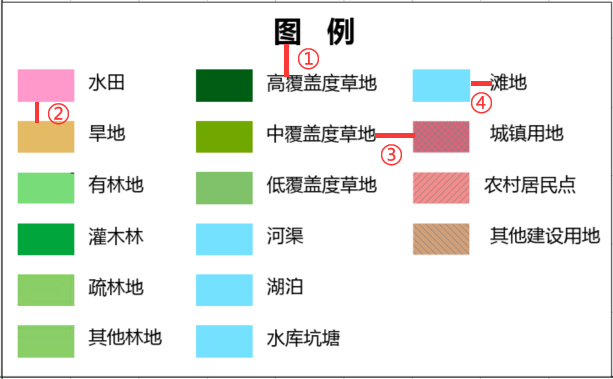
- ① The vertical distance between the legend title and the legend subitem is 10% of the height of the legend subitem.
- ② The line spacing between legend subitems is 50% of the height of the legend symbol.
- ③ The column spacing between the columns of the legend is 25% of the width of the legend symbol.
- ④ The Horizontal Distance between the legend symbol and the legend sub-item text is 25% of the width of the legend symbol.
Configure Web Printing Access Whitelist
Intranet penetration is a technology that enables intranet devices to break through LAN restrictions and achieve access from the extranet, and improper use may cause security problems such as data leakage and malicious attacks. When this configuration is enabled, only the addresses in the settings can be accessed through the request, effectively preventing the risk of other business systems being penetrated by the intranet through the Web Printing service.
The web printing access whitelist can be configured on the <externalUrlWhiteList> node in the [SuperMap iServer installation directory]\webapps\iserver\WEB-INF\iserver-system.xml file. The following is an example:
  <externalUrlWhiteList>
    <enabled>true</enabled>
    <urlPatterns>
      <string>^https://maptiles\.supermapol\.com/iserver/services/.*?</string>
      <string>^https://iserver\.supermap\.io/iserver/services/.*?</string>
    </urlPatterns>
  </externalUrlWhiteList>
Among them,
- <enabled>: Specify whether to enable the web printing access whitelist. The default value is false, which means it is not enabled. If your business system has high security requirements, we recommend that you enable this configuration. At this time, if you send a request to a URL that is not in the whitelist to obtain information such as map layers and legends, the request will be failure. The affected parameter nodes in web printing requests are as follows:
- content>url: the printed map json and the map service address contained in it
- content>value>layers>url: the address of the map service that will be printed
- layoutOptions>legendOptions>customItems>picAsUrl: printed custom legend address
- layoutOptions>legendOptions>layers>url: an operational layer used to obtain the legend
- layoutOptions>littleMapOptions>layers>url: the address of the map service used for minimap printing
- <urlPatterns>: URLs that can be accessed via a web printing service request. You can configure regular expressions for multiple URLs in this node, each set in the <string> node, with the following rules:
- A "^" anchor must be added to the regular expressions to indicate that the URL will start with the following string
- The regular expression needs to be able to express the complete URL request path, including the protocol name, domain name (or IP, port), path, etc
- Add "\" before the "." in the URL to escape it, otherwise incorrect string matching will occur.
- For non-fixed values, use ".*?" instead, for example, the service component name map-world
- By default, common public URL are configured in the configuration file, including:
- <string>^https://maptiles\.supermapol\.com/iserver/services/.*?</string>
- <string>^https://iserver\.supermap\.io/iserver/services/.*?</string>
Please note:
1. If you need to enable the web printing access whitelist, you need to configure the service address of iPortal to enable WebApps to use the printing function, for example: ^http://localhost:8190/iportal/web/maps/.*?; If a third-party map is also referenced, you also need to configure the third-party service address here.
2. URLs that meet the following conditions do not need to be configured to print on-demand requests via the web
a)The host in the URL is the same as the host in the Web Printing service URL
b)The URL contains the local address (localhost/127.0.0.1/local IP) and the port is iServer port number/8190