SuperMap iClient for Leaflet development process is as follows:

Figure 1 SuperMap iClient for Leaflet development process
The following demonstrates how to use SuperMap iClient for Leaflet to construct a simple map application.
Step 1: Download and Decompress Library File
- Get the SuperMap iClient Javascript source code from the open source community:
Gitee: https://git.oschina.net/isupermap/iClient9
- The installation directory structure is as foollows:
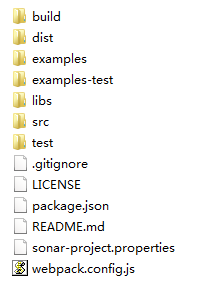
Figure 2 SuperMap iClient Javascript package structure
Step 2: Create the HTML Page
Create a new folder in a disk and named as "MyFirst"; In the "MyFirst” folder, use a text editor (such as NotePad++) to create a "GettingStarted.html" html page. And save the html to UTF-8 encoding. Add the following codes to it:
HTML |
|
|---|---|
<!DOCTYPE html><html><head> <meta charset="UTF-8"> <title>SuperMap REST service base map</title></head><body style=" margin: 0;overflow: hidden;background: #fff;width: 100%;height:100%;position: absolute;top: 0;"><div id="map" style="margin:0 auto;width: 100%;height: 100%"></div></body></html> |
|
Step 3: Reference Resource File
Copy the iclient9-leaflet.js to "MyFirst" folder:
Step 4: Copy iclient9-leaflet.js to "MyFirst" folder:
Add the following codes to <html> and <body> to implement the function of creating the map.
JavaScript |
|
|---|---|
<head> <meta charset="UTF-8"> <title>SuperMap REST Service Base Map</title><link rel="stylesheet" href="http://cdn.bootcss.com/leaflet/1.0.3/leaflet.css"><script type="text/javascript" src="http://cdn.bootcss.com/leaflet/1.0.3/leaflet.js"></script><script type="text/javascript" src="./iclient9-leaflet.min.js"></script></head> |
|
Step 5: Use Chrome to View
Add the following codes to <body> to implement the function of creating the map.
JavaScript |
|
|---|---|
<body style=" margin: 0;overflow: hidden;background: #fff;width: 100%;height:100%;position: absolute;top: 0;"><div id="map" style="margin:0 auto;width: 100%;height: 100%"></div> <script type="text/javascript"> var map, url = "http://support.supermap.com.cn:8090/iserver/services/map-world/rest/maps/World"; map = L.map('map', { crs: L.CRS.EPSG4326, center: [0, 0], maxZoom: 18, zoom: 1 }); L.supermap.tiledMapLayer(url).addTo(map);</script></body> |
|
Step 6: Run GettingStarted.html File, and Browse Map Data
Run SuperMap iServer and the GettingStarted.html file to browse the map data.
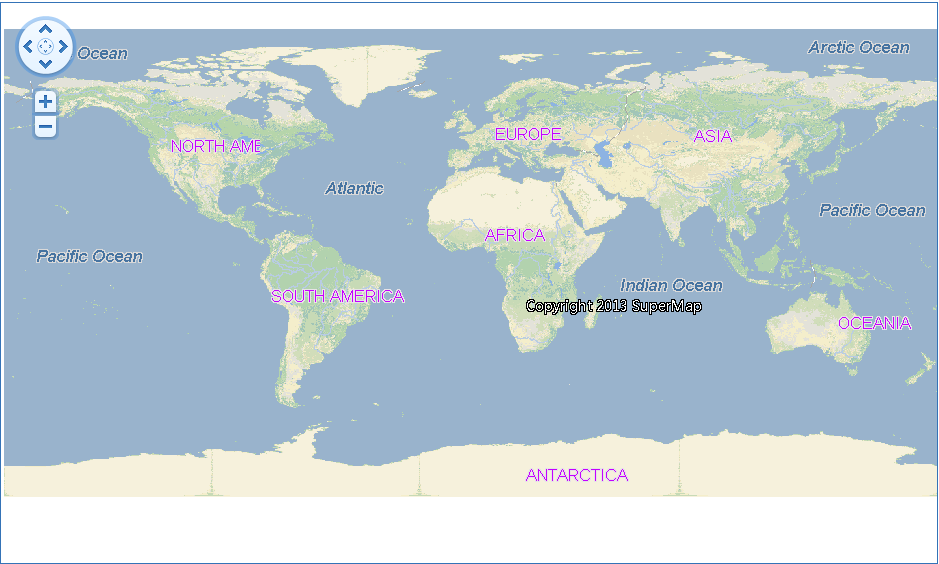
Figure 3 Access SuperMap iServer service world map