The Map component of SuperMap iServer can be built by various service providers. In Using Map Component, it introduces the initialization method using the Map component of workspace (based on UGCMapProvider). In this section, there is another method to build, i.e., using RestMapProvider:
For complete sample code, see: %SuperMap iServer Java_HOME%/samples/code/UseJavaAPI/MapComponentSampleUseRMP.
Initializing the map component
The Map component can be constructed by the MapContext, and you need to set map service component's configuration information and the map service provider for a MapContext. As to the service provider settings, two methods are provided, one is setting service provider object, the other is by setting the configuration of the service provider. The example in this section uses the former.
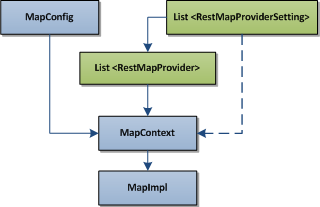
The above figure shows the process of using the SuperMap data to construct a Map component (MapImpl), where the arrows shows the initialization process. The dotted arrows indicate The usage of Map Component uses the way of setting the service provider. Here we follow the solid arrows flow. Firstly, construct the MapContext through MapConfig and UGCMapProviderSetting. Then initialize the map component (i.e., MapImpl object) through the map component context. The sample code is shown as below:
// Initialize REST map service provider
RestMapProviderSetting providerSetting = new RestMapProviderSetting();
//Specify the REST url
providerSetting.restServiceRootURL = "http://localhost:8090/iserver/services/map-china/rest";
// Build the RestMapProvider object
RestMapProvider restMapProvider = new RestMapProvider(providerSetting);
List<MapProvider>  providers = new ArrayList<MapProvider>();
providers.add(restMapProvider);
// Initialize the map context object
MapContext mapContext = new MapContext();
mapContext.setProviders(providers);
// Create the map service component
MapImpl mapComponent = new MapImpl();
//Specify service component
mapComponent.setComponentContext(mapContext);
return mapComponent;
SQL Query
SQL queries the specified layers and fields that meets the conditions.
Syntax:
public QueryResult queryBySQL(java.lang.String mapName, QueryParameterSet queryParameters)
Parameters:
- mapName: the map on which the query is performed.
- queryParameters: the query parameter set, which can include multiple query parameters.
The result is a QueryResult object, containing multiple recordsets.
The sample code of SQL query:
QueryParameterSet queryParameters = new QueryParameterSet();
QueryParameter[] queryLayerParams = new QueryParameter[1];
queryLayerParams[0] = new QueryParameter();
queryLayerParams[0].name = "Capital_pt@China";
// Attribute filter condition.
queryLayerParams[0].attributeFilter = "SmID<6";
// The field name returned
queryLayerParams[0].fields = new String[] { "NAME", "CLASS" };
queryParameters.queryParams = queryLayerParams;
// Set the query result that contains attribute information and spatial information
queryParameters.queryOption = QueryOption.ATTRIBUTEANDGEOMETRY;
// Query all features within SmID<6 on the layer of Capital_pt@China of the map of China
QueryResult queryResult = mapComponent.queryBySQL("China", queryParameters);
OutputQueryResult(queryResult);
Outputting map with bounds
Outputting the map by specifying its bounds means that retrieving the map tiles with the specified size and specified map bounds to the specified map. The default size of the map tile is 256 pixels *256 pixels.
Syntax:
public MapImage viewByBounds(Rectangle2D bounds, MapParameter mapParameter, ImageOutputOption outputOption)
Parameters:
- bounds: the bounding geographic coordinates.
- mapParameter: map parameter
- outputOption: image output settings
The result is a MapImage object, the image format is binary stream with PNG format. If the specified output image format is image, then the result, MapImage contains the URL of the image which stored in the cache under REST service in fact.
SampleCode:
// Bounds
Rectangle2D viewBounds = new Rectangle2D(9871111.11 ,2371111.11 , 12128888.89 , 4628888.89);
// Get map parameters of China
MapParameter mapParameter = mapComponent.getDefaultMapParameter("China");
// Image output settings, including format, bounds, url, size(256*256)
ImageOutputOption outputOption = new ImageOutputOption();
mapParameter.returnType = ReturnType.URL;
outputOption.format = OutputFormat.PNG;
mapParameter.viewBounds = viewBounds;
MapImage mapImage = mapComponent.getMapImage(mapParameter, outputOption);
System.out.println("Image Path: " + mapImage.imageUrl);
For the complete sample code, see %SuperMap iServer_HOME%/samples/code/UseJavaAPI/MapComponentSampleUseRMP. For the methods, see Getting started with Java API.