Below demonstrates the implementation of the service interface:
@Interface(componentTypes = { com.supermap.services.components.Map.class }, optional = false, multiple = false)
@Protocol(names={"BingMaps"})
public class BingMapsServlet extends HttpServlet implements InterfaceContextAware {
...
}
Where
- The service interface implementation class
needs to be a Servlet, which is implemented by being inherited from
HttpServlet. InterfaceContextAware, which is the service interface
context interface, is used to get the configuration information of
the service components and service interfaces.
Service Interface context
In the implementation class of the service interface, InterfaceContextAware can be used to get the service interface context, through which the service components and the configuration information of the service interfaces can be got.
Getting Service Interface configuration
The configuration inforamtion of the service interfaces is in iserver-services-interfaces.xml. (refer to Structure of Service Configure File) Below is the configuration for one service interface:
<interface class="com.supermap.sample.SampleServlet" name="sampleinterface">
<config class="com.supermap.sample.SampleServletSetting">
<param1>default</param1>
...
</config>
</interface>
SampleServletSetting is the configuration class of SampleServlet, with param1 corresponding to the property of the SampleServletSetting class.
In the implementation class of the service interface, InterfaceContextAware can be used to get the service interface context, through which the service components and the configuration information of the service interfaces in services interface configuration file can be got. The code is as follows:
@Interface(componentTypes = { com.supermap.services.components.Map.class }, optional = false, multiple = false)
@Protocol(names={"SampleInterface"})
public class SampleServlet extends HttpServlet implements InterfaceContextAware {
        ...
    public void setInterfaceContext(InterfaceContext context) {
            //Get service interface configuration from the service interface context
            SampleInterfaceConfig sampleConfig = context.getConfig(SampleInterfaceConfig.class);
    }
}
SampleInterfaceConfig object corresponds to the <config class="com.supermap.sample.SampleServletSetting"/> in the interface.
If additional configuration is not needed for the service interface, it is not necessary to define the service interface configuration class.
Getting service components
SuperMap iServer publishes the service components as Web services through the corresponding service interfaces. In the implementation class of the resource, GIS capabilities of the service components obtained from the service interface context.
@Interface(componentTypes = { com.supermap.services.components.Map.class }, optional = false, multiple = false)
@Protocol(names={"SampleInterface"})
public class SampleServlet extends HttpServlet implements InterfaceContextAware {
        ...
        public void setInterfaceContext(InterfaceContext context) {
                //Get service components from the service interface context (here it is MapComponent)
                List components = context.getComponents(Map.class);
                ...
        }
}
Extension example
The service interface determines how GIS capabilities are provded. By extending service interfaces, the formats in which the services are provided can be enriched, therefore better satisfying the needs of users.
In this example, a BingMaps image output interface is implemented. You can find the sample code in %SuperMap iServer_HOME%/samples/DSSE/BingMapsInterfaceSample.
According to the REST interface of BingMaps, we can get a map by accessing the URI below:
http://dev.virtualearth.net/REST/v1/Imagery/Map/ Road?mapArea=30.0,100.0,50.0,120.0&mapSize=512,512&key=BingMapsKey
"Road" is the map name provided by BingMap, mapArea (latitude top, longitude left, latitude bottom, and longitude right) is the geographical bounds for map image output, mapSize is the map image size (width, height), and BingMapsKey is the key to access BingMaps, please refer to BingMaps Key (http://msdn.microsoft.com/en-us/library/ff428642.aspx).
Actually, the REST interface of BingMap has serveral parameters. As an demonstration, here we only adopt 3 parameters--imagerySet, mapArea, and mapSize.
Below is the BingMapServlet implementation class, which implements the handling of URI and calling of the Map component to get the map image:
package com.supermap.sample.serviceinterface;
import java.io.IOException;
import java.io.InputStream;
import java.io.OutputStream;
import java.net.URLDecoder;
import java.util.List;
import javax.servlet.ServletException;
import javax.servlet.http.HttpServlet;
import javax.servlet.http.HttpServletRequest;
import javax.servlet.http.HttpServletResponse;
import com.supermap.services.Interface;
import com.supermap.services.InterfaceContext;
import com.supermap.services.InterfaceContextAware;
import com.supermap.services.components.Map;
import com.supermap.services.components.MapException;
import com.supermap.services.components.commontypes.ImageOutputOption;
import com.supermap.services.components.commontypes.MapImage;
import com.supermap.services.components.commontypes.MapParameter;
import com.supermap.services.components.commontypes.OutputFormat;
import com.supermap.services.components.commontypes.Rectangle;
import com.supermap.services.components.commontypes.Rectangle2D;
import com.supermap.services.components.commontypes.RectifyType;
import com.supermap.services.components.commontypes.ReturnType;
import com.supermap.services.interfaces.Protocol;
import com.supermap.services.util.Tool;
/**
 * <p>
 * URI of BingMaps REST map service: http://dev.virtualearth.net/REST/v1/Imagery/Map/ imagerySet?mapArea=mapArea&mapSize=mapSize&key=BingMapsKey


 * imagerySet: Map name


 * mapArea: Latitude top, longitude left, latitude bottom, and longitude right


 * mapSize: Map width and map height


 * BingMapsKey: Key to access BingMaps
 *
 * http://dev.virtualearth.net/REST/v1/Imagery/Map/ Road?mapArea=30.0,100.0,50.0,120.0&mapSize=512,512&key=BingMapsKey
 * http://localhost:8090/iserver/services/map-world/bingmaps/WorldMap?mapArea=30.0,100.0,50.0,120.0&mapSize=512,512
 * </p>
 */
@Interface(componentTypes = { com.supermap.services.components.Map.class }, optional = false, multiple = false)
@Protocol(names={"BingMaps"})
public class BingMapsServlet extends HttpServlet implements InterfaceContextAware {
    private Map mapImpl;
    public BingMapsServlet() {
            super();
    }
    protected void doGet(HttpServletRequest request, HttpServletResponse response) throws ServletException, IOException {
            //Get the root path of the service, which is /iserver/services/<servicecomponent>/<serviceinterface> for iserver
            String rootPath = request.getContextPath() + request.getServletPath();
        String requestURI = request.getRequestURL().toString();
        java.util.Map<String, String> paramMap = request.getParameterMap();
        int rootPathIndex = requestURI.indexOf(rootPath);
        String remainPart = requestURI.substring(rootPathIndex + rootPath.length() + 1);
        //The map name
        String mapName = (remainPart.indexOf('/') == -1 ? remainPart : remainPart.substring(0, remainPart.indexOf('/')));
        mapName = URLDecoder.decode(mapName,"utf-8");
        //The geographical extent and size of the image
        String mapArea = (String) request.getParameter("mapArea");
        String mapSize = (String) request.getParameter("mapSize");

        String[] mapAreaStrs = mapArea.split(",");
        String[] mapSizeStrs = mapSize.split(",");
        if(mapAreaStrs.length < 4||mapSizeStrs.length < 2){
                return;
        }

        Rectangle2D viewBounds = new Rectangle2D(Double.valueOf(mapAreaStrs[1]),Double.valueOf(mapAreaStrs[0]),
                                                                            Double.valueOf(mapAreaStrs[3]),Double.valueOf(mapAreaStrs[2]));
        Rectangle viewer = new Rectangle(0, 0, Integer.valueOf(mapSizeStrs[0]), Integer.valueOf(mapSizeStrs[1]));
        try {
                MapParameter mapParameter = this.mapImpl.getDefaultMapParameter(mapName);
            mapParameter.viewBounds = viewBounds;
            mapParameter.viewer = viewer;
            mapParameter.name = mapName;
            mapParameter.rectifyType = RectifyType.BYVIEWBOUNDS;
            //Return the iamge binary stream
            mapParameter.returnType=ReturnType.BINARY;

            ImageOutputOption outputOption = new ImageOutputOption();
            //Set the output format to PNG
            outputOption.format = OutputFormat.PNG;

            MapImage mapImage=null;
            if (mapImpl != null) {
                    mapImage = mapImpl.getMapImage(mapParameter, outputOption);
            }
            if(mapImage.imageData!=null){
                    //Get the image binary stream of mapImage and write it into the HTTP response
                    response.getOutputStream().write(mapImage.imageData);
            }
        } catch (MapException e) {
            e.printStackTrace();
        }
    }
    public void setInterfaceContext(InterfaceContext context) {
            //Get the service interface configuration from the service interface context (no configuration here).
            //InterfaceConfig interfaceConfig = context.getConfig(InterfaceConfig.class);

            //Get the service components from the service interface context (Map component here).
        List<Map> components = context.getComponents(Map.class);
        if (components != null) {
            for (Object component : components) {
                if (component instanceof Map) {
                    this.mapImpl = (Map) component;
                    break;
                }
            }
        }
    }
}
Place the Jar package after compiling in %SuperMap iServer_HOME%\webapps\iserver\WEB-INF\lib.
Add the BingMapsREST service interface, i.e., the <interface /> node in services.xml (refer to Structure of Service Configure File), as shown below:
<interface class="com.supermap.sample.serviceinterface.BingMapsServlet" name="bingmapsrest">
</interface>
Modify the configuration for the map-world component by adding bingmapsrest to the service interfaces bound with map-world, as shown below:
<component class="com.supermap.services.components.impl.MapImpl" interfaceNames="rest,wms111,wms130,wmts100,bingmaps"
name="map-world" providers="ugcMapProvider-World">
<config class="com.supermap.services.components.MapConfig">
</config>
</component>
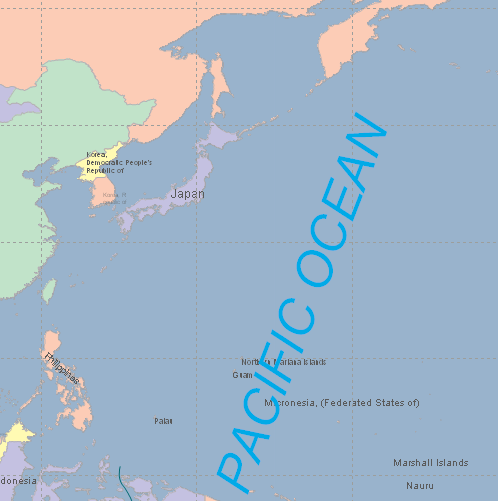
Implement the GET request on http://localhost:8090/iserver/services/map-world/bingmaps/WorldMap?mapArea=10.0,100.0,50.0,180.0&mapSize=512,512 to get the map in png format, as shown below: