

URI
<webPrinting_uri>/jobs[.<format>]
Supported Methods
Parent Resource
Child Resources
Introduction
The webPrintingJobs resource is the Web printing job list resource. By sending a POST request, you can create a Web printing job to output a Web map as a printable map document. Before printing maps, the administrator needs to configure the Web printing service address in iPortal Administration -> Site Configuration -> Support Services.
Supported Methods:
- POST: Create a Web printing job and return a printable map document.
Supported output formats: RJSON, JSON, XML.
Resource hierarchy
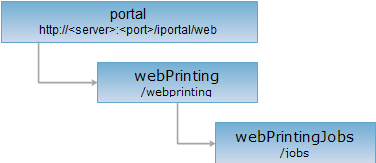
HTTP Request Method
Perform an HTTP request on the following URI. The rjson output format is used as an example, where supermapiportal is the server name.
http://supermapiportal:8190/iportal/web/webprinting/jobs.rjson
POST Request
Create a Web printing job and return a printable map document.
The input for creating a Web printing job is a text in JavaScript Object Notation (JSON) format, which describes the Web map content, print layout, output format, and other information. The Web map content must conform to the SuperMap WebMap specification. For details, please refer to: SuperMap WebMap Specification.
Request Parameters
For detailed request parameter structure, please refer to the iServer help documentation: webPrintingJobs.
Response Structure
For detailed response body structure, please refer to the iServer help documentation: webPrintingJobs.
Response Example
Perform a POST request on the webPrintingJobs resource: http://supermapiportal:8190/iportal/web/webprinting/jobs.rjson to create a Web printing job. For the request parameters and response body example, please refer to the iServer help documentation: webPrintingJobs.
See
- webPrinting, webPrintingJob
- Constructing REST Requests
- Status Codes
- Output Formats
- Resource hierarchy