

URI
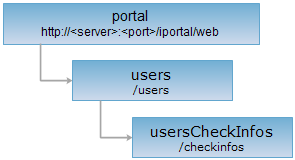
<users_uri>/checkinfos[.<format>]
Supported methods
Parent resource
Introduction
The usersCheckInfos resource is the user audit information list resource. Only an administrator with user auditing authority can use the resource. By sending a GET request, you can get the user audit information list, by sending a PUT request, you can update the user audit information list, by sending a DELETE request, you can delete the user's audit records.
Supported Methods:
- GET: Get the user audit information list.
- PUT: Update the user audit information list.
- DELETE: Delete the user's audit records.
- HEAD: Checks whether the usersCheckInfos resource exists or whether it has permission to access the resource.
Supported output formats: rjson, json, html, xml.
Resource hierarchy
HTTP request methods
Implement the HTTP request on the following URI, where supermapiportal is the server name, with rjson being the output format.
http://supermapiportal:8090/iportal/web/users/checkinfos.rjson
GET request
Get the user audit information list.
Request parameter
Following arguments need to be passed in the request sent.
| Name | Type | Description |
| checkStatuses | CheckStatus[] | Filtered by checking status. |
| orderBy | CheckInfoOrderBy | Sort by user registration time, audit time, user name or nickname. |
| currentPage | int | Filter according to current page. |
| pageSize | int | Filtered by page size. |
| orderType | OrderType | Filter according to the ascending/descending sorting order. |
Response structure
The structure of the response resource representation is as follows:
| Field | Type | Description |
| content | List<CheckInfoContent> | Page content. |
| currentPage | int | The current page number. |
| pageSize | int | The page size. |
| searchParameter | SearchParameter | The search parameter for the current page. |
| total | int | The total record number. |
| totalPage | int | The total number of pages. |
Response example
The returned rjson format representation after implementing the GET request on the usersCheckInfos resource http://localhost:8090/iportal/web/users/checkinfos.rjson is as follows:
{
"content": [
{
"checkStatus": "UNCHECKED",
"checkTime": null,
"checkUser": null,
"checkUserNick": null,
"createTime": 1482723439580,
"departmentId": null,
"id": 1,
"objectInfo": {
"departmentId": 1,
"departmentNames": null,
"description": null,
"email": "user1@163.com",
"isLocked": false,
"name": "user1",
"nickname": "user1",
"ownRoles": null,
"password": "user1`12",
"passwordLastModified": null,
"passwordQuestion": {
"pwdAnswer": "cangzhong",
"pwdQuestion": "school"
},
"roles": [
"PORTAL_USER"
],
"userGroups": null
},
"verifyReason": null
},
{
"checkStatus": "UNCHECKED",
"checkTime": null,
"checkUser": null,
"checkUserNick": null,
"createTime": 1482734036718,
"departmentId": null,
"id": 2,
"objectInfo": {
"departmentId": 1,
"departmentNames": null,
"description": null,
"email": "user2@163.com",
"isLocked": false,
"name": "user2",
"nickname": "user2",
"ownRoles": null,
"password": "user2`12",
"passwordLastModified": null,
"passwordQuestion": {
"pwdAnswer": "cangzhong",
"pwdQuestion": "school"
},
"roles": [
"PORTAL_USER"
],
"userGroups": null
},
"verifyReason": null
},
{
"checkStatus": "UNCHECKED",
"checkTime": null,
"checkUser": null,
"checkUserNick": null,
"createTime": 1482734623984,
"departmentId": null,
"id": 3,
"objectInfo": {
"departmentId": 1,
"departmentNames": null,
"description": null,
"email": "xiaoli@163.com",
"isLocked": false,
"name": "xiaoli",
"nickname": "xiaoli",
"ownRoles": null,
"password": "xiaoli`12",
"passwordLastModified": null,
"passwordQuestion": {
"pwdAnswer": "shangcang",
"pwdQuestion": "school"
},
"roles": [
"PORTAL_USER"
],
"userGroups": null
},
"verifyReason": null
}
],
"currentPage": 1,
"pageSize": 9,
"searchParameter": {
"checkStatuses": null,
"currentPage": 1,
"departmentIds": null,
"keywords": null,
"mapIds": null,
"objectType": "USER",
"orderBy": null,
"orderType": "ASC",
"pageSize": 9,
"serviceIds": null
},
"total": 3,
"totalPage": 1
}
If you want to get the specified audit list information, such as descending filter according to the status of the audit and the registered user name, you need to set checkStatuses = ["UNCHECKED"] & orderBy = "USERNAME" & orderType = DESC, that is, perform a GET request on the usersCheckInfos resource: http: //localhost:8090/iportal/web/users/checkinfos.rjson? CheckStatuses = ["UNCHECKED"] & orderBy = USERNAME & orderType = DESC to get the application list specified by the current login user. The returned rjson format is described as follows:
{
"content": [
{
"checkStatus": "UNCHECKED",
"checkTime": null,
"checkUser": null,
"checkUserNick": null,
"createTime": 1482734623984,
"departmentId": null,
"id": 3,
"objectInfo": {
"departmentId": 1,
"departmentNames": null,
"description": null,
"email": "xiaoli@163.com",
"isLocked": false,
"name": "xiaoli",
"nickname": "xiaoli",
"ownRoles": null,
"password": "xiaoli`12",
"passwordLastModified": null,
"passwordQuestion": {
"pwdAnswer": "shangcang",
"pwdQuestion": "school"
},
"roles": [
"PORTAL_USER"
],
"userGroups": null
},
"verifyReason": null
},
{
"checkStatus": "UNCHECKED",
"checkTime": null,
"checkUser": null,
"checkUserNick": null,
"createTime": 1482734036718,
"departmentId": null,
"id": 2,
"objectInfo": {
"departmentId": 1,
"departmentNames": null,
"description": null,
"email": "user2@163.com",
"isLocked": false,
"name": "user2",
"nickname": "user2",
"ownRoles": null,
"password": "user2`12",
"passwordLastModified": null,
"passwordQuestion": {
"pwdAnswer": "cangzhong",
"pwdQuestion": "school"
},
"roles": [
"PORTAL_USER"
],
"userGroups": null
},
"verifyReason": null
},
{
"checkStatus": "UNCHECKED",
"checkTime": null,
"checkUser": null,
"checkUserNick": null,
"createTime": 1482723439580,
"departmentId": null,
"id": 1,
"objectInfo": {
"departmentId": 1,
"departmentNames": null,
"description": null,
"email": "user1@163.com",
"isLocked": false,
"name": "user1",
"nickname": "user1",
"ownRoles": null,
"password": "user1`12",
"passwordLastModified": null,
"passwordQuestion": {
"pwdAnswer": "cangzhong",
"pwdQuestion": "school"
},
"roles": [
"PORTAL_USER"
],
"userGroups": null
},
"verifyReason": null
}
],
"currentPage": 1,
"pageSize": 9,
"searchParameter": {
"checkStatuses": [
"UNCHECKED"
],
"currentPage": 1,
"departmentIds": null,
"keywords": null,
"mapIds": null,
"objectType": "USER",
"orderBy": "USERNAME",
"orderType": "DESC",
"pageSize": 9,
"serviceIds": null
},
"total": 3,
"totalPage": 1
}
PUT request
Update the user audit information list.
Request parameter
Following arguments need to be passed in the request sent.
| Name | Type | Description |
| ids | Integer[] | The id array of the record audit. |
| checkInfo | CheckInfo | The audit info. |
Response structure
The structure of the response resource representation is as follows:
| Field | Type | Description |
| succeed | boolean | Check whether the specified registered user record is audited successfully. |
| error | Httperror | The error information. If the specified registered user record is audited successfully, it would not have this field. |
Response example
Performs the PUT request for the usersCheckInfos resource: http://localhost:8090/iportal/web/groups/applyinfo.rjson. To audit the specified registered user record. The request is as follows:
{
"ids": [
3
],
"checkInfo": {
"checkStatus": "SUCCESSFUL",
"verifyReason": ""
}
}
The response result in rjson format returned is as follows:
{"succeed": true}
DELETE request
Delete the registered user's audit records, supporting batch delete. The id array of the audit records that need to be deleted is passed in the url.
Response structure
The structure of the response resource representation is as follows:
| Field | Type | Description |
| succeed | boolean | Whether the service application form has been successfully deleted. |
| error | Httperror | Error information. This field will not be displayed if it is deleted successfully. |
Response example
Implement the DELETE request on the usersCheckInfos resource http://localhost:8090/iportal/web/users/checkinfos.rjson?ids=[1,2] to batch delete the records whose id is 1 or 2. Return rjson results:
{ "succeed": true}
HEAD request
Returns the same HTTP response header as the GET request, but does not have the response entity. It can get the metadata information in the response header without transferring the whole response content. Metadata information includes media type, character encoding, compression encoding, entity content length, and so on.
The HEAD request can be used to determine whether the usersCheckInfos resource exists or whether the client has authority to access the usersCheckInfos resource. It can quickly determine whether usersCheckInfos resource supports the representation in <format> format by performing HEAD request on URI with <format>.