

URI
<user_uri>/password[.<format>]
Supported methods
Parent resource
Introduction
resetPassword resource is to reset password according to the security answers you set before.
Supported Methods:
- PUT: to reset password according to the security answers you set before.
Supported output formats: RJSON, JSON, HTML, XML.
Resource hierarchy
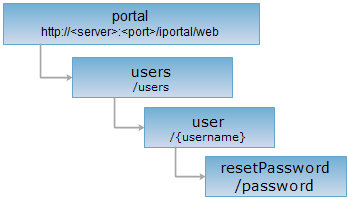
HTTP request methods
Implement the HTTP request on the following URI, where supermapiportal is the server name, with rjson being the output format.
http://supermapiportal:8090/iportal/web/users/{username}/password.rjson
PUT request
Reset password according to the security answers you set before.
Request parameter
Following arguments need to be passed in the request sent.
| Name | Type | Description |
| passwordQuestion | IportalPasswordQuestion | Security questions and answers. |
| newPassword | String | Password you reset. |
Response structure
The structure of the response resource representation is as follows:
|
Field |
Type | Description |
|
succeed |
boolean | Whether the password is reset successfully or not. Success represents the password is reset successfully; otherwise, false. |
Response example
Execute PUT request for resetPassword resource http://supermapiportal:8090/iportal/web/users/admin/password.rjson, according to the security answers you set before. The request body is as follows:
{
"passwordQuestion": {
"pwdAnswer": "No1MiddleSchool",
"pwdQuestion": "school"
},
"newPassword": "iportal"
}
The returned rjson format is as follows: