

URI
<scenes_uri>/batchaddscenes[.<format>]
Supported methods
Parent resource
Child resources
Introduction
【Deprecated】Add scenes in bulk. There are two types of service addresses and each of them requires a different permission. 1. For root address like http://supermapiserver:8090/iserver/services, users should have the admin role. With SuperMap iPortal 8C SP2 and later versions, users with scene resource management privileges also have the permission. 2. For a specific address, like: http://supermapiserver:8090/iserver/services/3D-Pipe3D/rest, both of the users mentioned above and normal users have the permission.
Supported Methods:
- POST: Adds scenes in bulk.
Supported output formats: rjson, json, html, xml.
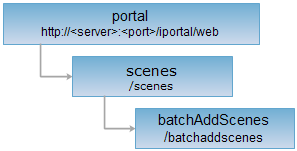
Resource hierarchy
HTTP request methods
Execute HTTP request on the following URI, here we take rjosn as the output format as an example. Where, supermapiserver is the server name.
http://supermapiportal:8090/iportal/web/scenes/batchaddscenes.rjson
POST request
To execute a POST request on batchAddScenes resource, the fields included in request body should contain:
| Name | Type | Description |
| rootUrl | String | Service address to add scenes in bulk: 1.root address,such as:ttp://supermapiserver:8090/iserver/services; 2.a specific address like, http://supermapiserver:8090/iserver/services/3D-Pipe3D/rest. |
| tags | List<String> | The tages of the scenes to be added. |
| authorizeSetting | List<IportalAuthorizeEntity> | ShareSettings of the scenes to be added. |
Response structure
The structure of the returned response resource representation is as follows:
| Field | Type | Description |
| succeed | boolean | Whether scenes have been added successfully in a batch. |
| newResourceID | String | ID of the newly added resource. |
| newResourceLocation | String | URL of the newly added resource. |
Response example
Execute POST request on batchAddScenes resource http://localhost:8090/iportal/web/scenes/batchaddscenes.rjson with the request body as follows:
{
"rootUrl": "http://rdc.ispeco.com:8080/iserver/services/3D-osgb/rest",
"authorizeSetting": [],
"tags": [
"user's scenes"
]
}
then the returned result in rjson format is as follows:
{
"newResourceID": "9760d04f-1d52-4617-886e-73c6962f33f2",
"succeed": true,
"newResourceLocation": "/web/scenes/batchaddscenes/9760d04f-1d52-4617-886e-73c6962f33f2"
}