

URI
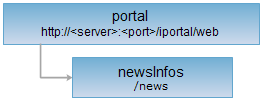
<portal_uri>/news[.<format>]
Supported Methods
Parent Resource
Child Resources
newsInfosPublishedStatus, newsInfo
Description
The newsInfos resource is the news list information. It supports querying the news list, adding news, and batch deleting news.
Supported Methods:
- GET: Query the news list information.
- POST: Add a news item.
- DELETE: Batch delete news items.
- HEAD: Check whether the newsInfos resource exists or whether the permissions allow access to the newsInfos resource.
Supported output formats: RJSON, JSON, XML.
Resource hierarchy
HTTP Request Methods
Perform HTTP requests on the following URI. The rjson output format is used as an example, where supermapiportal is the server name.
http://supermapiportal:8190/iportal/web/news.rjson
GET Request
Query the news list information.
Request Parameters
If no parameters are set, the news list information of the first page that the current user has permission to view is returned. After setting parameters, the news list information specified by the user is returned. The request parameters must be included in the URI.
| Name | Type | Description |
| currentPage | int | Filter by page number. |
| pageSize | int | Filter by page size. |
| isReturnContent | Boolean | Filter by whether to return news content. |
| keywords | String[] | Filter by news keywords. |
| orderBy | NewsOrderBy | Filter by sort type. |
| orderType | OrderType | Sort results in ascending / descending order. |
| published | Boolean | Filter by news publication status. |
Response Structure
Perform a GET request on the newsInfos resource. The returned news list information consists of the following fields:
| Field | Type | Description |
| currentPage | int | The current page number. |
| pageSize | int | The page size. |
| total | int | The total number of records. |
| totalPage | int | The total number of pages. |
| content | List<NewsInfo> | The detailed information of the queried news items. |
| searchParameter | NewsInfoSearchParameter | The search parameters for the current page. |
Response Example
Perform a GET request on the newsInfos resource: http://localhost:8190/iportal/web/news.rjson. The rjson format response is as follows:
{
"total": 2,
"totalPage": 1,
"pageSize": 9,
"searchParameter": {
"orderType": "ASC",
"keywords": null,
"isReturnContent": false,
"orderBy": null,
"pageSize": 9,
"published": null,
"currentPage": 1
},
"currentPage": 1,
"content": [
{
"thumbnail": null,
"visitCount": 0,
"createTime": 1600063805010,
"nickname": "wangmeng",
"updateTime": 1600063805010,
"id": 705562473,
"source": "R&D Center",
"published": true,
"title": "iPortal News Center Launched",
"category": null,
"userName": "wangmeng",
"content": null
},
{
"thumbnail": null,
"visitCount": 0,
"createTime": 1600063651692,
"nickname": "wangmeng",
"updateTime": 1600063651692,
"id": 1246621716,
"source": "Planning Department",
"published": true,
"title": "GTC Conference Notice No.1",
"category": null,
"userName": "wangmeng",
"content": null
}
]
}
If you want to get the news list information with specific conditions, such as filtering by keywords in the news title, you need to set keywords=["iPortal"]
For example, perform a GET request on the newsInfos resource: http://localhost:8190/iportal/web/newsInfos.rjson?keywords=["iPortal"] . The rjson format response is as follows:
{
"total": 1,
"totalPage": 1,
"pageSize": 9,
"searchParameter": {
"orderType": "ASC",
"keywords": [
"iPortal"
],
"isReturnContent": false,
"orderBy": null,
"pageSize": 9,
"published": null,
"currentPage": 1
},
"currentPage": 1,
"content": [
{
"thumbnail": null,
"visitCount": 0,
"createTime": 1600063805010,
"nickname": "wangmeng",
"updateTime": 1600063805010,
"id": 705562473,
"source": "R&D Center",
"published": true,
"title": "iPortal News Center Launched",
"category": null,
"userName": "wangmeng",
"content": null
}
]
}
POST Request
Add a news item.
Request Parameters
When sending a request, the following parameters must be included in the request body:
| Field | Type | Description |
| thumbnail | String | The thumbnail of the news. |
| source | String | The news source. |
| published | Boolean | Whether the news has been published. |
| title | String | The news title. |
| category | String | The category of the news. |
| content | String | The content of the news. |
Response Structure
The returned resource representation structure is as follows:
| Field | Type | Description |
| newResourceID | String | The ID of the added news item. |
| newResourceLocation | String | The URI of the added news item. |
| succeed | boolean | Whether the news item was added successfully. |
Response Example
Perform a POST request on the newsInfos resource: http://localhost:8190/iportal/web/news.rjson to add a new news item. The request body is as follows:
{
"title": "Meeting Notice",
"source": "Planning Department",
"content": "Department meeting will be held at 3:00 PM on September 15 in Conference Room 1. Please attend on time.",
"published": false
}
The rjson format response is as follows:
{
"newResourceID": "928867994",
"succeed": true,
"newResourceLocation": "http://<server><port>/iportal/web/news/928867994"
}
DELETE Request
Delete news items. Supports batch deletion of news items. Pass the array of news IDs to be deleted in the URL.
Response Structure
The returned resource representation structure is as follows:
| Field | Type | Description |
| succeed | boolean | Whether the news deletion was successful. |
| error | HttpError | Error information. This field is not returned if the deletion is successful. |
Response Example
Perform a DELETE request on the newsInfos resource: http://localhost:8190/iportal/web/news.rjson?ids=[1,2] to batch delete two news items with IDs 1 and 2. The rjson format response is as follows:
{ "succeed": true}
HEAD Request
Returns the same HTTP response headers as the GET request, but without the response entity. Metadata information contained in the response headers can be retrieved without transferring the entire response content. Metadata information includes media type, character encoding, compression encoding, entity content length, etc.
A HEAD request can be used to check whether the newsInfos resource exists or whether the client has permission to access the newsInfos resource. By performing a HEAD request on the URI with .<format> appended, you can also quickly determine whether the newsInfos resource supports the <format> format representation.
See
- portal, newsInfo, newsInfosPublishedStatus
- Constructing REST Requests
- Status Codes
- Output Formats
- Resource hierarchy