

URI
<myDatas_uri>/sharesetting[.<format>]
Supported Methods
Parent resource
Introduction
dataShareSetting is the share setting resource of the data. By sending a PUT request, you can update the permission information of data individually or in batch. The uploader and administrator of the data file can update the permission information of the data file.
There are five types of data sharing methods for the datasShareSetting resource: private, public, specified department, specified group and specified user. Private means that only data uploaders and administrators are allowed to search and download data; public means that all users (including anonymous users) are allowed to search and download data, and the corresponding permission type needs to be granted; specified department means that members of the specified department are allowed to search and download data, and the corresponding permission type needs to be granted; specified group means that members of one or more specified groups are allowed to search and download data, and the corresponding permission type needs to be granted; specified user means that one or more specified users are allowed to search and download data, and the corresponding permission type needs to be granted.
Note:
- SuperMap iPortal 7C(2015) and later versions only allow system administrators and iPortal users with the DATA_CENTER role to upload data and publish them as services. Administrators can modify the roles associated with users on the user management page (http://supermapiportal:8190/iportal/manager/security/users), or by sending a POST request to the user resource for modification.
- See the fileUpload resource for data file upload.
- See the fileDownload resource for data file download.
Supported Methods:
- PUT: Update the permission information of data individually or in batch.
Supported output formats: rjson, json, html, xml.
Resource hierarchy
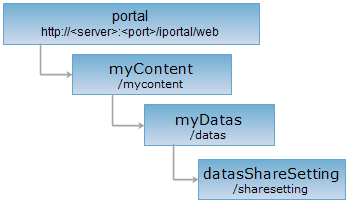
HTTP request methods
Implement the HTTP request on the following URI, where supermapiportal is the server name, with rjson being the output format.
http://supermapiportal:8190/iportal/web/mycontent/datas/sharesetting.rjson
PUT request
Batch update the permission information of data.
Request parameter
When sending the request, you need to pass the following parameters in the request body:
| Name | Type | Description |
| ids | List<Integer> | The ID array of the data. |
| entities | List<IportalDataAuthorizeEntity> | The sharing settings for the data. The data permission types include: SEARCH (search) and DOWNLOAD (download). |
The structure of the entities entity class is as follows:
| Field | Type | Description |
| dataPermissionType | DataPermissionType | The data permission type. Includes: SEARCH (search) and DOWNLOAD (download). |
| entityType | EntityType | Entity type. Includes: DEPARTMENT (department), USER (user), ROLE (role), GROUP (user group), IPORTALGROUP (group). For example: "entityType": "USER", representing granting permission to specified users. |
| entityName | String | Entity name. The name of the corresponding DEPARTMENT (department), USER (user), ROLE (role), GROUP (user group), IPORTALGROUP (group). |
| aliasName | String | Entity alias name. For example, when the entityType is USER, the alias represents nickname. |
| entityId | Integer | Entity id. Used for group/department authorization. |
Response structure
The structure of the response resource representation is as follows:
| Field | Type | Description |
| succeed | boolean | Whether the data sharing settings have been updated successfully in batches. |
| error | HttpError | Error information. This field will not be returned if the data sharing settings for batch update are successfully updated. |
Response example
There are five types of data sharing methods: private, public, specified department, specified group and specified user. The default permission information for uploaded data files is private, that is, only data uploaders and administrators are allowed to search and download data. The following are examples (please make sure that the uploader or administrator of the data file is logged in):
Implement the PUT request on the datasShareSetting resource http://localhost:8190/iportal/web/mycontent/datas/sharesetting.rjson to batch update the permission information of data to private, that is, allowing data file uploaders and administrators to search and download data files:
{
"ids": [
"1",
"2"
],
"entities": []
}
The returned resource representation in rjson format is as follows:
{"succeed": true}
Implement the PUT request on the datasShareSetting resource http://localhost:8190/iportal/web/mycontent/datas/sharesetting.rjson to batch update the permission information of data to public, allowing all users (including anonymous users) to download data files:
{
"ids": [
"1",
"2"
],
"entities": [
{
"entityType": "USER",
"entityName": "GUEST",
"dataPermissionType": "DOWNLOAD"
}
]
}
The returned resource representation in rjson format is as follows:
{"succeed": true}
Implement the PUT request on the datasShareSetting resource http://localhost:8190/iportal/web/mycontent/datas/sharesetting.rjson to batch update the permission information of data to specified department, that is, allowing members of the current user's department to download data files:
{
"ids": [
"1",
"2"
],
"entities": [
{
"entityId": 2,
"entityType": "DEPARTMENT",
"dataPermissionType": "DOWNLOAD"
}
]
}
The returned resource representation in rjson format is as follows:
{"succeed": true}
Implement the PUT request on the datasShareSetting resource http://localhost:8190/iportal/web/mycontent/datas/sharesetting.rjson to batch update the permission information of data to specified group, specifying the group with Id 1, allowing members of this group to download data files:
{
"ids": [
"1",
"2"
],
"entities": [
{
"entityId": 1,
"entityType": "IPORTALGROUP",
"dataPermissionType": "DOWNLOAD"
}
]
}
The returned resource representation in rjson format is as follows:
{"succeed": true}
Implement the PUT request on the datasShareSetting resource http://localhost:8190/iportal/web/mycontent/datas/sharesetting.rjson to batch update the permission information of data to specified users zhaoyuan and zhaoyuan2, allowing them to download data files:
{
"ids": [
"1",
"2"
],
"entities": [
{
"entityType": "USER",
"entityName": "zhaoyuan",
"dataPermissionType": "DOWNLOAD"
},
{
"entityType": "USER",
"entityName": "zhaoyuan2",
"dataPermissionType": "DOWNLOAD"
}
]
}
The returned resource representation in rjson format is as follows:
{"succeed": true}