

URI
<maps_uri>/sharesetting[.<format>]
Supported methods
Parent resource
Introduction
mapsShareSetting is used to modify the share settings of the map. By sending a PUT request, users can modify the map authorization in a batch. Only map creators and administrators can modify the map authorization.
Supported Methods:
- PUT: Modify the share settings of the map in a batch.
Supported output formats: RJSON, JSON, HTML and XML.
Resource hierarchy
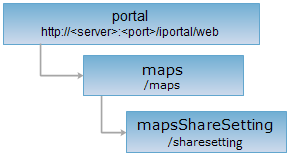
HTTP request methods
Execute the HTTP request on the following URI, where supermapiportal is the server name, with rjson being the output format.
http://supermapiportal:8190/iportal/web/maps/sharesetting.rjson
PUT request
Modify the share settings of the map in a batch.
Request parameter
The following arguments need to be included in the request sent.
| Name | Type | Description |
| ids | List<Integer> | The array of the map id. |
| entities | List<IportalAuthorizeEntity> | The share settings. Permission types include SEARCH (search), READ (view), READWRITE (edit). |
Response structure
The structure for the resource representation returned should be:
| Field | Type | Description |
| succeed | boolean | Whether the share settings of the map is successfully modified in a batch. |
| error | HttpError | Error message. This field will not be created if the setting is modified successfully. |
Response example
The mapsShareSetting resource has five types of modifying the share settings of the map in a batch: Private, public, specified user, specified group and specified department. Where, the type "public" includes two ways: one is to allow all users (including anonymous users) to search and view; the other is to allow all users (only login users) to edit. It is supported to set the sharing settings as public, specified user, specified group and specified department in the same time. It is also supported to set the sharing settings individually. Here demonstrates how to set individually (please make sure that the map creator or the administrator has logged in):
1. Private
Execute a PUT request on the mapsShareSetting resource: http://localhost:8190/iportal/web/maps/sharesetting.rjson. Modify the share settings of the map in a batch to be PRIVATE, that is, only the map creator and the administrator is allowed to search, view and edit the map. The request sent is like this:
{
"ids": [
2,
3
],
"entities": []
}
The response result in rjson format returned is as follows:
{"succeed": true}
2. Public
Execute a PUT request on the mapsShareSetting resource: http://localhost:8190/iportal/web/maps/sharesetting.rjson. Modify the share settings of the map in a batch to be PUBLIC, that is, all users (including anonymous users) are allowed to search and view, and all users (only the login users) are allowed to edit the map. The request sent is like this:
{
"ids": [
2,
3
],
"entities": [
{
"entityName": "GUEST",
"entityType": "USER",
"permissionType": "READWRITE"
}
]
}
The response result in rjson format returned is as follows:
{"succeed": true}
3. Specified department
Execute a PUT request on the mapsShareSetting resource: http://localhost:8190/iportal/web/maps/sharesetting.rjson. Modify the share settings of the map in a batch to be SPECIFIED DEPARTMENT of which all the members are allowed to edit the map. The request sent is like this:
{
"ids": [
2,
3
],
"entities": [
{
"entityId": 2,
"entityType": "DEPARTMENT",
"permissionType": "READWRITE"
}
]
}
The response result in rjson format returned is as follows:
{"succeed": true}
4. Specified group
Execute a PUT request on the mapsShareSetting resource: http://localhost:8190/iportal/web/maps/sharesetting.rjson. Modify the share settings of the map in a batch to be SPECIFIED GROUP, that is, the specified group with ID 1 is allowed to edit the map. The request sent is like this:
{
"ids": [
2,
3
],
"entities": [
{
"entityId": 1,
"entityType": "IPORTALGROUP",
"permissionType": "READWRITE"
}
]
}
The response result in rjson format returned is as follows:
{"succeed": true}
5. Specified user
Execute a PUT request on the mapsShareSetting resource: http://localhost:8190/iportal/web/maps/sharesetting.rjson. Modify the share settings of the map in a batch to be SPECIFIED USER, that is, the specified user liyl is allowed to edit the map. The request sent is like this:
{
"ids": [
2,
3
],
"entities": [
{
"entityName": "liyl",
"entityType": "USER",
"permissionType": "READWRITE"
}
]
}
The response result in rjson format returned is as follows:
{"succeed": true}