

URI
<map_uri>/attributes[.<format>]
Supported methods
Parent resource
Introduction
mapAttributes resource is the map attributes info resource. It can update the map attributes through sending the PUT request such as the map name, description and so on.
Supported Methods:
- PUT: Update the map attributes such as the map name, description amd so on.
Supported output formats: rjson, json, html, xml.
Resource hierarchy
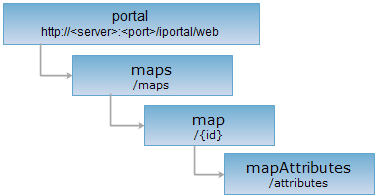
HTTP request methods
Execute the HTTP request on the following URI, where supermapiportal is the server name, with rjson being the output format.
http://supermapiportal:8090/iportal/web/maps/{id}/attributes.rjson
PUT request
Update the map attributes such as the map name, description amd so on.
Request parameter
Execute the PUT request on the mapAttributes resource. Update the map attributes. It consists of the following fields:
| Name | Type | Description |
| title | String | Map name. |
| description | String | The map description info. |
| thumbnail | String | The thumbnail of map. |
| tags | List<String> | The tag of map. |
Response structure
The returned resource representation structure is as follows:
| Field | Type | Description |
| succeed | boolean | Update the map attributes info successfully. |
| error | Httperror | Error. If successfult, it would not have the fields. |
| customResult | Map<String,Object> | Custom result information, such as: the map audit status information. |
Response example
Execute the PUT request on the mapAttributes resource: http://localhost:8090/iportal/web/maps/1/attributes.rjson. Update the map decription. the request body is as follows:
{
"title": "Tianditu",
"tags": [
"Tianditu"
],
"description": "Internet Maps",
"thumbnail": "http://<server>:<port>/iportal/services/../web/static/portal/img/map/tdtvec3857.png"
}
"title": "Tianditu",
"tags": [
"Tianditu"
],
"description": "Internet map",
"thumbnail": "http://192.168.120.40:8090/iportal/services/../web/static/portal/img/map/tdtvec3857.png"
}
The returned rjson format representation is as follows:
{
"succeed": true,
"customResult": {
"checkStatus": "SUCCESSFUL"
}
}
"succeed": true,
"customResult": {
"checkStatus": "SUCCESSFUL"
}
}