

URI
<portal_uri>/uploadfile[.<format>]
Supported methods
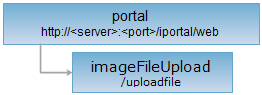
Parent resource
Introduction
imageFileUpload resource is the file resource to upload the pictures. It can upload the picture file through sending the POST request. Now it supports the picture formats: SVG vector graphics and raster image files such as PNG, JPEG, GIF. The recommended picture size is 265 * 170 pixels.
Supported Methods:
- POST: Upload the picture file.
Supported output formats: RJSON, JSON, HTML and XML.
Resource hierarchy
HTTP request methods
Implement the HTTP request on the following URI, where supermapiportal is the server name, with rjson being the output format.
http://supermapiportal:8190/iportal/web/uploadfile.rjson
POST request
Upload the picture file. The request body is the base64 encoding of the uploaded picture.
Request parameter
Execute POST request on the imageFileUpLoad resource to upload the picture file. When sending the request, the following parameters need to be passed in the request body:
| Name | Type | Description |
| toFile | String | [Required] The disk location where the uploaded picture will be stored. |
Response structure
Implement the POST request for the imageFileUpload resource. Upload the picture file. The returned resource representation structure is as follows:
| Field | Type | Description |
| fileName | String | File or directory name. |
| filePath | String | The absolute path of file or directory. |
| fileSize | long | The file size. Default is 0 byte. |
| isDirectory | boolean | Whether it is the directory. Default is false. |
Response example
The following example is implemented to upload pictures based on jQuery AjaxFileUpload.
- The uploaded scene thumbnail
Implement the POST request for the imageFileUpload resource: http://localhost:8190/iportal/web/uploadfile.rjson. Sending the request body is as follows. Upload the scene thumbnail:
//id is the storage name after image upload, sceneId is the scene id
var id= "sceneThumbnail";
function ajaxFileUpload(id, fileName,sceneId) {
var fileUploadPathPostFix = "./resources/thumbnail/scene/",
uri = utility.getRootUrl() + "web/uploadfile.json",
uploadFileName = id + "." + fileName.split(".")[1];
uri += "?toFile=" + fileUploadPathPostFix +sceneId+"/"+ uploadFileName;
$.ajaxFileUpload({
url: uri,
secureuri: false,
fileElementId: id,
dataType: 'json',
timeout: 60 * 60 * 1000,
success: function (data, status) {
$('#result').append('Upload success');
},
error: function (data, status, e) {
$('#result').append('Upload failed');
throw(e);
}
});
return false;
}
The response result in rjson format returned is as follows:
{
"fileName": "sceneThumbnail.png",
"filePath": "./resources/thumbnail/scene/12/sceneThumbnail.png",
"fileSize": 0,
"isDirectory": false
}
- Upload the group icon
Implement the POST request for the imageFileUpload resource: http://localhost:8190/iportal/web/uploadfile.rjson. Sending the request body is as follows. Upload the group icon:
//idis the storage name after image upload, groupId is the group GROUP id. When the group GROUP id is empty, a temporary upload path for the image will be generated, and newGuid() is any random number
var id= "logo";
function ajaxFileUpload(id, fileName,groupId) {
var fileUploadPathPostFix = "./resources/group/",
uri = utility.getRootUrl() + "web/uploadfile.json",
var uploadFileName;
if(groupId ===""){
uploadFileName = id + newGuid() +"." + fileName.split(".")[1];
uri += "?toFile=" + fileUploadPathPostFix +"temp/"+ uploadFileName;
}else{
uploadFileName = id + "." + fileName.split(".")[1];
uri += "?toFile=" + fileUploadPathPostFix +groupId+"/"+ uploadFileName;
}
$.ajaxFileUpload({
url: uri,
secureuri: false,
fileElementId: id,
dataType: 'json',
timeout: 60 * 60 * 1000,
success: function (data, status) {
$('#result').append('Upload success');
},
error: function (data, status, e) {
$('#result').append('Upload failed');
throw(e);
}
});
return false;
}
The response result in rjson format returned is as follows:
{
"fileName": "logo.png",
"filePath": "./resources/group/temp/logo.png",
"fileSize": 0,
"isDirectory": false
}