

URI
<groups_uri>/applyinfo[.<format>]
Supported methods
Parent resource
Introduction
groupsApply resource is the request list info that the current users apply to join multi-groups. Supports to get the related application list info, including the apply, audited, and has the permission to audit. Supports users to join multiple groups. Supports the current users batch audit the multi-applications of the multi-groups.
Supported Methods:
- GET: Gets the application list info related to the current users, including the applied, audited, and the one has permission to audit.
- POST: Users apply to join multiple group, namely, users can apply to join multiple groups.
- PUT: Current users audit the application in batch. Supports batch audit multiple applications of multi-groups.
- HEAD: Check whether the groupsApply resource exists. or to access the groupsApply resource.
Supported output formats: rjson, json, html, xml.
Resource hierarchy
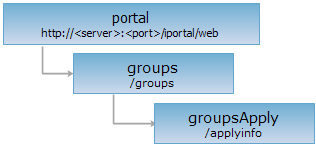
HTTP request methods
Implement the HTTP request on the following URI, where supermapiportal is the server name, with rjson being the output format.
http://supermapiportal:8090/iportal/web/groups/applyinfo.rjson
GET request
Gets the application list info related to the current users, including the applied, audited, and the one has permission to audit.
Request parameter
If the parameters are not set, return the application list info in the first page. After set the parameters, it will return the specified application list info. The request parameters should be included in the URI.
| Name | Type | Description |
| currentPage | int | Query according to the current page. |
| pageSize | int | Query according to the page size. |
| checkStatus | GroupCheckStatus | Query according to the group auditing status. |
| orderType | OrderType | Query according to the ascending order or descending order. |
| orderBy | ApplyOrderby | Query according to the sort type. |
| groupApplyRole | GroupApplyRole | Query according to group apply role type. |
Response structure
Implement the GET request for the groupsApply resource, return the application list info realted to the current users. It consists of the following fields:
| Field | Type | Description |
| content | List<GroupApplyInfo> | The page content. |
| currentPage | int | Current page. |
| pageSize | int | The page size. |
| searchParameter | SearchParameter | The search parameter of the current page. |
| total | int | Total records. |
| totalPage | int | Total pages. |
Response example
Performs the GET request for the groupsApply resource: http://localhost:8090/iportal/web/groups/applyinfo.rjson. Gets the application list info related to the current users. The returned rjson resource representation is as follows:
{
"content": [
{
"applicant": "wanghl",
"applicantNick": "xiaowang",
"applyReason": "interested",
"applyTime": 1415179231347,
"checkInfo": null,
"checkStatus": "WAITING",
"checkTime": 1415179231347,
"checkUser": null,
"checkUserNick": "null",
"groupId": 2,
"groupName": "iPortal",
"id": 2
},
{
"applicant": "wanghl",
"applicantNick": "xiaowang",
"applyReason": "study",
"applyTime": 1415234311912,
"checkInfo": "ACCEPTED",
"checkStatus": "ACCEPTED",
"checkTime": 1415234372996,
"checkUser": "admin",
"checkUserNick": "admin",
"groupId": 4,
"groupName": "FC",
"id": 4
}
],
"currentPage": 1,
"pageSize": 9,
"searchParameter": null,
"total": 2,
"totalPage": 1
}
If you want to get the specified application list info, such as the filter according to the group application role type and feedback status, it needs to set the groupApplyRole=APPLICANT&checkStatus=WAITING, namely, implement the GET request for the groupsApply resource: http://localhost:8090/iportal/web/groups/applyinfo.rjson?groupApplyRole=APPLICANT&checkStatus=WAITING. The returned rjson format is as follows:
{
"content": [
{
"applicant": "wanghl",
"applicantNick": "xiaowang",
"applyReason": "interested",
"applyTime": 1415179231347,
"checkInfo": null,
"checkStatus": "WAITING",
"checkTime": 1415179231347,
"checkUser": "null",
"checkUserNick": "null",
"groupId": 2,
"groupName": "iPortal",
"id": 2
}
],
"currentPage": 1,
"pageSize": 0,
"searchParameter": null,
"total": 1,
"totalPage": 0
}
POST request
Users apply to join multiple group, namely, users can apply to join multiple groups.
Request parameter
Following arguments need to be transmitted in the request sent:
| Name | Type | Description |
| groupIds | List<Integer> | The applied group id. |
| applyReason | String | The reason to join the group. |
| applicant | String | Applicant. |
Response structure
The returned resource representation structure is as follows:
| Field | Type | Description |
| succeed | boolean | Whether it is successful to apply to join the group. |
| error | Httperror | Error. If the apply to join the group successfully, it would not have this field. |
Response example
Performs the POST request for the groupsApply resource: http://localhost:8090/iportal/web/groups/applyinfo.rjson. Apply to join multiple groups. The request is as follows:
{
"groupIds": [4,5],
"applyReason": "collaborative editing",
"applicant": "wanghl"
}
The response result in rjson format returned is as follows:
{"succeed": true}
PUT request
Current users batch audit multi-applications of the multi-groups. Support to audited application according to the application id.
Request parameter
Following arguments need to be transmitted in the request sent:
| Name | Type | Description |
| ids | List<Integer> | Application id. |
| checkInfo | String | The audit info. |
| checkStatus | GroupCheckStatus | The audit result. |
Response structure
The returned resource representation structure is as follows:
| Field | Type | Description |
| succeed | boolean | Whether it is successful to audit the specified group application. |
| error | Httperror | Error. If the application of auditing the specified group is successful, it would not have this field. |
Response example
Performs the PUT request for the groupsApply resource: http://localhost:8090/iportal/web/groups/applyinfo.rjson. Batch audit the specified group application. The request is as follows:
{
"ids": [1,2],
"checkInfo": "ACCEPTED",
"checkStatus": "ACCEPTED"
}
The response result in rjson format returned is as follows:
{"succeed": true}
HEAD request
Asks for the response identical to the one that would correspond to a GET request, but without the response body. This is useful for retrieving meta-information written in response headers, without having to transport the entire content. The meta-information includes the media-type, content-encoding, transfer-encoding, content-length, etc.
HEAD request can be used to check if the groupsApply resource exists, or if the groupsApply resource can be accessed by clients. It can also determine if the groupsApply resource supports an output format <format> if performed on a URI with .<format> included.