

URI
<groups_uri>/{id}[.<format>]
Supported methods
Parent resource
Child resources
Introduction
The group resource is manager for a single group. You are allowed to view, update, delete information for a single group resource.
Supported Methods:
- GET: Check information for a single group resource.
- GET: Update information for a single group resource.
- DELETE: Delete information for a single group resource.
- HEAD: Check whether the group resource exists. or to access the clusterConfig resource.
Supported output formats: rjson, json, html, xml.
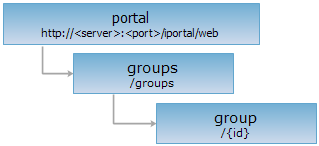
Resource hierarchy
HTTP request methods
Implement the HTTP request on the following URI, where supermapiportal is the server name, with rjson being the output format.
http://supermapiportal:8090/iportal/web/groups/{id}.rjson
GET request
Check information for a single group resource.
Response structure
When you implement the GET request on the group resource to acquire the specified group information, the structure of the response is as follows:
| Field | Type | Description |
| basicInfo | GroupBasicInfo | The basic information of the group. |
| groupMembers | GroupMember | The member list of the group. |
| groupResources | GroupResourceEntity | The resource llist of the group. |
Response example
The returned rjson format representation after implementing the GET request on the group resource http://localhost:8090/iportal/web/groups/1.rjson is as follows:
{
"basicInfo": {
"createTime": 1418891053489,
"creator": "admin",
"description": "",
"groupName": "FA",
"icon": null,
"id": 1,
"isEnabled": true,
"isNeedCheck": true,
"isPublic": true,
"nickname": "admin",
"resourceSharer": "MEMBER",
"tags": [
"iPortal"
],
"updateTime": 1418891053489
},
"groupMembers": {
"content": [
{
"groupId": 1,
"groupRole": "CREATOR",
"id": 1,
"joinTime": 1418891053489,
"memberDescription": null,
"roleUpdateTime": null,
"userName": "admin"
}
],
"currentPage": 1,
"pageSize": 9,
"searchParameter": null,
"total": 1,
"totalPage": 1
},
"groupResources": {
"content": null,
"currentPage": 1,
"pageSize": 0,
"searchParameter": null,
"total": 0,
"totalPage": 0
}
}
PUT request
Update the basic information of a single group. Only the creator of the group has permission to update the group.
Request parameter
Following arguments need to be included in the request sent.
| Name | Type | Description |
| id | Integer | The group id. |
| tags | List<String> | The group tag. |
| groupName | String | The group name. |
| isPublic | Boolean | The group type, with true indicating public and false indicating private. |
| description | String | The descriptive information of the group. |
| resourceSharer | GroupRole | The resource sharer of the group. |
| isNeedCheck | Boolean | Whether audition is needed while applying to join in the group. The default value is true, indicating auditin is required. |
Response structure
The representation structure of the resource returned is as follows:
| Field | Type | Description |
| succeed | boolean | Whether updating a single group is successful or not. |
| error | Httperror | Error information. If the update for a single group is successful, the field does not exist. |
Response example
When you implement the PUT request on the group resource http://localhost:8090/iportal/web/groups/4.rjson to update the basic information for a single group, the request body sent is as follows:
{
"id": 4,
"tags": [
"cloud、iPortal"
],
"groupName": "FC",
"isPublic": true,
"description": "",
"resourceSharer": "MEMBER",
"isNeedCheck": true
}
The representation returned in rjson is as follows:
{"succeed": true}
DELETE request
Delete group with specified id.
Response structure
The representation structure of the resource returned is as follows:
| Field | Type | Description |
| succeed | boolean | Whether the group has been successfully deleted or not. |
| error | Httperror | Error information. If the group has been successfully deleted, the field does not exist. |
Response example
Implement the DELETE request on the group resource http://localhost:8090/iportal/web/groups/8.rjson to return rjson format representation as follows:
{ "succeed": true}
HEAD request
Asks for the response identical to the one that would correspond to a GET request, but without the response body. This is useful for retrieving meta-information written in response headers, without having to transport the entire content. The meta-information includes the media-type, content-encoding, transfer-encoding, content-length, etc.
HEAD request can be used to check if the group resource exists, or if the group resource can be accessed by clients. It can also determine if the clusterConfig group supports an output format <format> if performed on a URI with .<format> included.